

 beeware
Windows MSI - Append version number to name?
Facts
- Per this document MSI artifacts support no more than three dot separated numbers for the version (even though my Win 10 VM shows a few versions with four dot separated numbers!).
- A given application, per PEP 440, may have a more complex/rich version string, for example
1.1.0a2for an alpha release, or0.3.1rc1for a release candidate.
Impact
Even though the MSI files produced by briefcase are differently named, suffixed by the PEP 440 version string, installing an MSI packaged application at release 1.0.0rc3 vs 1.0.0 results in the same version meta-information being displayed in the Windows "Programs and Features" dialog: 1.0.0.
Thought
If briefcase appended the PEP 440 version string to the package name, the "Programs and Features" dialog would become more informative, so to say. Otherwise, unless the application itself has some kind of "about box", there's no easy way to tell which version is installed.
I see three possible automatic behaviours in this regard:
- Never append PEP 440 version to name -- what we have today.
- Always append PEP 440 version to name.
- Only append PEP 440 version to name when some information could be lost, such as the comonly used dev/alpha/beta/rc/post suffixes.
Maybe briefcase could default to 3. and an optional command argument would make it behave as in 1. or 2.
Furthermore, if appending is considered, deciding on how to append is left for further discussion (danger, bikeshedding ahead!). :)

Thanks for raising this. This is an annoying inconsistency imposed by the MSI format, and I wasn't 100% confident the "stripping the remainder" approach would be acceptable to all.
In my opinion, there are 2 design considerations beyond basic aesthetics:
a) Ensuring end-users can easily tell if they have "1.2.3" and "1.2.3rc4" installed
b) Presenting to the "Program and Features" dialog that doesn't look "alien" in the context of other applications that might be installed.
c) Ensuring that "1.2.3" will be treated as an update to "1.2.3.rc4"
From your options, (1) (the status quo) violates (a).
I fear that (2) and (3) would violate (b) - however, I will admit I'm not sufficiently familiar with Windows idiom to say that with absolutely certainty.
However, there's a variant of your option (3) that might be worth considering: only append the "lost" information to the name - so, for example, "Foobar 1.2.3" would just be "Foobar", but "Foobar 1.2.3rc4" would be "Foobar (rc4)". That would have the benefit that extra name content only exists for the "unusual" packaging cases - which are also the ones you likely want to stand out in the packaging dialog.
Thoughts?

In my opinion, there are 2 design considerations beyond basic aesthetics:
a) Ensuring end-users can easily tell if they have "1.2.3" and "1.2.3rc4" installed
b) Presenting to the "Program and Features" dialog that doesn't look "alien" in the context of other applications that might be installed.
c) Ensuring that "1.2.3" will be treated as an update to "1.2.3.rc4"
Agree with all and suspect (c) will not be trivially attainable (read more below).
I fear that (2) and (3) would violate (b) - however, I will admit I'm not sufficiently familiar with Windows idiom to say that with absolutely certainty.
Not sure too. Bringing in two things for consideration:
- Should (a) be considered more important than (b)? IMHO it should. Thus, in case of conflict, assume the cost of violating (b).
- I took a peek at my dev system's "Programs and Features". Admittedly, it is both a sample of one and a dev/tech-oriented system, but interesting, nevertheless:
- Note how several of the lines include a version string at the end of the name.
- Including Microsoft provided ones.
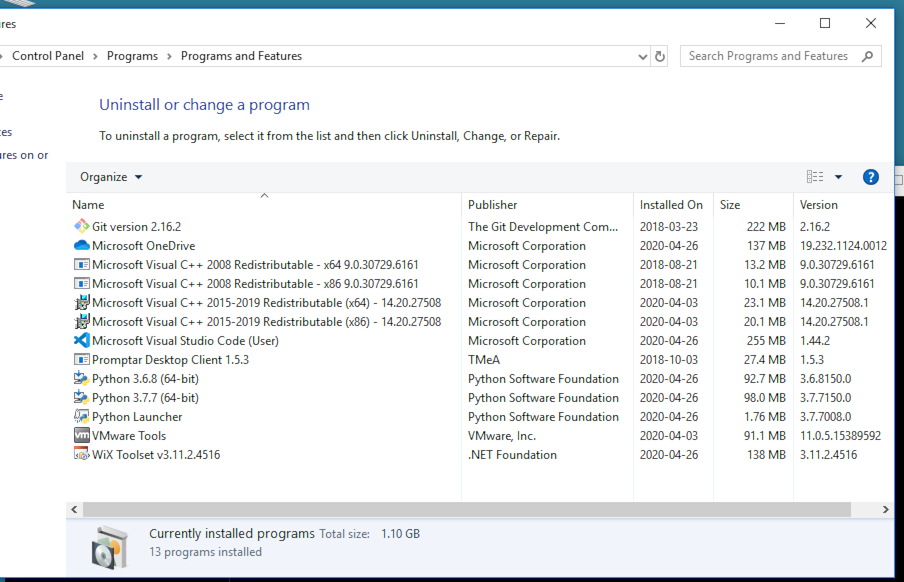
This would give me enough confidence to say that a product name including an appended version string is not "alien" in the context of other applications that might be installed.
However, there's a variant of your option (3) that might be worth considering: only append the "lost" information to the name - so, for example, "Foobar 1.2.3" would just be "Foobar", but "Foobar 1.2.3rc4" would be "Foobar (rc4)". That would have the benefit that extra name content only exists for the "unusual" packaging cases - which are also the ones you likely want to stand out in the packaging dialog.
Interesting but difficult to read at a glance -- depending on window and column widths, one may need to horizontally scroll to read both "segments" of the version -- and then they're kind of horizontally reversed: suffix on the left, X.Y.Z on the right. From my observation above (again, yes, sample of one!), I'd go very very KISSy, even more than what I originally shared:
- Default to append the PEP 440 version string the product name.
- Optionally exclude it.
- No other options.
If I had to go even KISS-er, for a reduced impact on briefcase's maintenance, then I'd go with always appending PEP 440 version string to product name. Would that be too much? I'm not sure... :-)
Probably the topic for a separate issue, but sharing a few tidbits here.
WRT (c) Ensuring that "1.2.3" will be treated as an update to "1.2.3.rc4":
- Looking at the screen shot I shared, one can find versions with four dot-separated numbers.
- I found that odd, but a more attentive read of the document I initially linked to gives us:
Note that Windows Installer uses only the first three fields of the product version. If you include a fourth field in your product version, the installer ignores the fourth field.
Hmmm... Interesting. I then tried hacking the .wsx file and:
- Appending
.a2to the product version with<?define ProductVersion = "1.1.0.a2" ?>is not accepted by WiX. - Appending
.1234to the product version with<?define ProductVersion = "1.1.0.1234" ?>seems to work, in the sense that the installed MSI shows1.1.0.1234in the version column, in "Programs and Features".
However, with 1.1.0.1234 installed:
-
Installing a similarly hacked
1.1.0.4242version did not successfully replace the installed package. Instead "Programs and Features" ended up listing two entries for the package (ups!):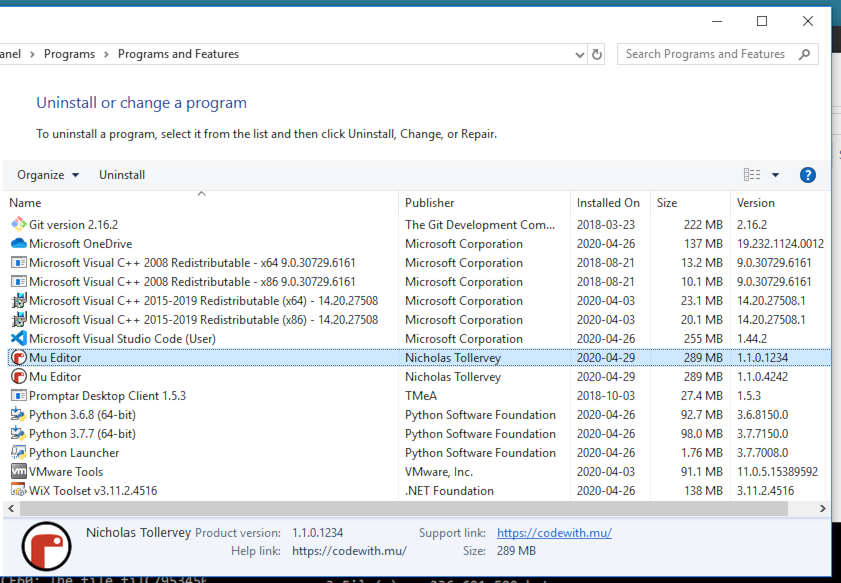
Then, with both 1.1.0.1234 and 1.1.0.4242 listed in "Programs and Features":
- Installing a
1.1.42version did apparently cleanup the previous mess and a single1.1.42version entry is shown, after the fact.
Important notes:
- I did not verify that the actual contents of the installed package were properly put in place in this exercise.
- Only concerned in observing what Windows lists as installed.
Parting thoughts:
- Again, probably the topic for its own issue.
- Solution seems non trivial, if at all possible, for two reasons:
- The PEP 440 version namespace is much larger and "higher-dimensional" than MSI's. I'm not sure if it is even mathematically possible to create a function f(PEP 440 version) that can reliably produce a unique MSI version with the equivalent semantics.
- MSI updates/upgrades seem powerful and, unfortunatelly, a complex matter. The Microsoft docs here might be the canonical authoritative reference on the topic -- warning: lots of reading ahead! ;-)
- Adding to this, I learned that MSI's major and minor version numbers cannot be larger than 255... How to handle a calver version like
2020.04.1?!... sigh! :-)
The fact that a large number of very high profile tools include version number in the package name would seem to imply it's "accepted" practice - definitely accepted enough to warrant Briefcase doing the same.
Based on your experimentation, it appears that the upgrading issue is... complicated. I agree this is probably an issue in itself.
On that basis, I'm inclined to agree that we should do the "simple" thing and include the full Python version string in the installed package name.
Rather than include a simple "don't append" boolean flag to opt out of the behavior, I would suggest adding support for an installed_name attribute in pyproject.toml. This would be an option that is only used by the MSI backend. It would be a format string that takes the app context at runtime, so you could define:
installed_name = "{app.name} {app.version} is great"`
in pyproject.toml, and get a highly customized app name.
Arguably, we should also add an installed_version attribute so the end user can customize the exact version string that is used (overriding the "drop the suffix" behavior that is the current default). This may involve adding a version_info parsed nametuple to the app context so that end-users could manually define:
installed_version = "{app.version_info.major}.{app.version_info.minor}"
That would allow users to walk their own way out of calver-style versioning problems.