

 bealex
Can't find swiflint
I had the plugin working on my project for a while, then it stopped working with that message:
Can't find swiftlint utility here:
/opt/homebrew/bin/swiftlint
Please check the path in settings.
/opt/homebrew/bin/swiftlint is the result of which swiftlint. Running swiftlint or /opt/homebrew/bin/swiftlint on the command line works.
My .swiflint.yml is at the root of my project.
Setting /opt/homebrew/bin in Tools > Swiftlint > Swiftlint path doesn't work either.
- Plugin version: 1.13.3
- AppCode version: 2021.1.3
- Swiflint version: 0.43.1


Thanks @bealex. Got the 1.13.4 and, well, yes and no: no more errors indeed, swiftlint seems to be found now... but no swiftlint warnings are displayed in the editor (only JetBrains inspections). Again, such warning are properly listed using command line swiftlint in the same directory.
Yes it was disabled then I enabled it again.
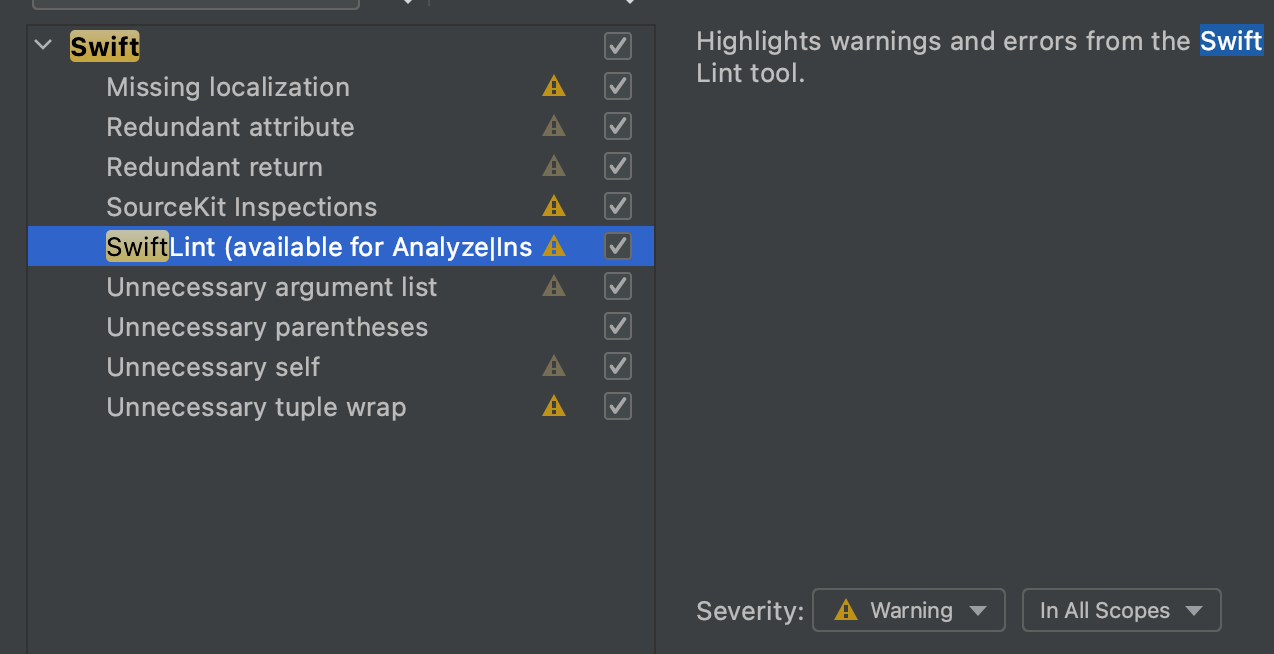 But still no warnings.
I tried to relaunch AppCode as well, with no more luck.
But still no warnings.
I tried to relaunch AppCode as well, with no more luck.
@bealex Actually I can see only one swiftlint warning, about trailing_whitespace.
So obviously it is running, but I wonder if it is find/using the proper .swiflint.yml. Mine is located at the root of the project.
Yup, it is something with config locations, seeing same in some projects. Will get to it soon.
Just to be sure I'm looking in the right direction. How many projects do you have opened at the same time?
Only one.
For what it's worth, the config file is ~/AppCodeProjects/myproject/.swiftlint.yml.
But of course there are many others in libs caches (like ~/Library/Caches/JetBrains/AppCode2021.1/DerivatedData/MyProject/-xxxx/SourcePackages/checkouts/SomeLib/.swiftlint.yml) and externs (like Extern/Sparkle/.swiftlint.yml for instance)
Can you please try this version? This way it will be faster then go through JB approval process. https://www.dropbox.com/s/ulwpmf2ew9fbxff/SwiftLint.zip?dl=0
Maybe some additional configuration file path in the plugin settings could help? If left blank, default config files lookup would apply, otherwise it would be passed as swiflint --config arguments.
Right now I'm not passing --config parameter, it breaks some scenarios. Basically what I'm doing is:
- getting source root directory (for example project root)
- getting file that we are linting now and directory that it is contained in
Somewhere in between these directories there can be SwiftLint configuration file (it must be called
.swiftlint.yml, I can't deal with other config file names)
I try to find this file (starting from source root), and run swiftlint in the directory where config file is found. If no file is found, swiftlint is run from the source root directory.
This should work for project files, for editing of frameworks (that can be added as sources and contain their own source roots). And it will ensure all swiftlint logic about using several/nested .swiftlint.yml files works.
It would help a lot if you describe where (from the project root) your config files are located, and where sources are located.
Okay here is an excerpt from my project structure:
-
~/project/myprojectRunningswiftlintfrom here outputs 6 violations, 0 serious in 460 files-
.swiftlint.yml -
Myproject/Runningswiftlintfrom here outputs 1861 violations, 650 serious in 412 files-
.idea/ -
Classes/Runningswiftlintfrom here outputs 1651 violations, 493 serious in 401 files-
Components/Runningswiftlintfrom here outputs 788 violations, 303 serious in 152 files-
ComponentA/Runningswiftlintfrom here outputs 42 violations, 11 serious in 14 files-
Subdir/Runningswiftlintfrom here outputs 42 violations, 11 serious in 14 files-
SomeClass.swiftRunningswiftlint SomeClass.swiftfromSubdir/outputs 9 violations, 0 serious in 1 file
-
-
-
-
-
-
Myproject.xcodeproj -
Myproject.xcworkspace -
Module1/ -
Module1Tests/ -
MyprojectTests/ -
MyprojectUITests/ -
buildetc
-
There are aussi libs that have their own swiftlint config, like:
-
~/Library/Caches/JetBrains/AppCode2021.1/DerivedData/Myproject-xxx/SourcePackages/checkouts-
SwiftCheck -
swifter-
.swiftlint.yml -
DangerFilecontainsswiftlint.config_file = '.swiftlint.yml'
-
-
Hi @bealex ,
Just to let you know: I stumbled on a file that does display more Swiflint warnings in the IDE. Those are 4 warnings:

However, running swiftlint cli on the same files yields 9 results: the 4 control_statement warnings + 4 line length violation warnings (>120) + 1 line length error (>200)
So again it looks like some swiftlint config is active, but not the same as used by cli.
Thanks a lot!
I'm slacking, have to keep up with my day job :)
Should return to the investigation in couple of days.
Any updates for this issue? I'm trying to use 0.13.4 with AppCode 2021.3.2, swiftlint is 0.45. I have a .swiftlint.yml file at the root of my SPM project. Running swiftlint from the command line works.
If I run Inspect code... swiftlint doesn't appear to run at all. The only output in the Problems view are from the existing AppCode Swift inspection rules. I also don't get any swiftlint output in the editor whatsoever (that is, nothing is flagged with red squiggly lines).
Swiftlint is enabled in Inspections as per the setup instructions.
At this point, this plugin does nothing.

I have since updated the plugin to 0.13.5 (the version posted in this thread). I also updated swiftlint to 0.46.1.
Then, I created a new inspections profile that disables everything except Swiftlint. I ran Inspect code... on a file. From the terminal I ran...
ps auxw | grep -i swiftlint
This revealed a single swiftlint process had started. If I run switftlint from the terminal, and point it at my config file, it complets almost instantly. I decided to kill the process in the terminal. Another one started. I killed that one and output was immediately shown in the Problem view in AppCode. The editor view itself was not updated.
Hrmm.
I edited the file in the editor using a known trigger for the colon rule, and then also threw in a very long line as a comment.
I went back to the terminal and once again could see a swiftlint process had begun. ~I killed it. Another one appeared.~ I killed it and immediately the editor view was updated to highlight errors from the swiftlint output.
Seems to me that for some reason, your plugin is launching swiftlint but then it's just hanging.
This is what the process looks like from the terminal:
mark 91796 0.0 0.1 35020376 27220 ?? S 1:40PM 0:00.32 /usr/local/Cellar/swiftlint/0.46.2/bin/swiftlint lint --no-cache --reporter csv --path /Users/mark/dev/Company/Project/Sources/App/Controllers/UsersController.swift
To clarify, that is running on a single file selected via the Inspect code... menu option.
~It's interesting that swiftlint is restarted if I kill it, but just restarted once. Still, I have to kill it twice to get output in AppCode.~
EDIT: I tested this a bit more. I think it is just one instance of swiftlint that is started unless the inspector is triggered a second time while waiting for the first instance to complete. If I make a single change in the editor that should trigger swiftlint to output a linting violation, then as soon as I kill that single instance the editor updates with the appropriate violation flagged.
Something that just occurred to me, if the plugin ends up calling swiftlint like this:
/usr/local/Cellar/swiftlint/0.46.2/bin/swiftlint lint --no-cache --reporter csv --path /Users/mark/dev/Company/Project/Sources/App/Controllers/UsersController.swift
Then this plugin could never work for linting while typing since changes haven't necessarily been saved to disk yet. What needs to happen is that the content of the editor is piped into stdin of the swiftlint command which would have the --use-stdin flag set.
Another thing I noticed is that while this plugin doesn't seem to work when trying to read a file on the --path option, it DOES work if you pipe the file (via cat) into the command itself.
I have created a Gist for this as a demo. Works for the following instances...
- linting via
Inspect code... - auto linting after file save
https://gist.github.com/markeissler/bcc99d4e7b3e59be5e57c67ebbf77251
@markeissler Hi. Thanks for the investigation and for the response and for the code. Appreciate it a lot.
Looking into hanging now. This is something I did not consider for some strange reason.
There are fundamental problems with stdin option though.
- It does not account for file filters that swiftlint is configured with (included/excluded).
- It does not anything about configuration files hierarchy (and it can be quite complex).
- And, as far as I remember, it also gives swiftlint less information about other files in the module (that can be used by SourceKit to make better decisions about code).
I tried that solution. It was good at the start, but unfortunately it proved itself to be quite brittle and hard to maintain.
I can easily be missing something though. Please tell me if I do.
@markeissler Can you please try to install this new version from the disk? Maybe I've found what was causing this behavior (still can't reproduce it), a test will be helpful.
https://github.com/bealex/SwiftLintAppCode/blob/bugfix/swiftlint-hanging/deployed/SwiftLint.zip
All of your points are valid. I'm just trying to find some sort of workaround.
I just tried your latest build from the post above. Same result. swiftlint is launched soon after opening a file. But it never exits. As soon as I kill it, results appear in the editor window.
It must be reading the file contents since it does display linting errors in the editor. But with that said, it doesn't appear to complete even though it returns results after killing the process. In a particular file, I get 439 linter warnings using the stdin approach, using your updated binary I get around 200 warnings. One of the ones I checked was the trailing_whitespace rule. I guess more of those errors when using the stdin approach.
I think that's telling us that it's possible that swiftlint itself is encountering problems? I'm running the latest version of that as mentioned above (0.46.1).
FWIW I can't seem to get 0.13.4 working even with stdin. I have to use either of the builds posted in this thread so far.
@markeissler Thanks for the test. Looks like swiftlint does not close the streams (either output or error) for some strange reason. Or output there is non-consistent.
Is it possible to get that file? Maybe it is a part of some open source project? I'd like to reproduce this a lot.
After your test I think I know what happens. Let me try to implement a fast hack to find out am I right.
Is it possible to get that file? Maybe it is a part of some open source project? I'd like to reproduce this a lot.
Unfortunately, it's closed source, proprietary.
@markeissler I've updated the plugin here: https://github.com/bealex/SwiftLintAppCode/blob/bugfix/swiftlint-hanging/deployed/SwiftLint.zip can you please test it once again?
I think with this one you set a timeout of 1 second, is this correct? On smaller files it appears to work but on larger files (I'm looking at a file that is over 2800 lines) I think it might be exiting too early.
I think with this one you set a timeout of 1 second, is this correct?
Yes it is. It's just a test.
On smaller files it appears to work but on larger files (I'm looking at a file that is over 2800 lines) I think it might be exiting too early.
Thanks! Now when I know what happens, it'll be easy to fix. :-)
@markeissler I've updated the plugin, sent the version to the Marketplace. Will be available after JB review. You can try it directly from the repository if needed: https://github.com/bealex/SwiftLintAppCode/raw/main/deployed/SwiftLint.zip
@Javarome can you please test it too? It is possible that you've encountered same error and new build will fix that.