

 beakerbrowser
Profile creation results in error
Describe the bug
The "New profile site" dialog returns the following error:
Uncaught error: Unexpected error: Error: Session does not exist.
To Reproduce
- Run 1.0.0 AppImage
- Click Next for the profile creation window to show up
- Enter a user name, but no description or picture
- Click Next
- Error shows up
Expected behavior I expected a generated profile site. Beaker doesn't give me the option to create a profile anywhere now.
Desktop (please complete the following information):
- OS: Linux Mint 19
- Beaker Version 1.0.0 prerelease3
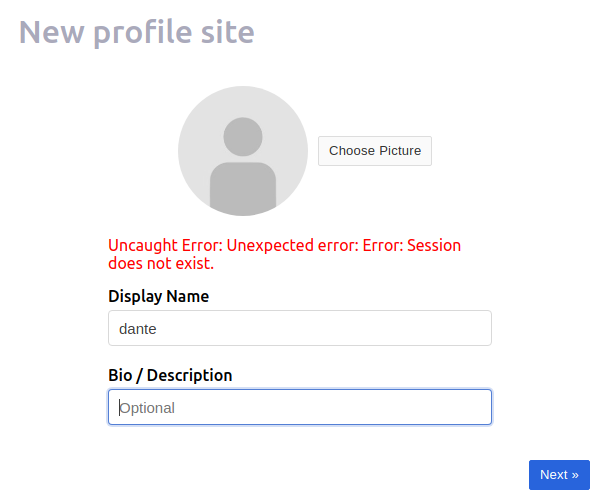 ](url)

Is this issue relevant? https://github.com/beakerbrowser/beaker/issues/1524

It is relevant! I tried the command from that issue:
sudo sysctl kernel.unprivileged_userns_clone=1
When I ran the AppImage, it was like I running it for the first time (I got the splash screen and user creation dialog):
- Run
sudo sysctl kernel.unprivileged_userns_clone=1 - Run 1.0.0 AppImage.
- Click Next for the profile creation window to show up
- Enter a user name, but no description or picture
- Click Next
- The home page is displayed, and the profile icon now shows up to the right of the WiFi one.
I had created an address book with a few hyperdrives prior to trying this fix, and they are gone now.
I hope this helps! Amazing work with this release :smile:
It does help! (And thanks!) I think we've got some more work to do on the AppImage 😅