

 bcgov
bcgov
UI - Location Types + Legal Descriptions
Description
Finishing up Location Types section:
-
When a user registers a manufactured home on a reserve location, user will need to provide the band name, number and added details
-
When a user registers a manufactured home to a location, in limited circumstances they may not have a PID number. E.g.:
- The lot at the civic address is new enough that it hasn't been assigned a PID yet
- The lot is at a mining site or crown land with no PID
In those cases, they have to enter a combination of fields known collectively as a "legal description" (e.g. Lot, Block, Parcel, Section, District Lot, etc). There is no set standard for what must be in a legal description - it could be any combination of those values. NOTE: MINIMUM REQUIRED FIELDS STILL TO BE CONFIRMED
AC
GIVEN I need to enter location information for an Indian reserve WHEN I navigate to Step 4 -> 1. Location Type -> Other Land -> Indian Reserve THEN I am able to enter the Band name, number and additional details (with validations) AND I am able to enter other legal description fields AND this information will also appear on the review and confirm screen as read only
AC
GIVEN I need to enter location information by way of a legal description WHEN I navigate to Step 4 -> 1. Location Type -> Other Land -> Strata OR Other AND I have not provided a valid PID THEN I am able to click on "I don't have a PID Number, I need to enter a Legal Description" THEN the "I don't have a PID.." link goes away AND the Additional Description field slides down THEN I am able to enter legal description data (with validations) AND this information will also appear on the review and confirm screen as read only
AND IF I have provided a valid PID THEN provide the user with user feedback (the legal description pulled in via LSTA as a string) indicating that it is a valid PID AND I am also able to add optional additional description text AND this information will also appear on the review and confirm screen as read only
AND IF the PID number look up is unsuccessful THEN show the PID error modal with updated text and contact information (see design)
NOTE: See design comps for additional AC details
See Design Ticket has all of the variations and details
https://app.zenhub.com/workspaces/design-team-space-6144b1bb15dbac0013e68828/issues/bcgov/entity/13473

All these legal description fields:
- Lot
- Parcel
- Block
- District Lot
- Part of
- Section
- Township
- Range
- Meridian
- Land District
- Plan
- Except Plan
- Additional Description
Staff Screens:
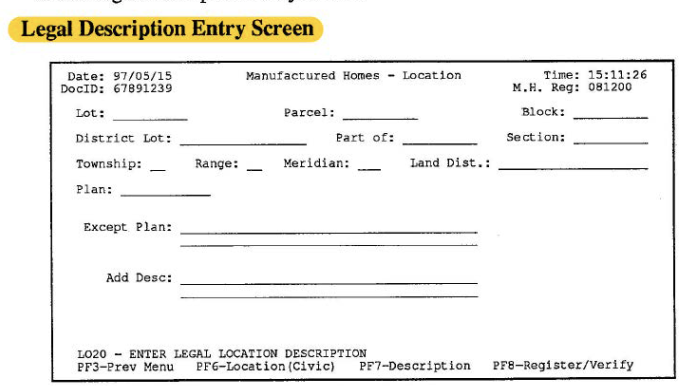
Paper Form:


@mstanton1 - please provide the minimum required fields when entering a legal description manually for Staff
@tlebedovich we've discussed today, and I raised it through PO Sync. The minimum requirements for staff will match the minimum requirements for end users as per the document that Scott shared with me. Thanks!

@mstanton1 - i updated the description above based on our updated designs.
@forgeuxGH5 - I am out of time and my IDIR just expired so that is the universe saying that will need you to UXA this full story please. Design comps to refer to is in the ticket info above. Thank you!
@cameron-eyds - Here is the in progress UXA (cannot UXA the PID entry until it's working) but you could get started on these items in the mean time:
Input Screen Text/typo updates:
-
[x] PID for Strata/Other needs to be capitalized:
-
[ ] Intro for Indian Reserve, Strata and Other should read "Enter as much of the legal land description as you have." Missing second "as"
-
[x] Indian Reserve should read "Band Name and Reserve Number are required."


- [x] Indian Reserve errors - remove capitalization here:

PID Error modal
- [x] Victoria Phone number does not match design comps?

Indian Reserve Review and Confirm Screen:
-
[x] Adjust list order for all manually-entered legal land description values as per Melissa's list comment below (read-only text on the review screen only - input form stays as is)
-
[x] Missing white space between Band Name/Reserve Number and the other optional fields:

-
[x] As soon as the user enters data into one or more manual legal description fields, then show the 2 required subheads Band Name and Reserve Number (show "Not Entered" if one or both required fields haven't been entered yet) along with any other fields that may have been entered.
-
[x] I input data into all of the manual entry legal description fields and a number of them never appear on the Review and Confirm screen.

Strata Review and Confirm Screen:
-
[x] Adjust list order for all manually-entered legal land description values as per Melissa's list comment below (read-only text on the review screen only - input form stays as is)
-
[x] For some reason "Block" is appearing when not entered. Only the required fields should be showing as "Not Entered" on the review screen. All of the other fields should only appear if/when info is entered in them.

-
[x] As soon as the user enters data into one or more manual legal description fields, then show the 3 required Strata subheads Strata Lot, Land District and Strata Plan (show "Not Entered" if one or all required fields haven't been entered yet) along with any other fields that may have been entered.
-
[x] I input data into all of the manual entry legal description fields and a number of them never appear on the Review and Confirm screen.

Other/Other Review and Confirm Screen:
-
[x] Adjust list order for all manually-entered legal land description values as per Melissa's list comment below (read-only text on the review screen only - input form stays as is)
-
[x] Since there are 2 combos for required fields, only show subheads for any fields that have been entered (whether they are required or not)
-
[x] When required fields aren't entered, we still need to show the other field info that was entered
-
[x] I input data into all of the manual entry legal description fields and a number of them never appear on the Review and Confirm screen.
-
[x] Since there are 2 combos for required fields, do not highlight any required field-level errors for Other, only highlight the required field instructional text (and turn the red off as soon as the user has fullfilled one of the 2 required combos):

- [x] The required field instructional text should not stay highlighted red if the user has entered at least one of the two required combos. In this case, that instructional text should not be red:

PID/LTSA Look Up UXA:
-
[ ] Can we add commas (with single space after each) between items so it's easier to read like BC Assessment does? TL: Not required for now
-
[ ] I noticed our LSTA look up information is missing some of the data and in a different order than what's on shown on the BC Assessment PID look up. TL: Not required for now - doug may review
Can we confirm we are pulling in everything we should and it's displaying in the correct order (you may need to chat with Melissa/Doug)? Examples:


- [x] Small spacing adjustment - set bottom margin to 20px instead of 12px here:

@tlebedovich I've received confirmation that the order for display of a legal land description does not actually align with our component in the UI. Keep input form screen order as is but for the Review and Confirm read-only screen and PDF outputs the order of the legal land description should be:

Lot Parcel Block District Lot Part Of Section Township Range Meridian Land District Plan Except Plan Additional Description
cc @doug-lovett @cameron-eyds @forgeuxGH5
@mstanton1 - UXA comments are good to go here now. Still waiting to do UXA for PID LTSA look up since it wasn't working. I don't think there is a dev assigned to this since it was done at the story level. A dev could start on the feedback above and then I could add additional UXA for LTSA look up once it's working.

Putting this story back into 'In Progress' to give some visibility to the UX updates happening under this ticket.
fyi @cameron-eyds - I will UXA the LSTA look up tomorrow and add in any additional notes.
@tlebedovich With regards to the Error Contact Phone Number, this was a recently requested change. Ticket ref: https://app.zenhub.com/workspaces/assets-team-space-61426544e7e2ea001d079597/issues/gh/bcgov/entity/14712
@cameron-eyds - ok, good to know about the number thanks. I added a few comments about LTSA. @mstanton1, can you have a look at the mismatch our LTSA data and what I see on BC Assessment PID lookup data - I assumed they would be pulling the same data in? Ours is missing the land district name and some other details and in a different order.
@tlebedovich Few comments with regards to the LTSA look up. We display exactly what is returned from LTSA request with zero manipulation, so if there is suspicion we are missing something, it would be missing on their end as well. Not sure if they do any manipulation in their UI.
Also, along the same lines, we 'can' add commas in but the string is just a run on description, our UI has no way of interpreting exactly where the commas should go. If we did it after each word alone, it would end up like the picture seen below.


@cameron-eyds - ah ok. random commas would not be a good thing so its look a run on description it is. And ok re: data being pulled, thanks for looking into both.
@tlebedovich Absolutely, no prob! Doug may have some ideas, however i'm just not sure if there is anything we could do that would be reliable in all instances.
@cameron-eyds - Looks great. One of my favourite components. one tiny item - I will move this along to RFQA, but please do this is your current ticket if you can:
the second "as" word was missed for the 3 intros - should be "Intro for Indian Reserve, Strata and Other should read "Enter as much of the legal land description as you have."
@tlebedovich Wonderful, thanks :)
Absolutely, will update in my current commit 👍
Verified the changes in TEST except the tiny word missing 'as' in the intro for Indian Reserve, Strata and Other. Will verify once the change is in, moving this ticket along, thanks!!
