

 bcgit
bcgit
"Invalid signature" when using ISignatureFactory with external HSM (SHA256+ECDSA)
I'm trying to generate a certificate self-signed by a KeyPair stored in Azure KeyVault (HSM).
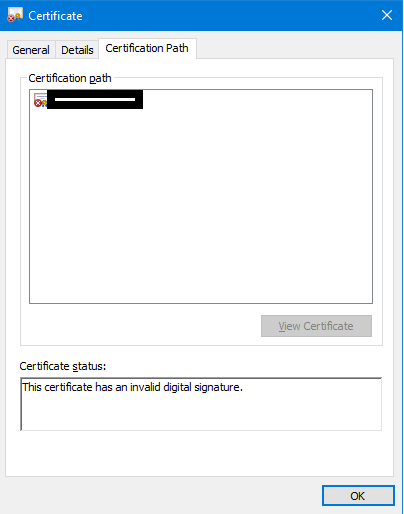
No matter what I tried, I get "invalid signature" error.
Generating the certificate parameters:
`     DateTime startDate = DateTime.Now.AddDays(-30);
     DateTime expiryDate = startDate.AddYears(100);

     BigInteger serialNumber = new BigInteger(32, new Random());
     X509V1CertificateGenerator certGen = new X509V1CertificateGenerator();

     X509Name selfSignedCA = new X509Name("CN=Test Root CA");

     certGen.SetSerialNumber(serialNumber);
     certGen.SetIssuerDN(selfSignedCA); //Self Signed
     certGen.SetNotBefore(startDate);
     certGen.SetNotAfter(expiryDate);
     certGen.SetSubjectDN(selfSignedCA);
`
Fetching a reference to the Azure KeyVault stored key (HSM like service):
` //Create a client connector to Azure KeyVault
    var keyClient = new Azure.Security.KeyVault.Keys.KeyClient(
         vaultUri: new Uri("https://xxxx.vault.azure.net/"),
         credential: new ClientSecretCredential(
             tenantId: "xxxx", //Active Directory
             clientId: "xxxx", //Application id?
             clientSecret: "xxxx"
             )
         );

        var x = keyClient.GetKey("key-new-ec"); //Fetch the reference to the key`
The key is successfully retrieved. I then try to generate a ECPublicKeyParameters object with the key's public data:
` X9ECParameters x9 = ECNamedCurveTable.GetByName("P-256"); Org.BouncyCastle.Math.EC.ECCurve curve = x9.Curve;
var ecPoint = curve.CreatePoint(new Org.BouncyCastle.Math.BigInteger(1, x.Value.Key.X), new Org.BouncyCastle.Math.BigInteger(1, x.Value.Key.Y));
ECDomainParameters dParams = new ECDomainParameters(curve, ecPoint, x9.N);
ECPublicKeyParameters pubKey = new ECPublicKeyParameters(ecPoint, dParams);

certGen.SetPublicKey(pubKey); //Setting the certificate's public key with the fetched one
`
Next step is generating a certificate signed with the key. I implemented a new ISignatureFactory object that should sign with an external signature function of KeyVault:
      AzureKeyVaultSignatureFactory customSignatureFactory = new AzureKeyVaultSignatureFactory(1);
      Org.BouncyCastle.X509.X509Certificate cert = certGen.Generate(customSignatureFactory);
This is my custom AzureKeyVaultSignatureFactory:
`public class AzureKeyVaultSignatureFactory : ISignatureFactory { private readonly int _keyHandle;
public AzureKeyVaultSignatureFactory(int keyHandle)
{
    this._keyHandle = keyHandle;
}

public IStreamCalculator CreateCalculator()
{
    var sig = new CustomAzureKeyVaultDigestSigner(this._keyHandle);

    sig.Init(true, null);

    return new DefaultSignatureCalculator(sig);
}

internal class CustomAzureKeyVaultDigestSigner : ISigner
{
    private readonly int _keyHandle;
    private byte[] _input;

    public CustomAzureKeyVaultDigestSigner(int keyHandle)
    {
        this._keyHandle = keyHandle;
    }

    public void Init(bool forSigning, ICipherParameters parameters)
    {
        this.Reset();
    }

    public void Update(byte input)
    {
        return;
    }

    public void BlockUpdate(byte[] input, int inOff, int length)
    {
        this._input = input.Skip(inOff).Take(length).ToArray();
    }

    public byte[] GenerateSignature()
    {
        //Crypto Client (Specific Key)
        try
        {

            //Crypto Client (Specific Key)
            CryptographyClient identitiesCAKey_cryptoClient = new CryptographyClient(
                keyId: new Uri("https://xxxx.vault.azure.net/keys/key-new-ec/xxxx"),
                credential: new ClientSecretCredential(

                      tenantId: "xxxx", //Active Directory
                      clientId: "xxxx", //Application id?
                      clientSecret: "xxxx"
                      )
            );

            SignResult signResult = identitiesCAKey_cryptoClient.SignData(SignatureAlgorithm.ES256, this._input);
            return signResult.Signature;


        }
        catch (Exception ex)
        {

            throw ex;
        }

        return null;
    }

    public bool VerifySignature(byte[] signature)
    {
        return false;
    }

    public void Reset() { }

    public string AlgorithmName => "SHA-256withRSA";
}

public object AlgorithmDetails => new AlgorithmIdentifier(PkcsObjectIdentifiers.Sha256WithRsaEncryption);
} `
Then I convert and write the certificate to a file:
 //convert to windows type 2 and get Base64
 X509Certificate2 cert2 = new X509Certificate2(DotNetUtilities.ToX509Certificate(cert));
 byte[] encoded = cert2.GetRawCertData();
 string certOutString = Convert.ToBase64String(encoded);
 System.IO.File.WriteAllBytes(@"test-signed2.cer", encoded);
And I get this:
I'm really stuck with this one. It is a rare usage of the ISignatureFactory interface (almost no documentation is available).
Azure KeyVault has two functions, Sign() and SignData(). The first one is for digest. I did compute the SHA256 hash of my data and tried to pass it to Sign() and still no success. Got back a 64 bytes signature.
Thanks so much for your help!
