

 bastibe
Runtime error: format not recognized
So I was trying to write several .wav file but get this error:
 First I get a system error due to wrong path for writing files, but after I fixed the path, this 'format not recognized' error occurs.

Does it work with a simple file name? It might be that libsndfile gets confused by the Asian characters in the file name. If so, you can provide the format, subtype, and endian manually, which should work as a workaround.

Thanks for your kindly replying,I figure it out that some of my files are originally named by Chinese character,so that is the situation.
发自我的iPhone
------------------ Original ------------------ From: Bastian Bechtold @.> Date: Sun,Aug 15,2021 6:53 PM To: bastibe/python-soundfile @.> Cc: 程一迅 @.>, Author @.> Subject: Re: [bastibe/python-soundfile] Runtime error: format not recognized (#309)
I'm afraid this problem is caused by libsndfile, not soundfile, so there's not much I can do about it. Either rename your files, or open a file descriptor (providing format, subtype, and endian manually), so libsndfile won't ever need to touch the actual file name.
I also found this error, but my file name does not has non-ascii characters.


This even happens when I'm writing into io.BytesIO:
RuntimeError: Error opening <_io.BytesIO object at 0x000001B109E460C0>: Format not recognised.
It might be that the wav file indeed contains a strange format that libsndfile doesn't recognize. Try supplying your own format and subtype manually.
I'm trying to write a file when I got this exception. I have tried using str, file object and io.BytesIO, but all failed with the same error.
As I said, try supplying your own
formatandsubtype.
The error still exists after adding them.
I have read the source code and found that the error is inside _open function, which does not pass argument format and subtype.
Could you elaborate in a bit more detail?
Please provide example code if you can.
soundfile is rather well-tested at this point and I am certain that format and subtype do indeed work as intended.
@bastibe , this could be a bug
https://github.com/bastibe/python-soundfile/issues/276

I encountered the same error and the reason was that the array I tried to write was 2D array of size 1XN. When I converted to 1D array of size N it worked fine.

As per the documentation, soundfile expects data in frames x channels, or one-dimensional data for mono files. It's unfortunate that librosa does it the other way around.
Same error, diferent (aparent) reason:
LibsndfileError: Error opening 'C:\Users\iamki\Desktop\Iam\Aulas\2022_2\DL\Projeto\Aplicacoes\COVID\base_de_dados\coughvid\00098cdb-4da1-4aa7-825a-4f1b9abc214b.wav': Format not recognised.
In colab I can fix it and runs okay, but in juperlab it return.

I've found one possible reason of this issue: the audio is on the wrong dimension. I forgot which dimension the audio should be, but you can try changing it. e.g.
[[x x]
[x x]             [[x x x x x ... x]
[x x]      --->   [x x x x x ... x]]
...
[x x]]
Thank you so much @CarlGao4 , apparently the two errors are also being conflated and even though there might be a dimension not recognized error, it gets reported as format not recognized with the file name which suggests that there might be something to do with the filenames and/or audio format.
Changing the dimension of input does resolve the issue for me as well.

As per the documentation, soundfile expects data in frames x channels, or one-dimensional data for mono files. It's unfortunate that librosa does it the other way around.
I have this issue when i try to load m4a file on Windows.

But i can load it when i use google colab
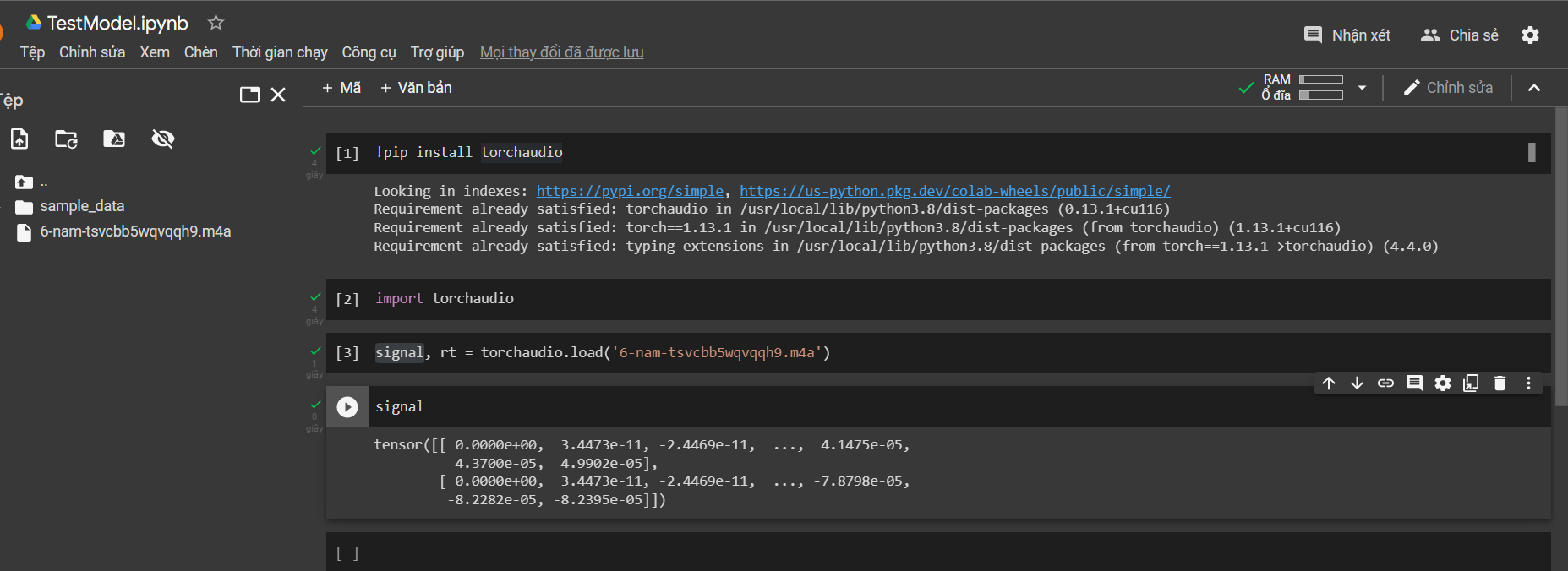
Can you guys tell me what is the problem and how to fix it ? Thank you so much
