

 backdrop
[UX] Vertical tabs and fieldsets that contain required fields should have a required indicator
Came across this UX flaw while working on #4302, but this UX improvement is broader than just that issue:
When editing a form that has required fields "hidden" in vertical tabs that are not selected by default, or fieldsets that are collapsed by default, there is no indication that there are in fact any required fields, so the user will most likely skip these tabs/fieldsets, and click the submit button, only to be faced with an error that a required field needs to be filled:

What I'm proposing is that we add the "required" indicator to such fieldsets/vtabs, so that:
- the user is likely to notice the requirement before they attempt to submit the form
- if they fail to notice the requirement, at least they get an indication of which tab may hold the required field that the form validation error is complaining about:
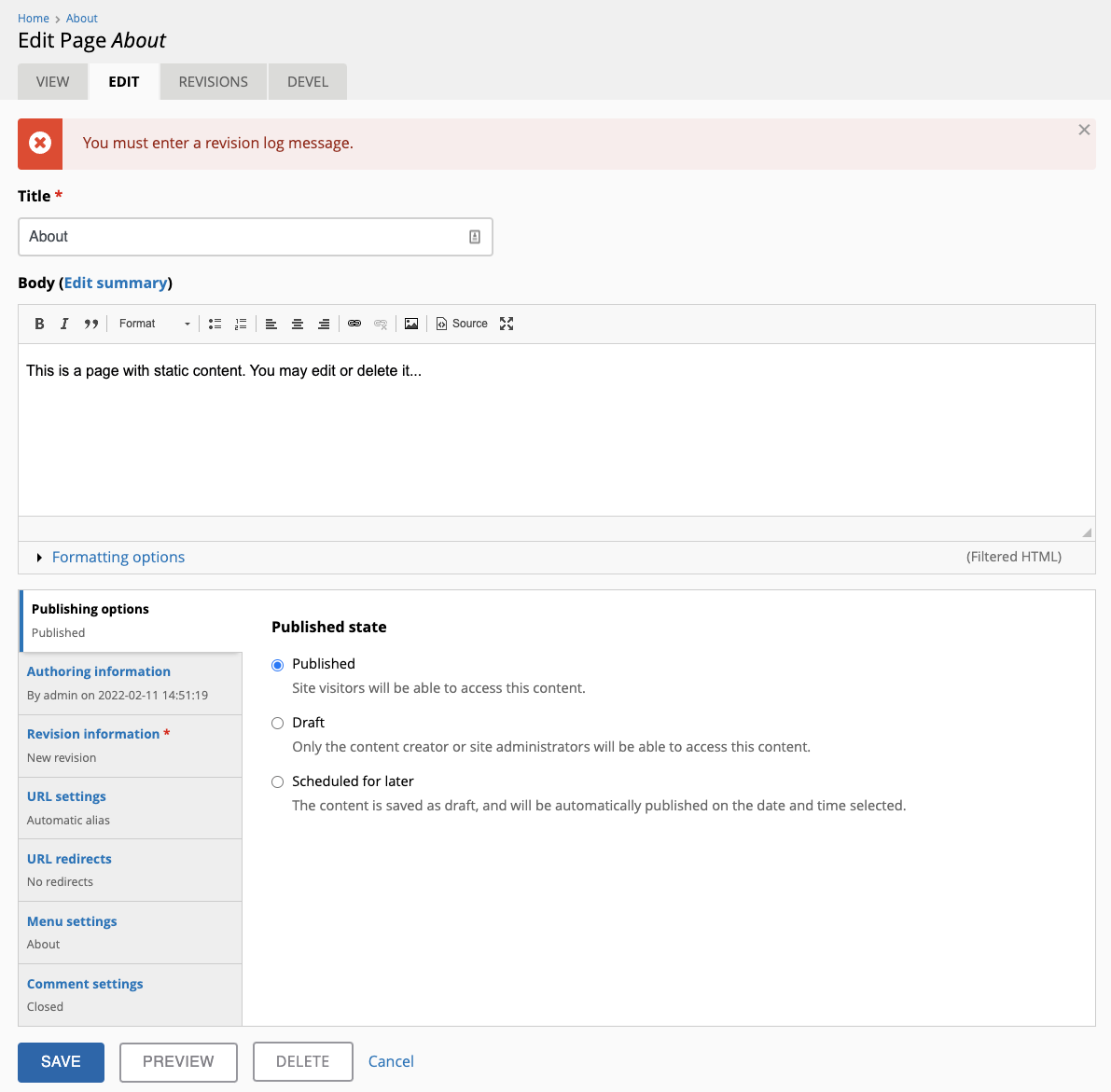
The fact that the validation does not automatically switch to the tab that contains the required field is a separate UX issue: #5504

This issue happens when setting up Ubercart for the first time, so it will be great to get this addressed.

The current PR works great for vertical tabs, both when rendered in their "full" form as well as when they are collapsed into regular fieldsets (fallback for when viewed in narrow screens). But:
- The current implementation is done in
core/misc/vertical-tabs.js, which means that we need to check how things work in situations where JS has been disabled. - The above also means that "regular", non-vtab fieldsets and
<details>elements won't benefit from this. I'll update the PR to account for those as well, but UX-wise does it make sense to provide "required" indicators or should we assume that required fields within collapsed fieldsets is a "bad decision" and automatically expand them (although I admit that that sounds rather "forceful")? - Further from the above, does it make sense to be adding "required" indicators to non-collapsible (i.e. always expanded) fieldsets, or should they only be added to collapsible ones?
...PR updated to support "free-standing" fieldsets and <details> elements besides vertical tabs (which also reduced the amount of things that we need to be doing in JS):


PS: I've introduced a new _element_has_required_children($element) helper function that is commonly used by both fieldsets and details, to avoid code duplication (could most likely be used by other elements too).
During the Design/UX meeting today we discussed this issue. Some good points:
- if fields are required, we should then be making sure to provide default values, or alternatively move these fields out of the collapsed fieldsets or vtabs
- contrib sometimes breaks that rule ^^ ...Ubercart was mentioned as a prominent use case where that happens
- perhaps only add the asterisk if any required field is actually missing a default value
Note to self: rebase the PR to refresh the sandbox for testing.