

 backdrop
Remove "Install from URL" and "Upload" options from Installer
Description of the need
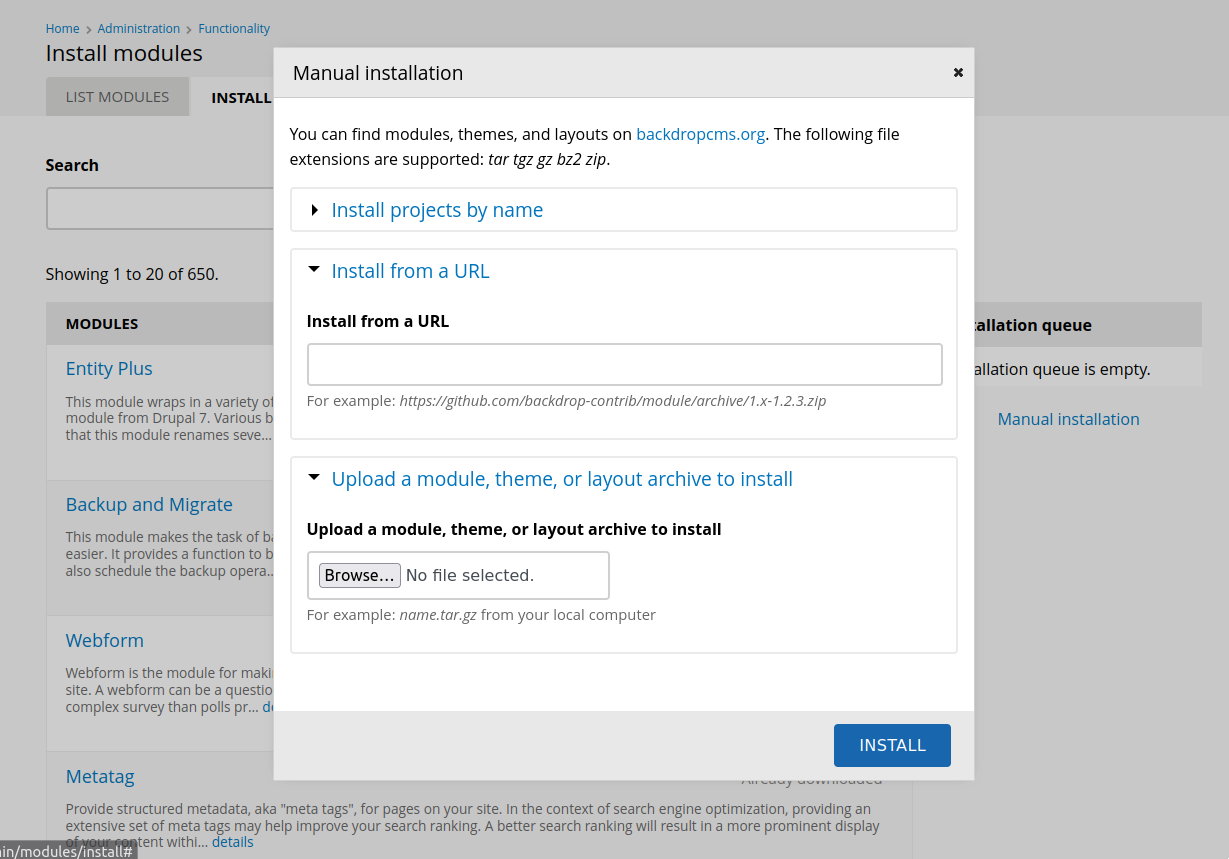
The project installer currently allows installation through 4 different mechanisms:
- Selecting projects via the browser.
- Pasting in a list of projects by name.
- Pasting a URL to a project.
- Uploading a project via a file upload field.
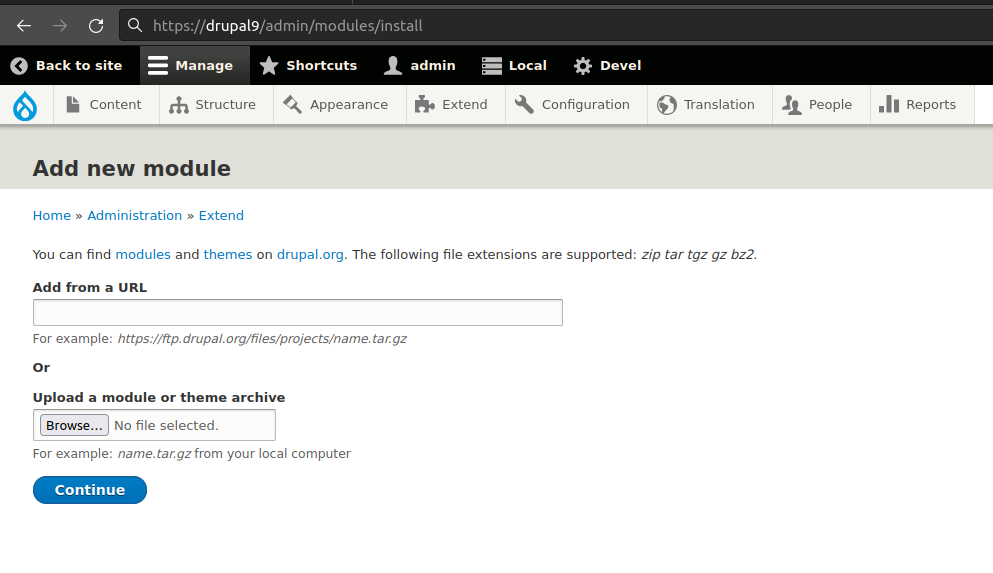
The addition of the project browser years ago added the first two options. The second two options we inherited from Drupal, which has had this ability the entire D7 cycle and continues to have it in D8/9 (though they do not have project browser).
Options for manual installation in Backdrop:
Options for manual installation in Drupal:
Proposed solution
Drupal provided this option historically as a way to install all modules, including those from drupal.org. It was the only UI-based approach to install any module. In Backdrop, the primary way to install modules is now through the browser. I think we should remove the ability to manually provide a URL or archive to prevent less experienced site owners from shooting themselves in the foot by trying to install arbitrary, probably untested, code onto their sites. If desired, users could of course continue to upload custom or arbitrary code via FTP, but we wouldn't provide a UI to directly upload executable PHP code.
Alternatives that have been considered
- Remove this ability completely.
- We could provide a setting to enable/disable this UI.
Additional information
This was prompted by multiple security researchers reporting this ability as a security vulnerability. It is not considered a security vulnerability by the security team because access to install modules is controlled through a permission. This is a feature that you can install arbitrary PHP code into a Backdrop site if you have permission to do so. However, even though this isn't a bug or vulnerability, I think the ability to upload (or worse, provide a link to) arbitrary PHP code is a bad idea.

Yes "Install from URL" don't need for Backdrop CMS.Because anone can download modules and theme from their website via API.

I think we should remove the ability to manually provide a URL or archive to prevent less experienced site owners from shooting themselves in the foot by trying to install arbitrary, probably untested, code onto their sites.
As someone who creates custom modules specific for projects/sites, I really appreciate and use that feature, although not very often.
If there are real security concerns, well, then lets remove it, but I think it has some value.

Not sure I agree with this either. There are example/test modules provided in how-to articles etc. that are hosted on GitHub and elsewhere. Our Project Browser and the "install by name" options both are limited to pulling from the "official" place (backdropcms.org), which means that if we remove the "form URL" and "upload" options, we'd effectively be forcing people to use FTP to install these modules.
As it is now, I can spin up a demo site on b.org, and copy the URL of a project without any official release yet, and then test it safely. If we remove the options suggested here, we are making things harder for people that want to volunteer to test, but don't want to set up on their local or any actual server.
If we are to remove functionality that exists in D7, I'd rather we did it in Backdrop 2.0. ...but I really think that we should keep those in.

I'm also skeptical about removing the "Install from URL" and "Upload" options, as they are helpful in some cases, and without alternative on demo sites. Disabling the options by default and providing a setting to enable them via the user interface could be a good compromise.

I agree with disabling by default. Or even put them into a separate module that isn't enabled by default. I don't think they meet the 80% of people threshold.

I think that I'd be fine with what @olafgrabienski and @herbdool suggested above ^^
There was a recent thread in Zulip where a person had trouble upgrading to Backdrop, because they had content_taxonomy enabled in their D7 site. The solution turned out to be much simpler in the end (they just disabled the module before they attempt to re-upgrade), but some of us jumped in to provide a "quick and dirty" port of the module (via coder_upgrade and slight tweaking/cleanup) in order to help unblock that person. That half-ready ported module could have been created either on a private GitHub repo by one of us, or under https://github.com/backdrop-contrib. In either scenario, no official release would have been available to test on Backdrop, so the option to be able to install via a URL would have been really helpful. If we removed that option, it would have been a potential show-stopper for that person to switch to Backdrop, and if it was disabled/hidden by default, it would have been an extra barrier added to the already not-ideal upgrade UX that this person was having. This is why I said:
If we are to remove functionality that exists in D7, I'd rather we did it in Backdrop 2.0. ...but I really think that we should keep those in.
Personally, I'm a fan of this feature in general. I've used it to test and demo projects/modules that are not available on BackdropCMS.org, in sandbox sites.
I really want this option to be avialable in some form.
However, I recently ran into a situation where I'd like to spin up sites for some people and allow them to download and install other projects from BackdropCMS.org. But, I don't want to provide them the option to upload any custom code or upload through a link. https://forum.backdropcms.org/forum/block-manual-installation-modules
While, this might sound silly, my plan is also to give them access to user 1 account. So, I can't simply hide this option with permissions. Keeping this in core and blocking will probably require installing a custom module to prevent them from installing custom modules and making sure that this new custom module can not be disabled.
My wish right now, would be that there was a setting in settings.php which I could toggle to disallow this feature.
I considered the idea that it might work to have a module in contrib with this feature (and remove it from core), so that enabling this feature would require the deliberate choice of downloading and enabling a contrib module to make it available. BUT, that doesn't really meet my use case either, because if I'm giving people the abillity to load modules off b.org, they anyone would have the ability to download and install this module, that would then let them install modules I don't want them to have access to.

We could provide a setting to enable/disable this UI.
Does anyone have any specific thoughts as to where something like that would live? ...admin/config/administration? ...admin/config/system? 😬 ...elsewhere?
...one thing that I would like to point out though, which is kinda important, is that people cannot install dev versions of modules as it is now via the browser/installer UI. If we allowed that, then there would be one less reason for this UI to exist and would make the decision here slightly easier.
I also think it would be good to remove these options. One thing @quicksketch recommended that might make it more palatable to others is to move this functionality someplace else, rather than removing it entirely. I think the devel module is a good place for it, and I'd be open to PRs there adding it back in. Another option is a separate contrib module.
As long as that module has an official release, people could use core to safely install the module, and then use the module to unsafely install whatever they like :)

As I mentioned in the past, having a way to allow people to install dev/unreleased versions via the admin UI (#664) would make the decision here easier. The Project Browser does not have the ability to list unreleased versions though (it relies on project nodes and release nodes on b.org). I would miss the two options proposed for removal here less if we:
- allowed the "Install project by name" option to pull projects from https://github.com/backdrop-contrib in GitHub regardless of whether they have a release or not
- made a "latest dev" option available for projects via the "change release" link (during the "Select versions" step in the installer)