

 backdrop
1.15 [UX] follow-up for new menu click/touch activate description text
Follow up to https://github.com/backdrop/backdrop-issues/issues/4200, text below from @klonos.
I also find this change very useful, as it exposes an already existing feature of the 3rd party library we use for the drop-down menus 👍
The help text for the new checkbox was initially this:
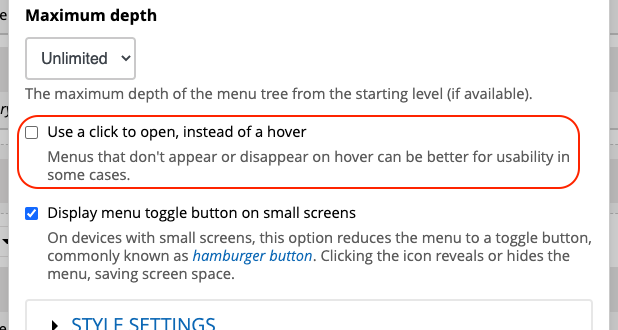
When checked, the menu will expand when clicked rather than when hovered.
Because that was simply repeating the label of the checkbox, I suggested this alternative:
This option may work better on mobile, where there is no cursor, and menu expand/collapse relies on touch events.
[edit] ...which now, after @herbdool's suggestion bellow, I would like to change to this:
This option may work better on devices where there is no cursor, and menu expand/collapse relies on touch events instead.
And we finally ended up with this:
Menus that don't appear or disappear on hover can be better for usability in some cases.
cc'ing @jenlampton, as she usually has better words for things 😄
PR: https://github.com/backdrop/backdrop/pull/3034

My comment from the other issue...
This option may work better on mobile, where there is no cursor, and menu expand/collapse relies on touch events.
The current core menu already uses click/touch on mobile, where there is no cursor. This setting is to make click/touch replace the hover setting on desktop. This new description text is misleading.
I wanted to note that this won't affect small mobile screens since the mobile menu already requires clicks.
Ah, yes. What @herbdool said :)
This option may work better on devices where there is no cursor, and menu expand/collapse relies on touch events instead.
But the core menus already work on most devices where there is no cursor. I still don't think this text is helping...
Menus that don't appear or disappear on hover can be better for usability in some cases.
Are you also recommending this text for the description for the checkbox? I'm not sure what this text has to do with the setting...
Let's delete the description text entirely and change the label to
Always use click to open sub-menus (instead of hover on large-screen devices)
Although radio buttons take up more space, would this be more clear?
Menu Drop-downs
(*) Open on mouse hover
( ) Open on mouse click
This setting applied to devices with a mouse cursor. Touch-screen devices always open on touch.

I like the radio buttons! There's a small typo, btw: "This setting applied ...". However, in my opinion we don't need this sentence in the help text, it's perfectly fine without, isn't it?
Menu Drop-downs
(*) Open on mouse hover
( ) Open on mouse click
Touch-screen devices always open on touch.

I like simplifying things -- this all looks good to me.
Menus that don't appear or disappear on hover can be better for usability in some cases.
Are you also recommending this text for the description for the checkbox? I'm not sure what this text has to do with the setting...
Probably unnecessary to include this in the description -- it's just saying that click menus that stay open can be more accessible/better usability for certain cases (e.g. primarily older audience, etc.).

The default touch/hover change is caused by device screen size, not whether they are touch-screen devices or not. (This is the problem we need to solve.) Large iPads, for example, currently use the hover effect even though they are Touch-screen devices.
Something like the following would be more correct:
Menu Drop-down behavior for devices with large screens:
(*) Sub-menus open with mouse hover
( ) Sub-menus open with mouse click or touch
Sub-menus on devices with smaller screens will always open on touch.
I've created a PR, do you think this is too wordy? Suggestions?
The default touch/hover change is caused by device screen size, not whether they are touch-screen devices or not.
👍
I've created a PR, do you think this is too wordy? Suggestions?
Okay, let's try to use fewer words:
Dropdown behavior on large screens:
(*) Open with mouse hover
( ) Open with mouse click or touch
Dropdowns on smaller screens will always open on touch.
(Note: I've used Dropdown instead of Drop-down as the Menu style in the configuration dialog is called Dropdown menu.)
PR updated
Looks good to me, only one thing: I think we don't use colons for the heading of a setting.
Dropdown behavior on large screens: should be Dropdown behavior on large screens
(Sorry @jenlampton - I forgot to remove the colon when I copied your former suggestion to adapt it.)
@quicksketch thinks the touch/hover effect is triggered by JavaScript and not by the same media query that changes the menu from desktop to mobile visually, so we might need to do some more testing to find out exactly how this thing works before we can add useful description text :)
The default touch/hover change is caused by device screen size, not whether they are touch-screen devices or not. (...) Large iPads, for example, currently use the hover effect even though they are Touch-screen devices.
@quicksketch thinks the touch/hover effect is triggered by JavaScript and not by the same media query that changes the menu from desktop to mobile visually
@jenlampton I've tested the menu behavior on a Backdrop site with the default (Open with mouse hover) setting:
- On a large iPad (Pro 11'', resolution equivalent to 1112 x 834px), sub-menus open on touch.
- On a small notebook browser window (768px), sub-menus open on hover.
- On even smaller notebook browser windows (less than 768px), the whole menu gets replaced by the 'Hamburger' menu.
So, if I don't miss something, the sentence "Touch-screen devices always open on touch" was actually correct. Based on that assumption, here's my suggestion:
Dropdown behavior on large screens
(*) Open with mouse hover
( ) Open with mouse click or touch
Touch-screen devices always open on touch.
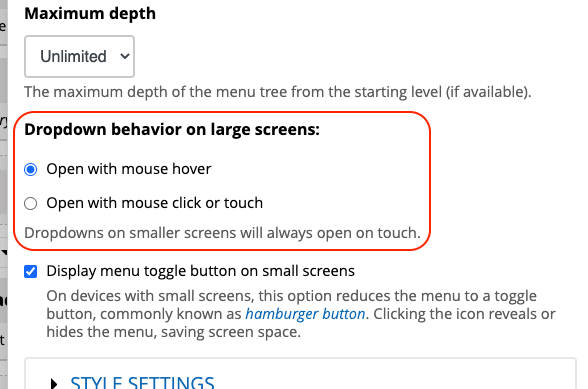

@jenlampton I've left a tiny nitpicking suggestion in the PR. Other than that, this is RTBC.
Attempting a summary to get this clear in my head:
touchscreens
- there is no hover, I've Googled, and @klonos confirmed on Zulip; hover is not a thing on touchscreen
- screen size does not matter, they all have no hover
- menus always open on click
NON-touchscreens
- regardless of the size, if there is a mouse, it will obey the radio option to hover vs click
THerefore, mentioning screen size is irrelevant.
The best option for wording this issue then is @olafgrabienski in https://github.com/backdrop/backdrop-issues/issues/4253#issuecomment-570175116

One correction:
...hover is not a thing on touchscreen
Not a thing on touchscreen**-only**. There exist devices/laptops that are touch-/pen-enabled, yet they also allow for mice to be connected and used.
Either way, we should test this and adapt the wording a bit.
But thats not what we're talking about here. If youre using it with a mouse youre not using it as a touchscreen. Regardless, the behavior will be according to the radio option, so the size issue still is irrelevant.
We've determined that size is irrelevant. We've determined the device being a touchscreen or not-touchscreen is also irrelevant. It sounds like the only deciding factor is whether you are using a finger or a cursor to trigger the menu?
How about something like this:
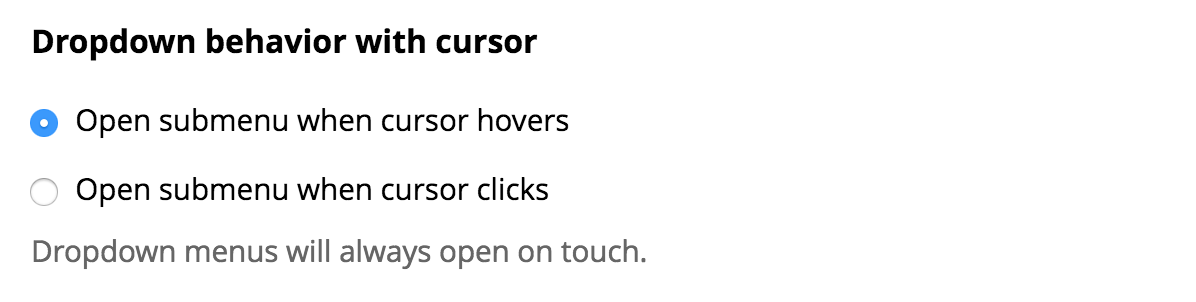
Dropdown menu behavior with cursor:
* Open submenu when cursor hovers
* Open submenu when cursor clicks
Dropdown menus will always open on touch.
(I've changed 'mouse' to 'cursor' because many people use trackpads instead of mice)
I just tested this on a touchscreen laptop. With the settings on the menu block not set to use the 'click' functionality (just default hover) I found:
- trackpad works with hover, as expected (hovering opens the submenu and a click on a main nav item automatically opens the target)
- touching a main menu item on the touchscreen functions as a click/touch open (ie. rather than automatically directing to the menu target it opens the menu and waits for another touch)
I think this confirms what is being reported.
How about:
Dropdown behavior
- Open with hover or touch
- Open with click or touch
Dropdown behavior Open with hover or touch Open with click or touch
I think that works
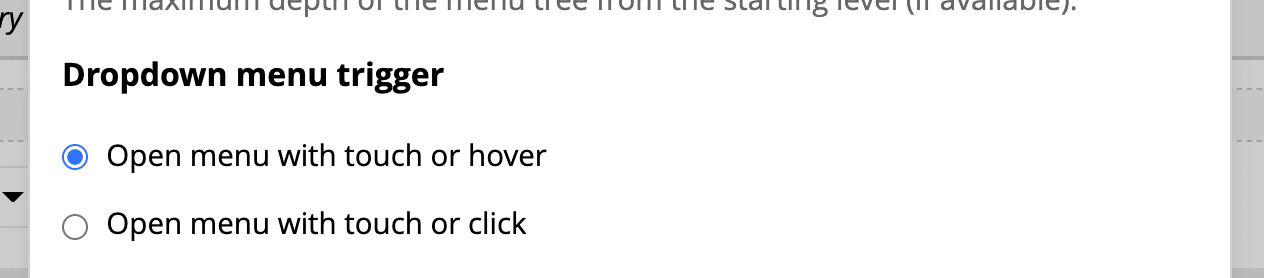
I've updated the PR to use: Dropdown menu trigger as the label. I felt that behavior was too vague. I also moved the part of the option that was different to the end of the line, so that as people are scanning it will be easier to pick out where the two options differ (and where they are the same).
- Open menu with touch or hover
- Open menu with touch or click
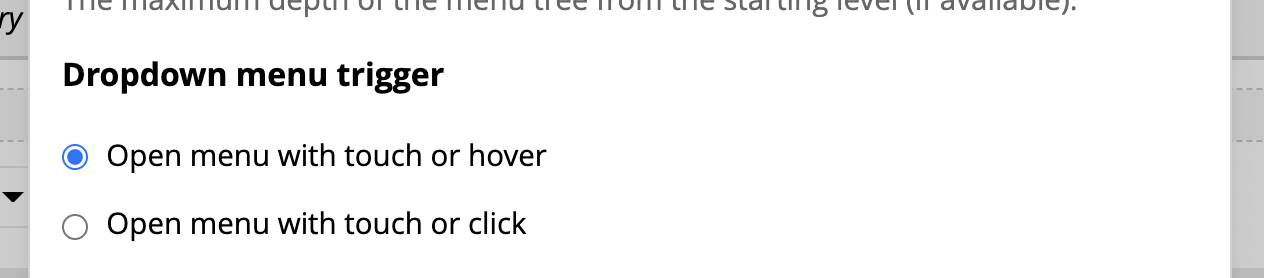
I'd love another review :)
Thanks for the updated PR! Here are the current state and the last suggestion for comparison:
Last suggestion:
Dropdown behavior
- Open with hover or touch
- Open with click or touch
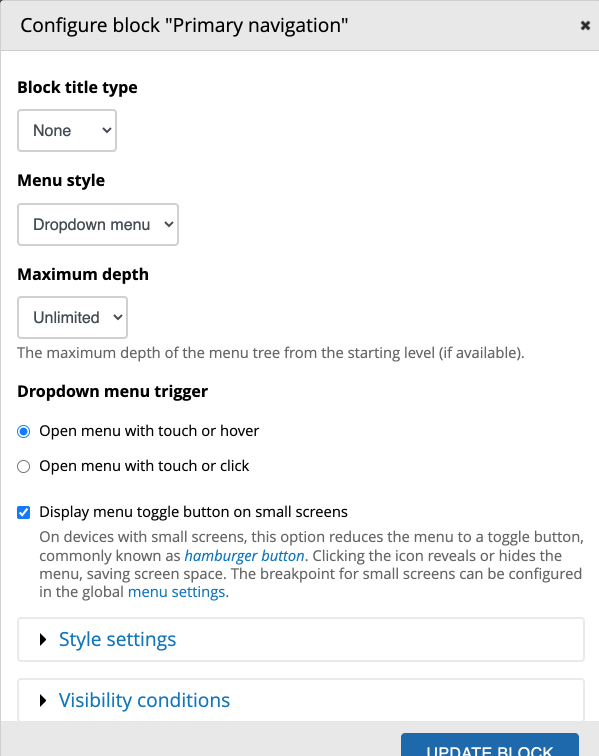
Current PR (screenshot below):
Dropdown menu trigger
- Open menu with touch or hover
- Open menu with touch or click
Moving the different part at the end of the line is very helpful. I don't like the other changes, though:
- In my opinion, it's generally not necessary to use the term "menu" in the options, it just adds more text.
- I think, Dropdown "behavior" is better than "menu trigger". The latter is likely to be confounded with the "toggle button" setting, which is just below but a whole different thing.
Current screenshot:
I dislike behaviour because that could mean anything about how the menu behaves: how fast or slow it opens, if it slides open or blinks, etc. We may have other behaviors we want to add settings for. This label should match this specific behavior. Can you think of a better word than "trigger" (rather than going back to the word that's problematic) that's specific to what opens the submenu?
I want to be sure people will know what this setting does. Saying it's a "behavior that opens" isn't very descriptive (especially if you don't think of a menu as "opening", which I expect is that case in some languages). If we provide some context as to what is opening what, it would be more helpful.
brainstorm Behavior that opens Action that opens child menu Event that reveals inner menu Interaction that displays more links ???
On Fri, Jan 7, 2022, 1:01 AM Olaf Grabienski @.***> wrote:
Thanks for the updated PR! Here are the current state and the last suggestion for comparison:
Last suggestion:
Dropdown behavior
- Open with hover or touch
- Open with click or touch
Current PR (screenshot below):
Dropdown menu trigger
- Open menu with touch or hover
- Open menu with touch or click
Moving the different part at the end of the line is very helpful. I don't like the other changes, though:
- In my opinion, it's generally not necessary to use the term "menu" in the options, it just adds more text.
- I think, Dropdown "behavior" is better than "menu trigger". The latter is likely to be confounded with the "toggle button" setting, which is just below but a whole different thing.
Current screenshot:
[image: backdrop-menu-dropdown-trigger] https://user-images.githubusercontent.com/14188307/148518686-3c23307d-b2ba-40bb-a282-6d7d5a9b73cf.png
— Reply to this email directly, view it on GitHub https://github.com/backdrop/backdrop-issues/issues/4253#issuecomment-1007242879, or unsubscribe https://github.com/notifications/unsubscribe-auth/AADBER3OXBIX24EJ6C2WPRLUU2TWPANCNFSM4KB5ODYQ . Triage notifications on the go with GitHub Mobile for iOS https://apps.apple.com/app/apple-store/id1477376905?ct=notification-email&mt=8&pt=524675 or Android https://play.google.com/store/apps/details?id=com.github.android&referrer=utm_campaign%3Dnotification-email%26utm_medium%3Demail%26utm_source%3Dgithub.
You are receiving this because you were mentioned.Message ID: @.***>
Feedback:
- I understand the vagueness of "behavior" 👍🏼
- I don't like the word trigger, but it is necessary in various things in IT, so I avoid it if possible.
- The label starts with the words "dropdown" and "menu", whereas we should try to emphasize the verb we choose for the action (be it "trigger" or "open" or "reveal" or "display")
- We are repeating "Open menu with" for both options, which could be used as a label.
How about:
Open dropdown menu with
- Touch or hover
- Touch or click
(not sure whether "with" or "on" or "upon" is more appropriate)
...or:
Open dropdown menu when
- Touched or hovered
- Touched or clicked
Can you think of a better word than "trigger" (...) that's specific to what opens the submenu?
Let's see! Maybe including one of the terms "to open" or "submenu" makes it even more clear:
Dropdown submenu trigger is very clear. Sounds however quite technical and a bit awkward to me. Advantage: the options can be short:
Dropdown submenu trigger
- Open with touch or hover
- Open with touch or click
(edit: Strictly speaking, 'Open with' isn't the trigger; not sure if that's a problem.)
Dropdown opening behavior might be technically less clear, but it sounds very understandable to me, especially if we use the term "submenu" in the options:
Dropdown opening behavior
- Open submenu with touch or hover
- Open submenu with touch or click
🤔 ...well, technically you are not "opening the submenu", rather than "the submenus are revealed when you open the parent menu item".
In this specific context, the menu has one behavior and that is to open and close (or "expand" and "collapse" if you like). What we want to describe here though is the various available options that cause it ("triggers"). The triggers are: touch/hover/click.
When it comes to the various verbs being used to describe actions:
- the parent menu is opened/expanded and closed/collapsed
- the submenus are shown/revealed and hidden
So my previous suggestion would be either:
Open dropdown menu when it is
- Touched or hovered
- Touched or clicked
...or if you want to use the word "submenus" as the main object, then:
Show submenus when the parent menu is
- Touched or hovered
- Touched or clicked
Thanks @klonos. I'm not sure if I agree to emphasize the verb in the label here. The approach sounds generally elegant, but I think a sentence shouldn't be split up in two parts (label and option), so that the option isn't descriptive without the label. To avoid issues, e.g. re translations, I'd prefer to stick with a traditional label like Dropdown opening behavior and more complete options, e.g. my suggestion from above but using "show" instead of "open".
Dropdown opening behavior
- Show submenu with touch or hover
- Show submenu with touch or click
...I think a sentence shouldn't be split up in two parts (label and option), so that the option isn't descriptive without the label. To avoid issues, e.g. re translations...
Right. I haven't thought about it that way.