

 backdrop
[Multisite] Provide option for installing global or site-specific projects via the UI
Describe your issue or idea
In multisite, if you install a module with the project installer, it goes into the root/modules folder, instead of the sites/sitefolder/modules folder as expected.

Yes, I just started playing with Project Installer for the first time and saw this.

This is intentional apparently, same in Drupal: https://api.backdropcms.org/api/backdrop/core%21modules%21system%21system.updater.inc/function/ModuleUpdater%3A%3AgetInstallDirectory/1
@BWPanda think we should change this? Or close this issue? I guess it makes sense that contrib project should go into their main folder; only really custom projects need to go into the multisite folders. Unless anyone objects...
I object. Putting projects in the root directories is for when they're used for all sites. But why assume that's the case here? Why assume that installing a module from the UI of a specific website means that module is going to be used on other websites?
I think if we're not willing to change this outright, we should at least provide an option to specify where new modules are installed...
Hmm, I am leaning towards what @BWPanda is suggesting at the moment. If I am installing a module/theme/layout from the admin UI of a specific site, then I expect that to be installed/available only for that site.
Having said that, I see the reason why some might want it to be done the other way (installed globally, for all sites), but cannot think of any way to make this more intuitive ...unless we provide an option in the Installer UI.

I'm going to change this from being a bug, and leave it open for now. Maybe call it a feature request.
Yeah, I think that how this would work ideally is if there was something like an "Install for all sites" checkbox somewhere in the installer steps, and then have the installer extract files to the proper dir. Depends on the code/logic complexity if this should be in core, or contrib.
...sound like a fun/interesting problem/task 🙂
I don't see how this is a potential contrib fix... As for code complexity, should be fairly simple. Drush and b already have code that does this.
@BWPanda as I said, this sounds like a very interesting problem to solve, and it would save work/time for people, so UX++ (site builders). I may take a crack at it ...if either you or anyone else don't beat me to it 🙂
Here's a PR: https://github.com/backdrop/backdrop/pull/3946
It adds a new field to the 'Select versions' form (only for multisites, if it's not a multisite this field isn't shown):
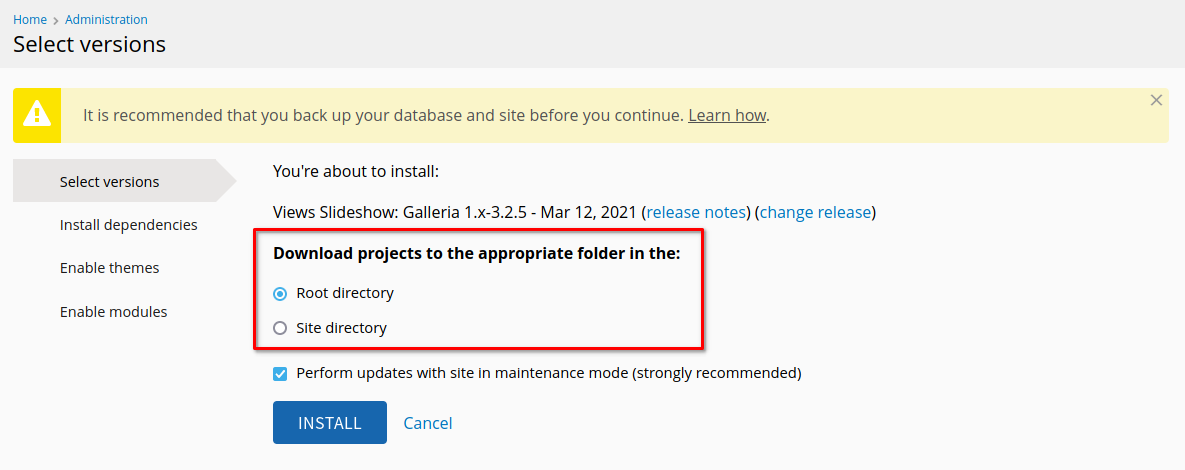
And a Lando file for testing can be found here: https://github.com/backdrop/backdrop-issues/issues/4151
@BWPanda cool, I'll try to test soon.
One thought about wording: that "Root directory" feels a bit misleading. For sure the modules wont land in the "root". The label contains the required context info, but the label and option aren't so easy to connect.
Wording usually isn't my biggest talent, but how about a shorter label above and with the options?
- Shared modules directory
- Site's modules directory
Update: wait, isn't this also for themes and layouts? Then my suggestion makes no sense.

Yup, we should simplify, so that it makes sense to less technical people. Perhaps something that says:
Multisite setup detected. Make these projects available for: ( ) all sites in this multisite setup ( ) only for the current site
Perhaps also denote the actual file paths? (as help text to each individual option)
Update: wait, isn't this also for themes and layouts?
Right, we'd need to account for all that.
...I just recalled some very good advise from @olafgrabienski on another thread re making sure that the labels of fields and the respective options are all individual sentences that can stand on their own. So my previous suggestion would need to be tweaked accordingly. I don't have a good suggestion at this time, but you get the point 😉
...this is as good as I could get it to:
Multisite setup detected ( ) Make these projects available for all sites ( ) Make these projects available only for the current site
I originally considered two ways to word this:
- Where the project would be downloaded (e.g. root directory, site-specific directory)
- What sites the project would be available for (e.g. all sites, this site)
I went with the first one, but I'm happy to try the second.
Yup, we should simplify, so that it makes sense to less technical people.
I'm happy to try different wording, but I disagree with that premise. This field is only shown for multisites, and if someone is using a multisite then they would know the difference between the site-specific directory and the root directory. You could argue that someone might just be managing a site that was setup by someone else (e.g. a site admin with no access to the file system), but I still think they'd need to know the difference, especially when they can be installing modules that will be available to other sites (which they might not manage).
I just recalled some very good advise [...] re making sure that the labels of fields and the respective options are all individual sentences that can stand on their own.
I also disagree with this. Examples from core that don't do this:
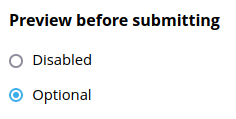
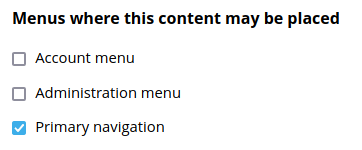
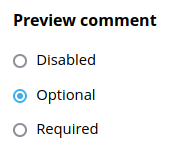
If the plan is to ultimately change those too, I think that's just going to unnecessarily duplicate words in the UI. I mean, that's what field labels are for: giving context to the options so we don't have to repeat the same thing for each one. If we don't plan to change the above examples, then I don't see the point of changing this PR either.
I've updated the PR to add a description to each option with the path in question. If we want to try the 2nd wording as described above, then I don't think a path in the description makes sense then...
Now looks like this:

TBH, I actually liked the direction of @klonos' suggestion, though not ideal (yet). But I usually can't help much with wording.
And I still find the word "Root" misleading and rather confusing (even for the "slightly more technical user"). :wink:
making sure that the labels of fields and the respective options are all individual sentences that can stand on their own
I also disagree with this. Examples from core that don't do this (...)
@BWPanda I agree the examples shouldn't be changed but they don't match what I had in mind. I don't think, labels and options have to be individual sentences. However, if there are sentences,
a sentence shouldn't be split up in two parts (label and option), so that the option isn't descriptive without the label
Incomplete sentences like Download project(s) to the appropriate folder in the are hard to understand for people translating Backdrop strings into other languages.
Example for an alternative:
Parent directory for download project(s):
- Root / Shared
- Site-specific

Yes, what @olafgrabienski said ^^ ...sorry I failed to explain things properly. That's what I meant.
PS: The explanation and examples that @olafgrabienski provided should go somewhere in our documentation and/or coding standards. I'll make sure that that gets done.

How's this?
A lot better!
One thought: Is the "/app/www" part of the example path actually helpful? How about "/modules/" and "/sites/example.com/modules/"?
Yup, very much better @BWPanda 👍🏼 ...and I like @indigoxela's suggestion too 👍🏼 (changing the /multisite/ bit to /example.com/ - don't have any strong feelings re removing the /app/www/ bits).
Is the "/app/www" part of the example path actually helpful?
So that's dynamically generated based on the actual site. The root path is obtained using BACKDROP_ROOT, while the site-specific path uses conf_path(). So this'll show the user the actual path to their actual directories.
The reason for the /app/www/ part is that it was included by default (for me) with BACKDROP_ROOT. Whereas conf_path() was just ./sites/multisite. It looked weird having one path be absolute and one be relative, so that's why I wrapped them both in realpath().
So that's dynamically generated based on the actual site. The root path is obtained using
BACKDROP_ROOT, while the site-specific path usesconf_path(). So this'll show the user the actual path to their actual directories.
In that case (and sorry I didn't check the actual code before commenting), I believe that it is indeed helpful having those there 👍🏼 ...but should we then remove the e.g.s, since these are actual paths and not examples?
...but should we then remove the
e.g.s, since these are actual paths and not examples?
...or replace them with i.e.s instead, which is more accurate?
So lots of feedback here, but anyone actually want to test/review? Or if you have already, tag it as such?
@BWPanda - I've tested this. If the modules folder has not yet been created in the sites/multi_one/ folder then the UI cannot install the module.
This is the error I get:
Error installing Paragraphs. Error installing / updating. Error: Unable to create <em class="placeholder"></em> due to the following: <em class="placeholder">Cannot chmod <em class="placeholder"></em>.</em>
PS - this is exactly what is rendered on screen - this is not an error with copying. It is exactly the same in the log.
Once bee has installed a module in that sites directory (or I manually create the modules folder in that location), then the UI can install there.
