
powerline-shell

powerline-shell copied to clipboard
 b-ryan
What is the option to change Segment Separator?
My segments separators are appearing like this:
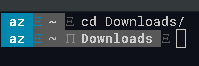
Apparently it's not loading the segment separators. After searching i found this solution in stackoverflow:
In Terminal->Preferences.... In Settings->Text click on the button Change... in the section Font. Choose any font with "Powerline" in its name and you should get to see the Powerline symbols.
This indeed solves the problem of powerline but the whole terminal font changes for powerline font and it's not a good font for whole terminal text, i barely can read it.
Before i tried this in a VM with a different ubuntu flavour and it worked well followning the same tutorial.
How can i solve this?
I was trying to change the Segment Separator but how do i do it?
