

 aws
aws
Trouble with aliases and environment subdomains
Hi Copilot team, fantastic product.
I'm having a problem and I think I've exhausted reading other issues and the documentation and I'm going to ask directly.
I have a copilot service running at (eg) api.example.com. It works great! api.example.com is a hosted zone on Route 53, and I've created several additional environments (successfully, with the same certificate), and deployed services and jobs with secrets to those environments (I can read the logs in CloudWatch), but I cannot get any additional subdomain aliases to work, eg, test.api.example.com, staging.api.example.com, and the copilot generated URLs don't seem to work either.
Here is my manifest.yml:
http:
  path: '/'
  alias: api.example.com

environments:
  staging:
    http:
      path: '/'
      alias: staging.api.example.com
When I run copilot deploy, it ends with the message: You can access your service at https://staging.api.example.com over the internet. But it cannot be reached. I've tried adding different records for it to Route 53, but without success.
Am I making a basic error? Or is what I'm attempting impossible, and I'm misunderstanding how aliases work?
Thanks for any clarity

Hi @patkirts,
I am really sorry to hear that you are facing problems with aliases.
Just to make sure that I understand your problem correctly, you have a hosted zone e.g. api.example.com in route 53 and you are trying to deploy multiple environments with the same certificate and let say prod.api.example.com service is working fine but when you try to create more environments with the same certificates then let say test.api.example.com service is getting created successfully but it is not reachable?
Could you also confirm -
- Services at both
api.example.comandprod.api.example.comworking fine and are reachable over the internet? - Are you getting 503 for the other services?

Hi! Thanks for your quick response.
I now have a theory, and it would be good to get your opinion before I take action.
First, I want to note that I have never been able to access any sub-subdomains, like prod, but also none of the default copilot subdomain structures. None. But api.example.com has always been accessible, with the first environment created.
But I figured something out after writing this last night. When copilot init --domain was run the first time, the ACN certificate used did not include the wildcard *.api.example.com. I added a new certificate with this later, in order to define the domains with the aliases (which seemed to work, as far as command line output went).
I now fear that this has caused a conflict, and that I will need to destroy the project and reinitialize it with the wildcard certificate at the beginning. My hypothesis is that copilot is not using the wildcard certificate in Route 53 when I attempt to deploy the new environments to subdomains. This would also explain, I think, why the default subdomains do not work.
Does that make sense as the cause and prescription?
Thank you
@patkirts yeah that does make sense.
I would like you to confirm couple things to me:
-
Can you check if your load balancers -> listeners has correct SSL certificate attached by going to the AWS console then load balancers and under listener rules you could find that. You can click on view/edit certificate and check if it is still using your new certificate and not the one created by copilot when you did
copilot init --domain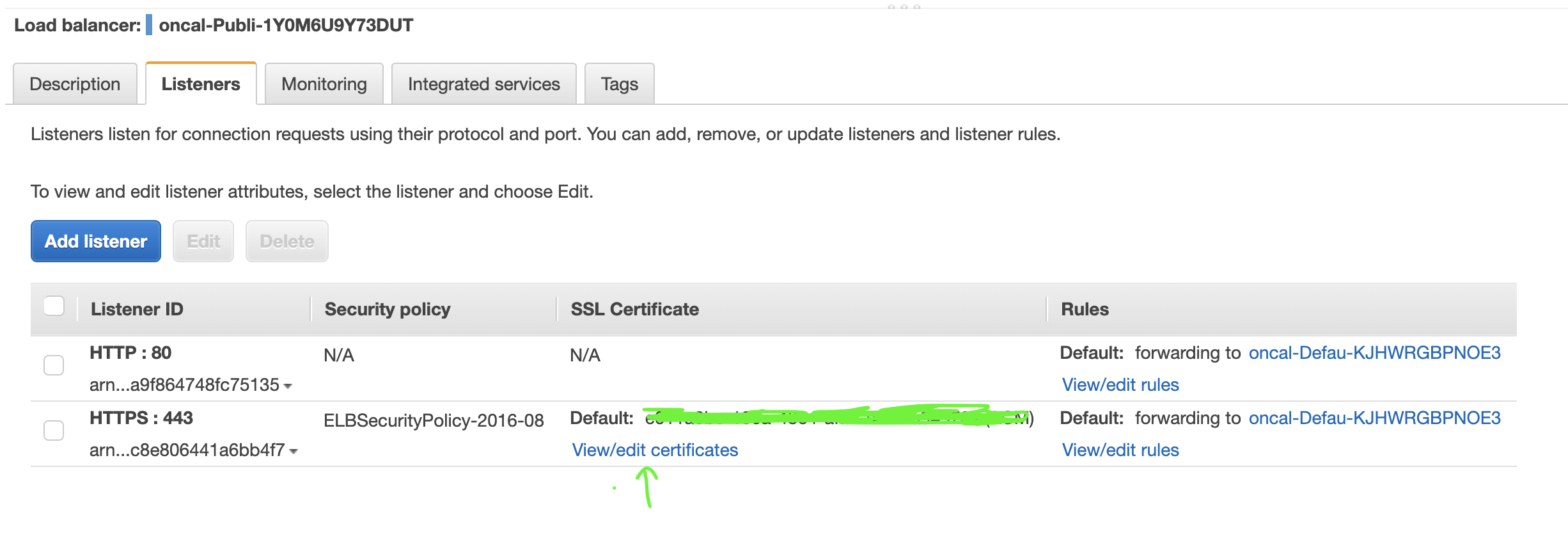
-
Can you also check in Route53 that your A record is pointing to the right load balancer?
Thank you for pointing me to this. It looks like I have 2 load balancers using the new certificate, and 1 using the one with the original certificate used when I initialized the domain.
After carefully comparing, I can confirm that the one using the first certificate (without wildcard) does correspond to the load balancer for the cluster for the first environment created, and the later 2 environments' load balancers are using the new certificate.
Is it possible to update/replace the original certificate without destroying and recreating the project?
To respond to the second question, it looks like each of the A records for each of the svc.env.name.local Route 53 hosted zones has an IP address corresponding to one of the 3 load balancers.
@patkirts, You can actually do the following things to replace the original certificate:
- You can change the first environment's manifest to replace
certificatesfield with your new certificate. e.g.
http:
  public:
    certificates: [<new certificate arn>]
- Now run
copilot env deploy --name <firstEnvirontmentName> - Now change your services' manifest (living in first environment) to add
aliasandhosted_zonefields as mentioned here. - Run
copilot svc deploy --name <serviceName> --env <firstEnvirontmentName>
This will replace your certificate successfully and you will not need to destroy or recreate the app.
Please let me know if you have any more queries.
@paragbhingre Thank you so much for this, and I'm sorry I forgot to respond. Your final instructions worked flawlessly, and are exactly what is required. I experienced no downtime.