

 aws
aws
Latest version overwrites custom load balancer rules
Hi there, I had a bit of a panic today when our service went down.
Way back, before copilot supported custom alias urls, I set up our custom domain manually. I followed a guide in these forums but I can no longer find it. Basically though, I had to add custom rules to the load balancer so that it would forward requests from our domain to the instances.
This hasn't caused problem since it was set up probably over a year ago. This latest deploy removed those rules though. I don't know if this is a copilot thing or a cloudformation thing, but I thought I'd mention it because its certainly a potential hazard for anyone else in this position.
I would like to just use the copilot alias field, except I want my domain to point at a cloudfront CDN and have the CDN point to the load balancer. I assume every deploy would change the route53 settings and skip the CDN?
Is there a way to go about all of this safely? Much appreciated.

Hi @coopsmoss !
I'm really sorry to hear that the rules got updated causing a downtime for the service 🙇
This latest deploy removed those rules though. I don't know if this is a copilot thing or a cloudformation thing, but I thought I'd mention it because its certainly a potential hazard for anyone else in this position.
Is there a way to go about all of this safely? Much appreciated.
Can you help me understand the sequence of events that happened?
I assume that Copilot got upgraded to v1.20, did you create an environment manifest or update any service manifest fields?
How do you deploy your service is it with copilot deploy or through a pipeline?
I would like to just use the copilot alias field, except I want my domain to point at a cloudfront CDN and have the CDN point to the load balancer. I assume every deploy would change the route53 settings and skip the CDN?
The slightly good news is that Copilot's integration with CloudFront should be coming soon. @CaptainCarpensir and @iamhopaul123 are working on the integration here: https://github.com/aws/copilot-cli/issues/3701. I'm marking it as related so that we can figure out a way of using your existing distribution but have the rules be managed through Copilot.

Hi @efekarakus thanks for the reply.
We deploy using the CLI in a gitlab runner with copilot deploy.
The runner pulls down the latest version of the CLI by default, which, in hindsight, is probably a mistake.
We didn't change anything in the affected services's manifest.yml, though I did make a small change in a scheduled job manifest, I doubt it would be related though.
In the deployment log, there are far more things going on than usual.
  - An ECS task definition to group your containers and run them on ECS       [update complete]     [0.0s]
  - An IAM role to control permissions for the containers in your tasks       [update complete]     [18.4s]
- Updating the infrastructure for stack api-prod-v1                           [update in progress]  [299.8s]
  - An IAM role for container auto scaling                                    [update complete]     [18.4s]
  - An autoscaling target to scale your service's desired count               [not started]
  - A custom resource returning the ECS service's running task count          [update complete]     [3.6s]
  - Update your environment's shared resources                                [not started]
  - An IAM Role for the Fargate agent to make AWS API calls on your behalf    [update complete]     [18.4s]
  - An HTTP listener rule that redirects HTTP to HTTPS                        [update complete]     [0.0s]
  - A custom resource assigning priority for HTTP listener rules              [create complete]     [3.2s]
  - An HTTPS listener rule for forwarding HTTPS traffic to your tasks         [update complete]     [0.0s]
  - A custom resource assigning priority for HTTPS listener rules             [update complete]     [3.2s]
  - The default alias record for the application load balancer                [not started]
  - An ECS service to run and maintain your tasks in the environment cluster  [update in progress]  [260.8s]
Quite curious anyway. I wonder if you think I'm safe to deploy again or do you think we'll have the same issue? I'll do a test in a staging environment either way and see what happens.
Looking forward to the new cloud front features!
Hello @coopsmoss !
I am really sorry this is causing problems for your deployments! It's weird because the listener rules are created individually in the service stack and attached to the listener. Theoretically, Copilot should be only able to update or delete the listener rules that'are in the service stack, not the ones that you've added manually. I think we'll need to investigate a bit more into this - would highly appreciate it if you are willing to help with the following questions!
- One suspicion that I had was an
UPDATEevent may be triggered on the HTTPS listener of your ALB (these are in the environment stack, not service stack). Service deployments sometimes will trigger an update in the environment stack, you can tell by the- Update your environment's shared resourcesin your progress tracker. To verify, would you mind going to your environment stack'sEventstab - do you see anUPDATE_IN_PROGRESSgetting triggered on theHTTPSListenerresource, around the time when you saw the failure? Even better, would you mind sharing the list of resources that haveUPDATEevents around that time? - Just to make sure, the rules that get removed are on the listener on port 443, right?
- How did you manage your certificate? Did you use a Copilot-managed certificate (that is, you created the app with
--domainflag), or did you import your certificate into the environment, or did you have a workaround to use your own certificate at the time because cert imported wasn't supported yet?
Quite curious anyway. I wonder if you think I'm safe to deploy again or do you think we'll have the same issue?
Unfortunately I can't really provide an answer with full confidence without understanding what was causing the issue first 😢 I apologize again for the issue that you encountered!

Hello @coopsmoss. So sorry for the trouble and inconvenience. Like what @Lou1415926 mentioned, usually the service deployment shouldn't impact the other listener rules that you set up manually (though it is always not recommended to make manual changes). Could you also share the env stack logs since the last problematic update? You can see them from the CFN console. Or use AWS CLI to describe the env stack and only includes the event logs. Thank you!

Just to share my recent experience. A while ago it happened to us once, but then it didn't happen anymore for quite sometime until today.
Our application requires us to use custom domain, so we added our custom domain to the load balancer host list, so it can be accessed via the custom domain.
For example below, co-pilot automatically assigns client-development.example.com, and we added 2 new hosts dev.example.com and my-custom-domain.com.
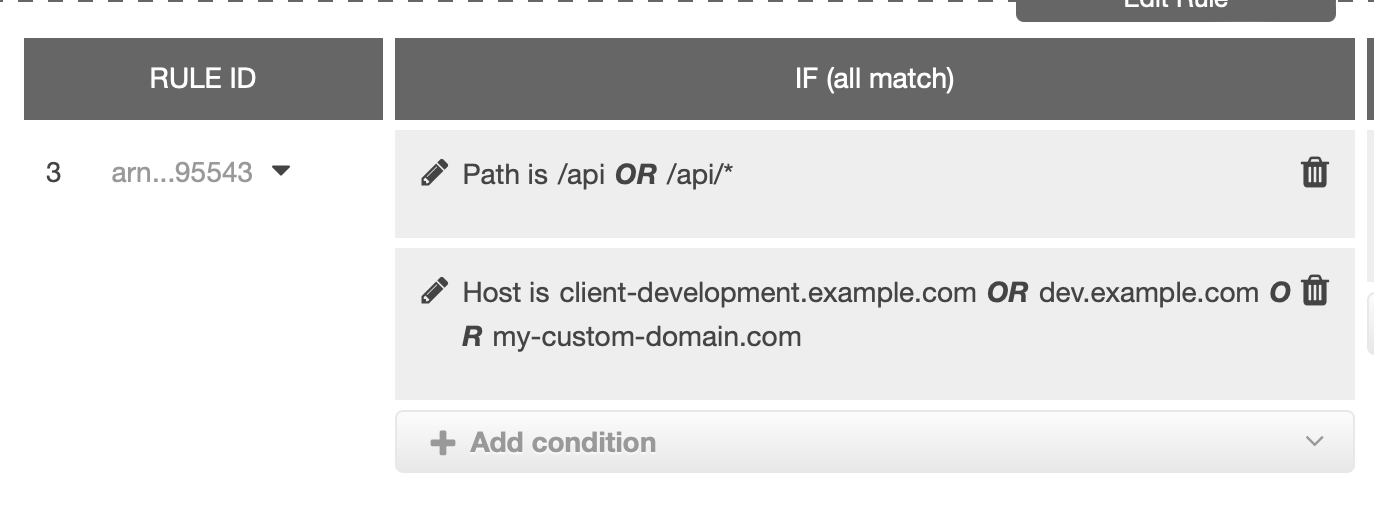
It was working fine before, until today, it removed both our custom domains causing the application not accessible via the custom domain. I think most likely it has something to do with copilot v1.27.0.
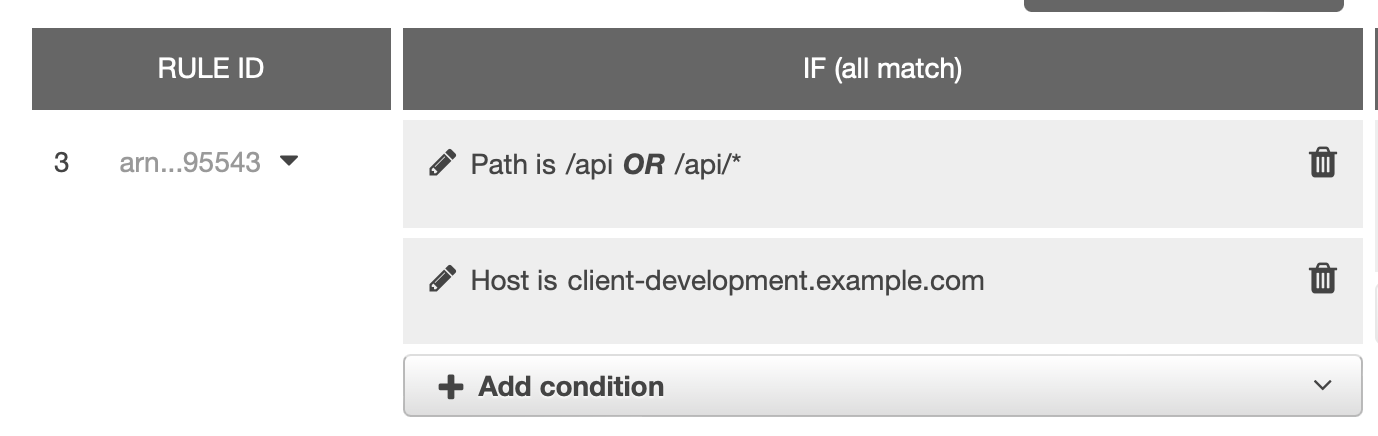
So my question is, how can we avoid this from happening again in the future? Is there a better way to handle custom domain instead of manually modifying it? And to prevent it from being removed by copilot?
Let me know if there's anything needed to help solve this issue.
Original issue filed: https://github.com/aws/copilot-cli/issues/4710

@nabilzhafri Thank you for posting your question here, and we are really sorry to hear that the new version of Copilot removed your custom domains from the listener rules. May I know why there is a need to add custom domains manually when you can add aliases using the http.alias field in your service manifest? You can pull all your domains in there and let Copilot do all your work.

This exact issue happened for us a while back, and we chalked it up to an issue in Copilot that had since been fixed (we also pull a fresh Copilot install on every build). Prior to that we had been running with the custom host manually added to the listener rule for about six months. But it has happened again a couple more times since.
Losing access to the app at what is essentially the DNS level is obviously very difficult. Additionally this one is pretty difficult to troubleshoot since there are no traffic logs to follow.
I've tried adding an alias in the environment manifest file as recommended above, but it doesn't seem to have effect. I think part of the issue is we are using an external DNS (CloudFlare) that is not manageable from AWS.
At the end of the day we simply need a way to attach a load balanced application to an external url. Manually updating the load balancer used to be a sufficient workaround, but now it seems this no longer works.
Edit - I moved the http alias into the service manifest instead of the environment manifest, and this confirms the unmanaged DNS theory
✘ `http.alias` must match one of the following patterns:
- prod-fix.svc.example.com,
- <name>.prod-fix.svc.example.com,
- svc.example.com,
- <name>.svc.example.com,
- example.com,
- <name>.example.com
✘ deploy service prod to environment prod-fix: alias "svc.customdomain.com" is not supported in hosted zones managed by Copilot

This issue is stale because it has been open 60 days with no response activity, and is tagged with pending/question. Remove the stale label, add a comment, or this will be closed in 14 days.
![github-actions[bot] avatar](https://avatars.githubusercontent.com/in/15368?v=4 "Published by a pub.dev verified publisher")
This issue is closed due to inactivity. Feel free to reopen the issue if you have any follow-ups!