

 aws
aws
Cancel deployment
Hi guys,
I 've just experimented starting a deployment which introduced changes that made the container fail the health check.
So I just hit ctr+c and interrupted the copilot CLI, fixed the bug then tried to deploy again but the newly issued command fails prompty with:
✘ Proposing infrastructure changes for stack xxx-test-site
✘ deploy service: stack xxx-test-site is currently being updated and cannot be deployed to
So when I show status
% copilot svc status
Found only one deployed service site in environment test
Task Summary

  Running      ██████████  1/1 desired tasks are running
  Deployments  ░░░░░░░░░░  0/1 running tasks for primary (rev 5)
This means that the deployment with the bug was still trying to be done.
I had to wait a long time until all resources were freed up and was able to make an svc deploy again.
Is there any way to cancel a deployment that's currently running?
This could be useful to avoid a wrong deployment from taking place, or to avoid this long retries of an impossible to succeed deployment.

Hi @nbarrera !
Yon can cancel the stack update through CloudFormation console by clicking "Stack actions" and then "cancel stack updates"
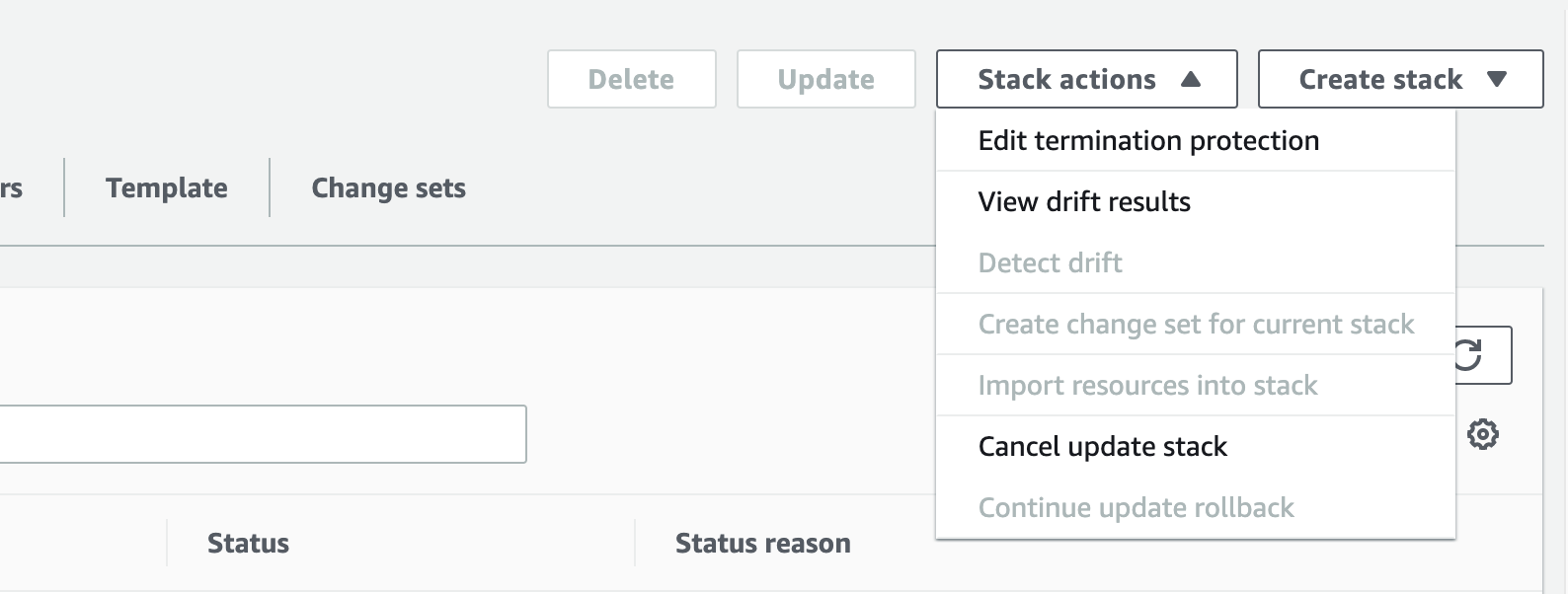
After the rollback is completed, you can run svc deploy again.
Hope this helps!!

Thank you, took me WAY too long to find this. As a copilot beginner a single wrong setting costs about an hour of waiting time without it. A user friendly way that other apps use are something like this:
- After copilot deploy display:
To rollback the current deploy press ctrl+c once. - First
ctrl+c: Show prompt:Do you want to rollback the current deploy? (y/n). - Second
ctrl+c: Show prompt:Are you sure you want to force quit the current deployment, bla bla? (y/n). - Third
ctrl+c: Kill everything


An aws command line approach to cancel a running stack update is:
$ aws cloudformation cancel-update-stack --stack-name $STACK_NAME
Where $STACK_NAME is what you see in the output after $ copilot svc deploy which typically looks like
$ copilot svc deploy
Updating the infrastructure for stack [STACK_NAME IS HERE]

Hey @sxalexander !
Currently we are actively working on this feature. We will post here once this is released. stay tuned!

Hello @nbarrera and @sxalexander !
Ctrl-C feature is released in v1.30 🎉 . You can now cancel your stack update to rollback to previous configuration.