aws-amplify
Deployment errors are not caught if the error occurs in a deleted resource
Before opening, please confirm:
- [X] I have installed the latest version of the Amplify CLI (see above), and confirmed that the issue still persists.
- [X] I have searched for duplicate or closed issues.
- [X] I have read the guide for submitting bug reports.
- [X] I have done my best to include a minimal, self-contained set of instructions for consistently reproducing the issue.
- [X] I have removed any sensitive information from my code snippets and submission.
How did you install the Amplify CLI?
npm
If applicable, what version of Node.js are you using?
v16.16.0
Amplify CLI Version
10.0.0
What operating system are you using?
Mac
Did you make any manual changes to the cloud resources managed by Amplify? Please describe the changes made.
No
Amplify Categories
auth, storage, api, hosting
Amplify Commands
add, delete, push
Describe the bug
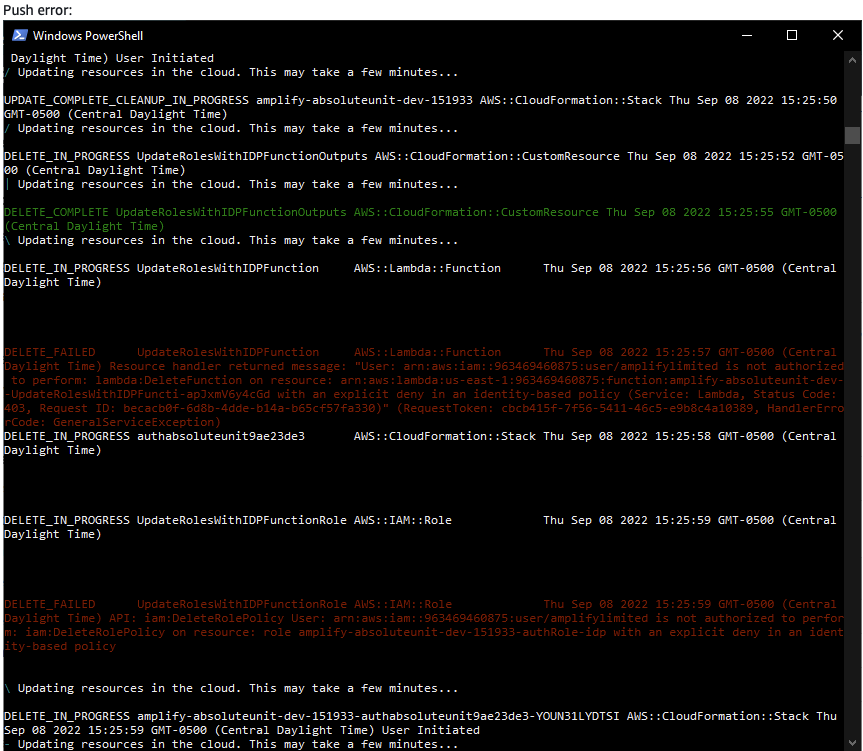
The Amplify CLI does not catch deployment errors during push if the errors occur in resources that are being deleted.
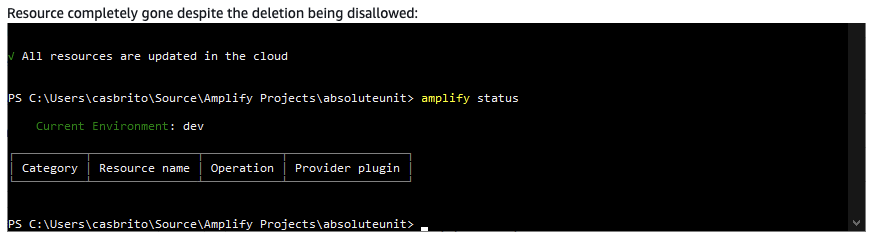
This allows the CLI to proceed with modifying contents of #current-cloud-backend directory in the cloud, even if the resources were not successfully deleted. The project will then be in a permanent error state, because the resources will still exist in the backend but are not linked to the project. The error state will persist because pull depends on the contents of the #current-cloud-backend directory in the cloud. Running amplify status will show that the resource was deleted, but the resource will still exist in the console.
Expected behavior
Errors in deleting a resource during push should trigger a rollback and should not put the project in a permanent error state.
A description of the error should be shown to the user, so they can effectively resolve the problem.
Reproduction steps
- Create a new IAM policy by copying the AdministratorAccess-Amplify policy listed in the CLI documentation, and ONLY leave the permissions with Delete in them. The effect should be Deny. Scroll to the bottom for an exact copy of the Deny policy.
- Attach the Deny policy to an IAM user or a role you use with the Amplify CLI who would have admin privileges otherwise.
- Have the user create a new Amplify app with
amplify init. The user will be able to create and update resources, but won't be able to delete resources due to the IAM policy. - Add a random resource like a user pool with
amplify add auth. -
amplify push - Remove the resource with
amplify remove auth. -
amplify push. - Observe the push throws an error from CloudFormation about an explicit deny on the action (in older versions of amplify an Error is visible but is ignored, in 10.0.0 the error does not appear at all).
- Run
amplify statuswhen the push finishes and see the user pool is now missing from the project. - Check in Cognito, and see the user pool is still there.
Here is the contents of the Deny policy:
{
  "Version": "2012-10-17",
  "Statement": [
    {
      "Effect": "Deny",
      "Action": [
        "amplify:DeleteApp",
        "amplify:DeleteBackendEnvironment",
        "amplify:DeleteBranch",
        "apigateway:DELETE",
        "appsync:DeleteApiKey",
        "appsync:DeleteDataSource",
        "appsync:DeleteFunction",
        "appsync:DeleteGraphqlApi",
        "appsync:DeleteResolver",
        "appsync:DeleteType",
        "cloudformation:DeleteStack",
        "cloudformation:DeleteStackSet",
        "cloudfront:DeleteCloudFrontOriginAccessIdentity",
        "cloudfront:DeleteDistribution",
        "cognito-identity:DeleteIdentityPool",
        "cognito-idp:DeleteGroup",
        "cognito-idp:DeleteUser",
        "cognito-idp:DeleteUserPool",
        "cognito-idp:DeleteUserPoolClient",
        "dynamodb:DeleteItem",
        "dynamodb:DeleteTable",
        "es:DeleteElasticsearchDomain",
        "events:DeleteRule",
        "iam:DeletePolicy",
        "iam:DeletePolicyVersion",
        "iam:DeleteRole",
        "iam:DeleteRolePermissionsBoundary",
        "iam:DeleteRolePolicy",
        "kinesis:DeleteStream",
        "lambda:DeleteEventSourceMapping",
        "lambda:DeleteFunction",
        "lambda:DeleteLayerVersion",
        "mobiletargeting:DeleteApnsChannel",
        "mobiletargeting:DeleteApnsSandboxChannel",
        "mobiletargeting:DeleteApp",
        "mobiletargeting:DeleteEmailChannel",
        "mobiletargeting:DeleteGcmChannel",
        "mobiletargeting:DeleteSmsChannel",
        "s3:DeleteBucket",
        "s3:DeleteBucketPolicy",
        "s3:DeleteBucketWebsite",
        "s3:DeleteObject",
        "s3:DeleteObjectVersion"
      ],
      "Resource": "*"
    }
  ]
}
GraphQL schema(s)
# Put schemas below this line
Project Identifier
No response
Log output
# Put your logs below this line
Additional information
This error no longer appears in v10.0.0 and up (it still happens silently), but was appearing in older versions.