

 auth0
auth0
Bug 🐛: on login success redirection "getAccessTokenSilently" promise takes 5-10 seconds to fulfill
Describe the problem
When someone hits login and enters his credentials then he's redirected to the app again. The getAccessTokenSilently promise takes 5-10 seconds to be fulfilled!
Core Problem
I've investigated and turned out that if the auth0 isLoading state is set to true and getAccessTokenSilently was called it gets stuck for 5-10 seconds till the promise is fulfilled. When the isLoading state is set to false at the time getAccessTokenSilently is called the bug vanishes!
Note: I'm using the phrase promise takes x seconds to be fulfilled! repeatedly cause that's where the core of the problem is located. When the getAccessTokenSilently is called before isLoading is set to false, getAccessTokenSilently assumes that I'm not an authenticated user cause I actually am in that particular moment the function was fired and it's right in doing that. The problem is that the API request to https://{DOMAIN}/oauth/token always returns a response in 200-380ms. That being said getAccessTokenSilently function holds the access token in the response object for 5-10 seconds before it fulfills the promise with the token value that it has a couple of seconds ago!
What was the expected behavior?
One of the following behaviors:
- solve whatever the problem that's holding the API response value for a couple of seconds before fulfilling the promise with the token value
- part of the
getAccessTokenSilentlyis to wait for theisLoadingstate to befalsebefore any other logic - show a warning in the console saying that the function was called before the auth0 authentication state is synced
- reject the call to
getAccessTokenSilentlywhen auth0 is still loading(isLoadingis set to true)
Reproduction
- Clone the repo
git clone https://github.com/YassinEldeeb/auth0-perf-bug-reproducible - Install the dependencies
yarn - Run next.js in development
yarn dev - Open
http://localhost:3000in your browser - Hit the
Loginbutton. - Enter your credentials.
- Open your browser console and wait for the
getAccessTokenSilentlyandconsole.timeresults - It'll take 5-10 seconds to get the result
- uncomment the if statement that checks for the
isLoadingvalue before runninggetAccessTokenSilentlyand add theisLoadingto the useEffect dependency array in this file - Logout then login again and open your browser's console to see how fast the call is compared to before
Environment
Please provide the following:
-
Version of
auth0-reactused: 1.10.2 - Which browsers have you tested in? Chrome, Firefox, and Edge (All browsers)
- Which framework are you using, if applicable (Angular, React, etc): React
- Other modules/plugins/libraries that might be involved: None - this's a very minimal reproducible exampe

And here's a video reference for the steps above on the reproducible example:
https://user-images.githubusercontent.com/72823042/184692828-a6d1fd5f-4348-4cd9-881b-a05a9843c7fb.mp4
Hi @YassinEldeeb - thanks for raising this
uncomment the if statement that checks for the isLoading value before running getAccessTokenSilently and add the isLoading to the useEffect dependency array in this file
Yep, this is expected behaviour, as you pointed out - you need to wait until isLoading is complete before trying to call getAccessTokenSilently

Yep, this is expected behaviour, as you pointed out - you need to wait until isLoading is complete before trying to call getAccessTokenSilently
@adamjmcgrath but the problem is that it's not obvious that the core of the problem is not waiting for isLoading from auth0 client.
In a kind of complicated scenario like this one where it's an HOC for wrapping the Apollo Client with a custom link to inject auth0 token in the request headers. It's incredibly difficult to spot where the problem is that's causing a 5-10 seconds delay. It took me 3 hours of debugging to spot where is the problem in a relatively large project. So at least a warning in the console would have been helpful in the debugging process.
export const ApolloProviderWithAuth0: FC<{
  children: NextComponentType<NextPageContext, any>
  pageProps: any
}> = ({ children: Children, pageProps }) => {
  const { getIdTokenClaims, getAccessTokenSilently, isLoading } = useAuth0()

  const httpLink = new HttpLink({
    uri: 'http://localhost:4000/graphql',
  })

  const authLink = setContext(async (_, { headers, ...rest }) => {
    let token

    try {
      // This call refreshes the `id_token` if it was expired
      // WARNING!: calling this in a non-authorized state will get the apollo link stuck for a bit thus
      // not making an api request at all, so you've to make sure the user is authorized!
      await getAccessTokenSilently()

      token = (await getIdTokenClaims())?.__raw
    } catch (error) {
      console.log(error)
    }

    if (!token) return { headers, ...rest }

    return {
      ...rest,
      headers: {
        ...headers,
        authorization: `Bearer ${token}`,
      },
    }
  })

  const apolloClientRef = useRef<ApolloClient<NormalizedCacheObject>>()

  if (!apolloClientRef.current) {
    apolloClientRef.current = new ApolloClient({
      link: authLink.concat(httpLink),
      cache: new InMemoryCache(),
    })
  }

  return apolloClientRef.current ------------------> && !isLoading <------------------ ? (
    <ApolloProvider client={apolloClientRef.current}>
      <Children {...pageProps} />
    </ApolloProvider>
  ) : (
    <></>
  )
}
@YassinEldeeb - thanks for the feedback and the PR
Let me have a look into this next week and get back to you
Apologies for the delay getting back to you @YassinEldeeb, I'll try and take a look at this when I can
Hi @YassinEldeeb
So, there are a few things going on here.
First off, your application is incorrectly configured to use SPA JS. Even though you're using localStorage/refreshTokens, you still need to set the "Allowed Web Origins" to allow the web_message response mode to work. The SDK uses this as a fallback when no Refresh Token is found.
When a client is incorrectly configured for web_message, /authorize requests for web_message will fail silently (this is a security requirement of the Authorization Server). When /authorize fails silently, the request to getTokenSilently times out (I think the default is 60 secs). If you check the console, you'll see that the /authorize iframe returns a 400 and if you open the page the message will tell you invalid_request: The specified redirect_uri 'http://localhost:3000' does not have a registered origin.

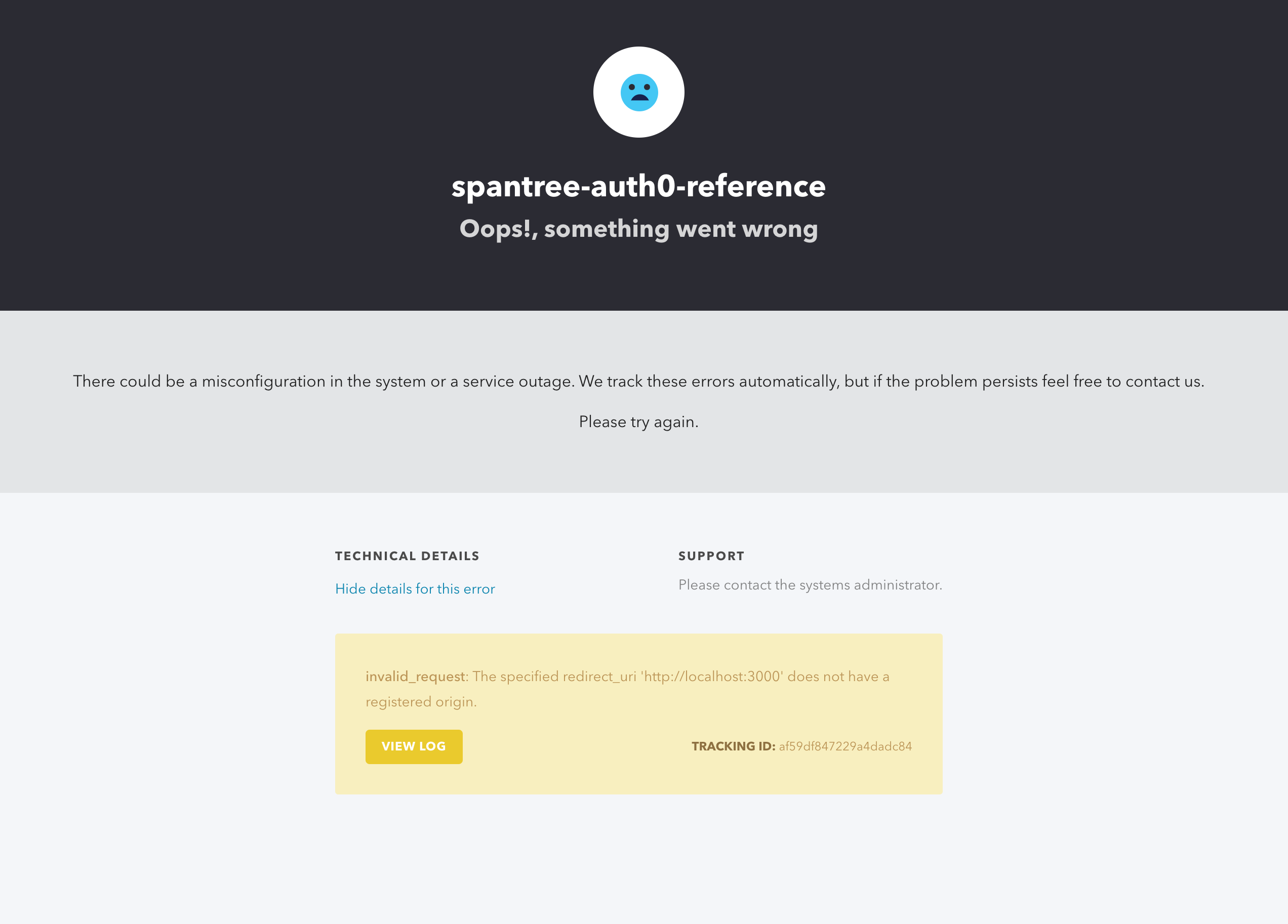
getAccessTokenSilently acquires a lock to prevent concurrent requests, when it times out the lock is held for the duration of the timeout (60 secs in this case). If you leave the page (say to login) within these 60 secs, there's a bug in the SPA JS SDK that will not clean up this dangling lock and it will delay subsequent requests to between 0 and 10 secs (the lock timeout delay) depending on how long it takes you to login.
There's a couple of things we're doing to improve how this works:
- We're fixing the dangling lock issue https://github.com/auth0/auth0-spa-js/pull/974
- We're removing the web_message fallback in v2 (so you won't need to set "Allowed Web Origins" when you're using
localStorage/refreshTokens)
But for the time being, you should configure your Auth0 application with "Allowed Web Origins" (see also this FAQ)
Thank you for the detailed breakdown of what is the cause of this issue and thank you for letting me know the actions you're currently taking for improving this. And yeah deadlocks are tricky.
I think I am facing similar issue in my React's SPA.
Here's the code:
        const auth0Client = new auth0.WebAuth({
          domain: env("REACT_APP_AUTH0_DOMAIN"),
          clientID: env("REACT_APP_AUTH0_CLIENT_ID"),
          audience: env("REACT_APP_AUTH0_AUDIENCE"),
          redirectUri: await auth.buildAuthorizeUrl({
            redirectUri: url("/logged-in", true),
          }),
          responseType: "code",
        })

        auth0Client.login(
          {
            realm: "Username-Password-Authentication",
            username: formData?.email,
            password: formData?.password!,
          },
        )
This code redirects user to Auth0 (consent screen), after being redirected back to the app, Auth0 hook instantly gets "Invalid state" error after loading is over.
Unfortunately there are no more details to make it more clear and after few days of trying everything I ran out of ideas.
Any idea what this can be? There's no extra calls to Auth0 besides fetching user from useAuth0() hook.
PS. It worked on v1.8.x but got broken after update to v1.10.x
