

 auth0
auth0
Universal Login theme changes don't get applied on import
Description
When using the package as a node module to deploy/import a configuration which includes theme changes, the effects aren't visible on the actual Login screen, but only on the Auth0 web app. Also, some properties get reset.
Reproduction
We have multiple environments set up and are using the CLI to easily propagate changes throughout them. We're using this package as a node module with 2 npm scripts: one that does auth0cli.import() and one that does auth0cli.export().
import
auth0cli.import({
    config: configuration,
    input_file: './configuration',
  });
export
auth0cli.export({
    config: configuration,
    output_folder: './configuration',
    format: 'directory',
  });
where configuration is read from a json file as guided here
Example json:
{
  "AUTH0_DOMAIN": "tenantName.eu.auth0.com",
  "AUTH0_KEYWORD_REPLACE_MAPPINGS": {
    "AUTH0_TENANT_NAME": "tenantName",
    "EMAIL_RESULT_URL": "http://localhost:3000",
    "CALLBACK_URLS": ["http://localhost:3000"],
    "ALLOWED_LOGOUT_URLS": ["http://localhost:3000"],
    "WEB_ORIGINS": ["http://localhost:3000"]
  },
  "AUTH0_ALLOW_DELETE": true
}
Initially we set up everything in the Auth0 web app, then ran the export command to have everything in code.
Now, whenever we run the import command with something new in the automatically generated themes/theme.json file, the change can only be seen in the web app, but not on the actual login screen.
For example, let's say we want to change the background color of the page to red:
theme.json
{
  "colors": {
    "primary_button": "#2D3748",
    "primary_button_label": "#ffffff",
    "secondary_button_border": "#c9cace",
    "secondary_button_label": "#1e212a",
    "base_focus_color": "#2D3748",
    "base_hover_color": "#000000",
    "links_focused_components": "#2D3748",
    "header": "#1e212a",
    "body_text": "#1e212a",
    "widget_background": "#ffffff",
    "widget_border": "#c9cace",
    "input_labels_placeholders": "#2D3748",
    "input_filled_text": "#000000",
    "input_border": "#c9cace",
    "input_background": "#ffffff",
    "icons": "#65676e",
    "error": "#d03c38",
    "success": "#13a688"
  },
  "fonts": {
    "font_url": "",
    "reference_text_size": 16,
    "title": {
      "bold": false,
      "size": 150
    },
    "subtitle": {
      "bold": false,
      "size": 87.5
    },
    "body_text": {
      "bold": false,
      "size": 87.5
    },
    "buttons_text": {
      "bold": false,
      "size": 100
    },
    "input_labels": {
      "bold": false,
      "size": 100
    },
    "links": {
      "bold": true,
      "size": 87.5
    },
    "links_style": "normal"
  },
  "borders": {
    "button_border_weight": 1,
    "buttons_style": "rounded",
    "button_border_radius": 6,
    "input_border_weight": 1,
    "inputs_style": "rounded",
    "input_border_radius": 6,
    "widget_corner_radius": 8,
    "widget_border_weight": 0,
    "show_widget_shadow": false
  },
  "widget": {
    "logo_position": "left",
    "logo_url": "",
    "logo_height": 40,
    "header_text_alignment": "left",
    "social_buttons_layout": "bottom"
  },
  "page_background": {
    "page_layout": "center",
    "background_color": "#FF0000",
    "background_image_url": ""
  },
  "displayName": "Unnamed Theme"
}
This is visible in the web app:


But the actual login screen now has a black background and even some properties got reset (the logo and headers should be left aligned, not centered).
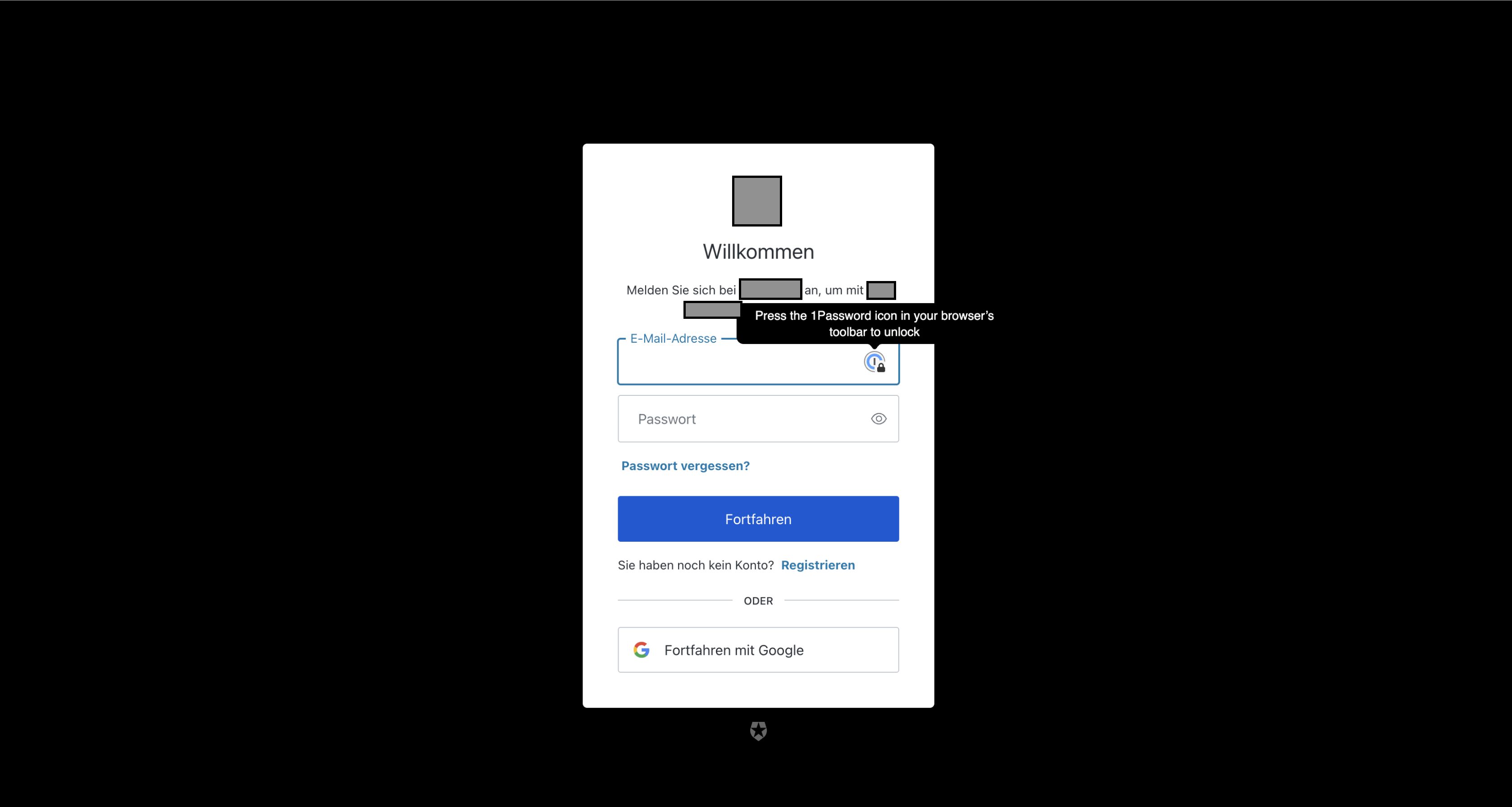
excuse the high quality censorship of the sensitive information 😂
Environment
Auth0 Config uses the new Universal Login.
- Version of this library used: 7.14.2
- Version of the platform or framework used, if applicable: -
- Other relevant versions (language, server software, OS, browser): macOS 12.2.1
- Other modules/plugins/libraries that might be involved: -

Okay, it turns out we had "universal_login": {} set in our tenant.json file and that was messing things up, even though the docs says it shouldn't. Removing that line made the deployment actually update the Universal Login styling.
@szilard-dobai Thanks for calling this out. As you've correctly deduced, the culprit is that universal_login : {} configuration line. Currently working with the team now to identify an appropriate solution. In the meantime, the workaround of removing that line from your configurations is sensible.
even though the docs says it shouldn't.
Perhaps I need to clarify a bit more, but the empty only applies to root-level properties.

This has been addressed with an API fix; no update necessary here. Thanks for reporting!
Hi,
I have a similar issue. (I'm not sure if I should open a new issue here or not, let me know if I should.)
We use a0deploy (version 7.19.0) from gitlab pipeline.
First, we customized the new universal login page using the auth0 UI. It was working fine either in the "Try"/preview function and in our test app as well.
Then we just exported the config using a0deploy export -c config.json --strip --format yaml --output_folder .
Note, the this export does contain the universal_login: {} under the tenant node.
If I just import the same config, then most of the customizations are "lost".
It is interesting though, that the customized settings are preserved and visible in the auth0 customization UI, but they are not in the actual deployed version.
I tried to remove the universal_login: {} part and run the import again, but the same happens. If I run an export again, then the universal_login: {} part is there again.
Could you please provide some help about this? It would be really nice to save the customized ui setting into our config repo as well.
Thanks!

Oh, it's even worse :(
Even though it's not listed in the docs, I can exclude "themes" from the config using like "AUTH0_EXCLUDED": ["themes"],
It will then not export / import the themes part.
BUT! Sadly, it still triggers some new deploy with the default(?) settings of the login UI. The custom settings are still visible in the "Customization Options" UI, but I have to "Save and publish" from there again.
So it makes this whole process useless :( I cannot use the config without ruining the customized ui, and i cannot customize the ui from the config.
What is it I'm missing or doing wrong?
For the record, I opened a support ticket. We did not get to a resolution there, but at least I have a workaround now.
After the a0deploy import ...
- get the default branding theme
- patch the same theme using the patch endpoint
Something like this just works for me:
# get the theme id
echo -n "export AUTH0_THEME_ID=" > theme_id.env
curl -L "https://${AUTH0_DOMAIN}/api/v2/branding/themes/default" \
-H 'Accept: application/json' \
-H "Authorization: Bearer ${AUTH0_ACCESS_TOKEN}" | jq -M '.themeId' >> theme_id.env
source theme_id.env

# get the theme config
curl -L "https://${AUTH0_DOMAIN}/api/v2/branding/themes/default" \
-H 'Accept: application/json' \
-H "Authorization: Bearer ${AUTH0_ACCESS_TOKEN}" | jq -M 'del(.themeId)' > theme.json

# patch the same theme with the same config
curl -L -X PATCH "https://${AUTH0_DOMAIN}/api/v2/branding/themes/${AUTH0_THEME_ID}" \
-H 'Content-Type: application/json' \
-H 'Accept: application/json' \
-H "Authorization: Bearer ${AUTH0_ACCESS_TOKEN}" \
-d @theme.json
You can get an access token using i.e. the credentials of the "Deploy CLI" auth0 application you created for using a0deploy.
Hello! We've found the cause of the problem. When you import the configuration via the Deploy CLI, it makes multiple PATCH calls in the set order. The PATCH request to /api/v2/branding/themes/{themeId} is made first, and it’s followed up by the PATCH request to /api/v2/branding. The PATCH call to /api/v2/branding disables the customized theme in some environments (e.g. EU2). The workaround is to exclude patching the Branding endpoint "AUTH0_EXCLUDED": ["branding"]. We've logged the issue with engineering, and this should fixed soon.
@willvedd FYI.
