

 arqex
arqex
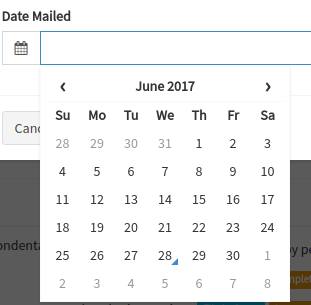
Calendar is hidden partially
Calendar is hidden by parent block with overflow: hidden.
It would be good, add option for rendering calendar into body and avoid with bug.


Hi @Mater.
I don't understand what you mean by "rendering calendar into body". Why can't you just use CSS to put the calendar above the div?

"rendering calendar into body"
render calendar to end of HTML body tag. This render required for placing calendar outside of div with CSS overflow: hidden, it fixes this bug. I think CSS doesn't help here.
example of case with bug http://codepen.io/Mater/pen/bBeZeM
I did a quick Google for parent overflow hidden child visible and found this SO post. Could it be of any help? To apply the clearfix class instead of using overflow: hidden.
I have updated codepen http://codepen.io/Mater/pen/bBeZeM I have to use datepicker in content with scroll, and clearfix doesn't help. Clearfix makes div bigger to fit content, it doesn't add any scroll. Need parent div with fixed height and scrolls.
I see the problem you are having, and rendering it to body would solve the problem. But I don't want to do that, mainly because the of the reasons that are mentioned here. I put great weight of what Dan says, so I'm not really keen on implementing it.
But I want to find a different solution for this. One idea is to input the ID for the element which you want this component to render to. Idk if that's 1) possible and 2) feasible, I'd have to think about it some more and do some research. If you have any ideas please share.
@Mater @simeg
One solution (that we think of implementing) is using position:fixed instead of position: absolute, to just take the calendar out of the flow entirely.
That's step one. Step 2 is to get the input's x and y position (on click for example) relative to your window and pass them as style props (adapted to your needs) to the calendar element. Then, proceed to position the calendar as you wish on the screen, relative to the input's x and y.
Hope that makes sense. 😄

@MindRave Not sure if I follow on the second part, but if you do implement the solution you are talking about please let know as it sounds interesting!
Any updates on this? I've not found a work-around for this bug so far and it's a show-stopper for me. Thanks.


solved this using Tether
import React from 'react';
import DateTime from 'react-datetime'
import CalendarContainer from 'react-datetime/src/CalendarContainer'
import TetherComponent from 'react-tether'

export default class TetheredDateTime extends DateTime {
    render() {
        let className = 'rdt' + (this.props.className ?
                    ( Array.isArray( this.props.className ) ?
                        ' ' + this.props.className.join( ' ' ) : ' ' + this.props.className) : ''),
            children = []
        ;

        if ( this.props.input ) {
            const props = {
                key: 'i',
                type: 'text',
                className: 'form-control',
                onFocus: this.openCalendar,
                onChange: this.onInputChange,
                onKeyDown: this.onInputKey,
                value: this.state.inputValue,
                ...this.props.inputProps
            };

            children = [
                <input {...props} />
            ];
        } else {
            className += ' rdtStatic';
        }

        return (
            <div className={className}>
                <TetherComponent
                    attachment="top left"
                    targetAttachment="bottom left"
                    constraints={[
                        {
                            to: 'scrollParent',
                        },
                        {
                            to: 'window',
                            pin: ['bottom']
                        }
                    ]}
                >
                    {children}
                    { this.state.open &&
                        <div className='rdtPicker' >
                            <CalendarContainer
                                view={this.state.currentView}
                                viewProps={this.getComponentProps()}
                                onClickOutside={this.handleClickOutside}
                            />
                        </div>
                    }
                </TetherComponent>
            </div>
        );
    }
}
CSS:
.rdtPicker {
    display: block;
    position: static;
}
Optional CSS: (use this if you need to hide the datepicker when it reaches the top of the parent container)
.tether-out-of-bounds-top .rdtPicker {
    visibility: hidden;
}

vallarj's suggestion worked well for me, but I needed to make it work in a TypeScript application.
I've not included the CSS as I had to customize it for my app, but the CSS in vallarj's is a good starting place.
I've tweaked the code formatting and approach to suit my own opinons, you'll probably want to do the same or revert them to a more "standard" web-style.
Typings/react-datetime.CalendarContainer.d.ts
// This hack is fragile as it relies on the internal implementation of react-datetime.
// The internal implementation might change at any time and is untyped, so the purpose of this
// file is to make the typings simply work, rather than to provide correct and useful typings.
import * as React from "react";

interface Props {
    view: any;
    viewProps: any;
    onClickOutside: any;
}

export default class extends React.Component<Props> { }
TetheredDateTime.tsx
import * as DateTime from "react-datetime";
import * as React from "react";
// See typings/react-datetime.CalendarContainer.d.ts
import CalendarContainer from "react-datetime/src/CalendarContainer";
import TetherComponent from "react-tether";

export class TetheredDateTime extends DateTime {
    // The definition for DateTime doesn't include parts of it's private implementation,
    // so as a hack we can ignore the typings all together for those parts.
    // e.g. this.openCalendar will become this.anyThis.openCalendar
    private anyThis: any = this;

    public render() {
        let className = "rdt";

        if (this.props.className) {
            className += " " + (
                Array.isArray(this.props.className) ?
                this.props.className.join(" ") :
                this.props.className
            );
        }

        if (!this.props.input) {
            className += " rdtStatic";
        }

        return (
            <div className={className}>
                <TetherComponent
                    attachment="top left"
                    targetAttachment="bottom left"
                    constraints={[
                        { to: "scrollParent", },
                        { to: "window", pin: ["bottom"] }
                    ]}
                >
                    {this.props.input &&
                        <input
                            key="i"
                            type="text"
                            className="form-control"
                            onFocus={this.anyThis.openCalendar}
                            onChange={this.anyThis.onInputChange}
                            onKeyDown={this.anyThis.onInputKey}
                            value={this.state.inputValue}
                            {...this.props.inputProps}
                        />
                    }
                    {this.state.open &&
                        <div className="rdtPicker" >
                            <CalendarContainer
                                view={this.anyThis.state.currentView}
                                viewProps={this.anyThis.getComponentProps()}
                                onClickOutside={this.anyThis.handleClickOutside}
                            />
                        </div>
                    }
                </TetherComponent>
            </div>
        );
    }
}

As it turns out, this is a common issue. This is also a possible workaround for #356. AFAIK there is no other way to do this but to render the component directly into the body/react root node.
It would be nice if this (or a similar fix) gets merged since the workarounds here are dependent on the current implementation of the DateTime class and will break if changes are introduced.
Thoughts? @simeg
@vallarj
It would be nice if this (or a similar fix) gets merged
Are you referring to your fix above? I do not want to introduce a dependency that would wrap this component for this (in the great matter of things) not major issue. It would introduce a lot of complexity.
I've read a lot of proposed fixes but I haven't actually looked into this my self. I'll do when I find the time. In the mean time if anyone of you that are having this problem could look into this, it would be highly appreciative.
I didn't mention that was a fix. I actually referred to it as a workaround. I just said that a similar fix to this would be appreciated. Thanks anyway.
@vallarj Ok, my bad. I misinterpreted, I see that now.
We could start looking at other components that does this and how they solve it. How does tether do it, for example? That's where I would start.
I maintain this component but I'm not responsible for fixing every issue, we're doing it together 😄 That's what makes open-source awesome ⭐️
Probably there are another ways... but u just realized a workaround fix without use of tether... just
// create a new class with a position sticky ... or any CSS that solve your visualization problem.
const styles = {
  ...
  rdtPickerFix: {
    position: 'sticky !important'
  }
};
Then into your component class or function create a function with simple javascript code
 let rtdFixTimeout = () => {
    var el = document.getElementsByClassName('rdtPicker');
    for (var x = 0; x < el.length; x++)
      el[x].classList.add(classes.rdtPickerFix);
  };
Finally, call the function onFocus event of Datetime
return (
<Datetime
      className={classes.rdtPickerFix}
      inputProps={{ placeholder: placeholder }} {...props}
      onFocus={() => {
          rtdFixTimeout(); // <-- here
      }}
  />
);
This could be improved with some checks before call or add a state as classFixAdded = true to avoid future calls once the first focus is invoked.

@simeg, regarding an alternative solution, I propose providing a ref for the calendar container. If we can obtain a reference to the calendar's HTMLElement, we can dynamically render it whenever needed and manually position it below/above the input. This approach would offer more flexibility and control over the calendar's placement.
