

 arnaudleclerc
Add Azure Maps HTML Marker Layer module
Hi Arnaud,
I would like to add clusters on the map. I already did it with Azure Map and angularJS by using an HTML Marker Layer as described on the : Azure Maps HTML Marker Layer module
Here is the result :

HTML Marker layer is using the following JS File : https://github.com/Azure-Samples/azure-maps-html-marker-layer/blob/main/dist/azure-maps-html-marker-layer.js and renders both HTMLMarkers and clusters with the functions markerRenderCallback and clusterRenderCallback.
the HTML Marker layer is using a datasource initialized this way :
let clusterRadius = 25;

let clusterProperties = clusterProperties:any = {
	'Property_1': ['any', ['==', ['get', 'Property_1'], true]],
	'Property_2': ['any', ['==', ['get', 'Property_2'], true]],
	'Property_3': ['any', ['==', ['get', 'Property_3'], true]]
};

let DataSource = new atlas.source.DataSource(null, {
	//Tell the data source to cluster point data.
	cluster: true,
	//The radius in pixels to cluster points together.
	clusterRadius: this.clusterRadius,
	//The maximum zoom level in which clustering occurs.
	//If you zoom in more than this, all points are rendered as symbols.
	//clusterMaxZoom: 6,
	clusterProperties: clusterProperties
});
I tried to download the source Code of AzureMapControl.Components to modify it by myself, but it seems it is more complex than I can handle. I would really appreciate this enhancement.

Hi @spicamelot ! On a first look, that looks possible. I'll take another look at it over the weekend to see how it can be implemented 🙂

Just to keep you up to date, I have made some progress on that. I have started to implement the HtmlMarkerLayer, I am targeting something like that :
@page "/HtmlMarkerLayer"

@using AzureMapsControl.Components.Map
<AzureMap Id="map"
          CameraOptions="new CameraOptions { Zoom = 3, Center = new Components.Atlas.Position(-97, 39) }"
          StyleOptions="StyleOptions"
          EventActivationFlags="MapEventActivationFlags
                                .None()
                                .Enable(MapEventType.Ready)"
          OnReady="OnMapReady" />

@code  {

    public StyleOptions StyleOptions = new StyleOptions
    {
        Style = MapStyle.Night,
        View = "auto"
    };

    public async Task OnMapReady(MapEventArgs eventArgs)
    {
        var datasource = new Components.Data.DataSource
        {
            Options = new Components.Data.DataSourceOptions
            {
                Cluster = true
            }
        };

        await eventArgs.Map.AddSourceAsync(datasource);

        Func<string, Components.Atlas.Position, IDictionary<string, object>, Components.Markers.HtmlMarker> markerCallback = (string id, Components.Atlas.Position position, IDictionary<string, object> properties) =>
        {
            if (properties.TryGetValue("cluster", out var cluster) && ((bool)cluster))
            {
                return new Components.Markers.HtmlMarker(id, new Components.Markers.HtmlMarkerOptions
                {
                    Position = position,
                    Color = "DarkViolet",
                    Text = properties.TryGetValue("point_count_abbreviated", out var text) ? (string)text : null
                });
            }

            var color = "blue";

            if (properties.TryGetValue("EntityType", out var entityType))
            {
                switch ((string)entityType)
                {
                    case "Gas Station":
                        color = "#3366CC";
                        break;
                    case "Grocery Store":
                        color = "#DC3912";
                        break;
                    case "Restaurant":
                        color = "#FF9900";
                        break;
                    case "School":
                        color = "#109618";
                        break;
                }
            }

            return new Components.Markers.HtmlMarker(id, new Components.Markers.HtmlMarkerOptions
            {
                Position = position,
                Color = color
            });
        };

        var markerLayer = new Components.Layers.HtmlMarkerLayer
        {
            Options = new Components.Layers.HtmlMarkerLayerOptions(markerCallback)
            {
                Source = datasource.Id
            }
        };

        await eventArgs.Map.AddLayerAsync(markerLayer);

        var geojsonFeed = "https://azuremapscodesamples.azurewebsites.net/Common/data/geojson/SamplePoiDataSet.json";
        await datasource.ImportDataFromUrlAsync(geojsonFeed);
    }
}
I am currently facing an issue, which is that the markerCallback is expecting to give back an HtmlMarker and so cannot run asynchronously. The callback defined on the library will need to return a Task<HtmlMarker>, which will be converted as a Promise. I will dig a little bit on the code of the extension itself later this week to see if a solution is possible. I'll keep you updated.
I've got a sample working with the changes on the mentioned pull request above. If you're curious, feel free to take a look at the features/html-marker-layer branch.
Still a couple of things need to be done after that, like attaching the events. I'll wait first for the pull request to be reviewed.
Hello Arnaud.
Do you know if there is a way for me to try the the html-marker-layer branch with Promise<HtmlMarker> support ? I am sorry for this question, but I am a noob with github, and clusters management is the last blocking feature for my project.
I guess that events still have to be handled, but maybe I can help for that. As I said, I am a noob with github. If I can help, could you help me to start and to target the right piece of code ?
Hi! Sure, there is a possibility to test it 😊
I just published a new version of this package just for this : 1.8.0-html-marker-laye0001. This version contains the current state of the features/html-marker-layer branch. You can download and install this package on your project.
As the PR containing the migration to Promise has not been validated yet, you should download the script from my fork of the official Azure Samples repository and reference it in your application. You can find it here : https://github.com/arnaudleclerc/azure-maps-html-marker-layer/tree/features/async-markercallback/dist
And you are right, there is still some work to do on this! I am not sure the cluster are refining themselves correctly, the events have not been handled... And I sadly do not have a lot of time to work on this currently. But if you want to give it some time, I can gladly guide you on how to do this. I have set up a slack channel a while ago, feel free to join it if you want to, that would be easier for such direct communication : https://azuremapscontrolcomp.slack.com/ssb/redirect
Hello Arnaud,
I tried the 1.8.0 update with async-markercallback, and here are some feedbacks :
It works with both the provider sample and my own data.

- With typescript, I used to fill the datasource by using a FeatureCollection object, This collection does not exist in AzureMapsControl, and the clustered map is not working with just an Array of Features. As a workaround, I have created some anonymous objects that I then serialized to a JSON string so a to match the geoJSON sample format. So, this point is not a blocking issue.
- I have added an OnClick event on non-clustered markers (I have reused the OnClick event code I was using before trying the clustered layer). These events are not triggered. I would like to handle click events on both clusters and individual markers.
- When zooming on the map, the clusters are splitted as expected (I have to check with different cluster radius values to be sure, but it seems to be ok). But there is a strange behaviour : when zooming on the cluster containing two positions, the two markers appears, but the cluster does not disappear. On the screenshot above, look at the cluster on the right, marked with "2". Before taking the screenshot, I have zoomed on the map and two pinpoints appears close to the cluster. When dezooming, the cluster is still displayed as well as the pinpoints.
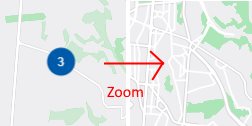
- Another strange behavior when Zooming : some clusters does not display pinpoint at all after being zoomed (see below). I am still investigating to understand if the position I provide could be different for pinpoints and clusters, but I do not think so. I have to check for markers html property too, so as to avoid a wrong html that would prevent the marker to be display.
At last, I cannot join your slack channel. Do you need my email or ID to let me join in ? In any case, a big thank you for your project !
Thanks for you feedback, really appreciate it!
First of all, I think I shared the wrong link with you to join Slack, sorry. Please try again with this one, this is hopefully the correct one : https://join.slack.com/t/azuremapscontrolcomp/shared_invite/zt-oyoclzro-ZoFakjPLD8Y~nlxO49ybjg
The removal of the clusters seems to be a little bit weird, but I cannot pinpoint yet where the issue comes from. The native javascript example I have works fine, but maybe the delay due to the WS communication makes it less efficient. I will have to investigate on this.
As far as I remember, I did not implement the events yet on this one. It has been a while I did not work directly on this feature, but I am sure there is still a lot to do.
Sadly, I still miss time to work on this right now. I will give it a shot as soon as possible, but if you wish to take a look at it by yourself, that would be awesome. Just let me know if you can join the slack channel, I can then give you a proper introduction to the library 😀