

 appsmithorg
[Bug]: Form.haschanges property initially not available when in a non-visible tab
Is there an existing issue for this?
- [X] I have searched the existing issues
Description
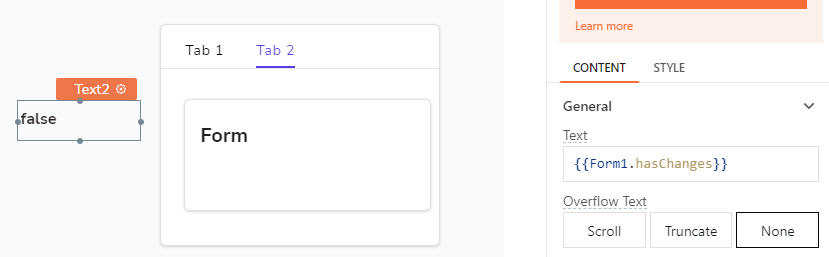
If I have a tabbed container with a form1 inside tab2 I can display the value of Form1.hasChanges in a text field (or use in a JSObject)
 When I restart the app with it defaulting to Tab1 (and thus not displaying Form1) I get an error message "hasChanges doesn't exist in Form1"
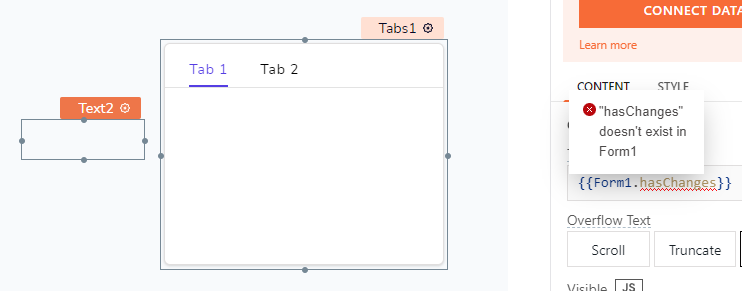 Selecting Tab2 clears the error message.
Steps To Reproduce
- Create new app
- Add Tabs widget
- Select Tab2
- Add Form widget
- Outside Tabs add text widget
- Enter {{Form1.hasChanges}} for the Text attribute
- Text will say "false"
- Select Tab1
- Text will sat "false"
- Refresh web page
- Text will be blank
- Inspect Text wdiget to see error message
Public Sample App
https://app.appsmith.com/app/form1-haschanges-doen-t-exist/page1-637d6f32cbb10813d213db08
Issue video log
No response
Version
Self Hosted 1.8.8

This is not a bug for us, this was a deliberate change to prevent the performance issues on tabs. At a time we only process evaluations the active tab and not the other tabs because then the app would become slower as the no. of widgets and the no. of tabs increase.
@nzidol what is your use-case here?

@dilippitchika I thought so too but it works when I drop a table and access it's properties in tab 2. So I was confused by this

This might be a symptom of a bigger issue which i want the team to look at.
I have multiple tabs and want to prevent the user to switch tabs without saving changes. Preferably with a single function in a JSObject. I can agree with the performance considerations but the attribute should still be available, probably with value null, instead of throwing coding errors.
I have an ugly workaround with a buttongroup instead of tabs, so I can react before a user switches... , but that buttonbar now has different configurations on every tab to only check on the current form of that tab.
Cheers
Ido
On Thu, 24 Nov 2022, 7:08 pm dilippitchika, @.***> wrote:
This is not a bug for us, this was a deliberate change to prevent the performance issues on tabs. At a time we only process evaluations the active tab and not the other tabs because then the app would become slower as the no. of widgets and the no. of tabs increase.
@nzidol https://github.com/nzidol what is your use-case here?
— Reply to this email directly, view it on GitHub https://github.com/appsmithorg/appsmith/issues/18369#issuecomment-1325997465, or unsubscribe https://github.com/notifications/unsubscribe-auth/ADH46HJKN3X6NF4FPUQQB7TWJ4A4LANCNFSM6AAAAAASINFPBM . You are receiving this because you were mentioned.Message ID: @.***>
Considering performance; its only a change we thought of, I don't think we actually did anything yet. While we are here @SatishGandham this is going to be a challenge if we optimize for this and the widgets in other tabs is not at all present, so of course the property will also fail.
However, I still want to understand, how is this is challenge @nzidol, if you have an undefined value for some property, can you just avoid it in the JS object you want to use for such validation, when the value is set your logic should work perfectly fine

@ashit-rath can you bring some light on why this might be happening right now?
Something has probably changed; the value evaluates correctly but the error on the property pane still exists.
@nzidol can you check once?
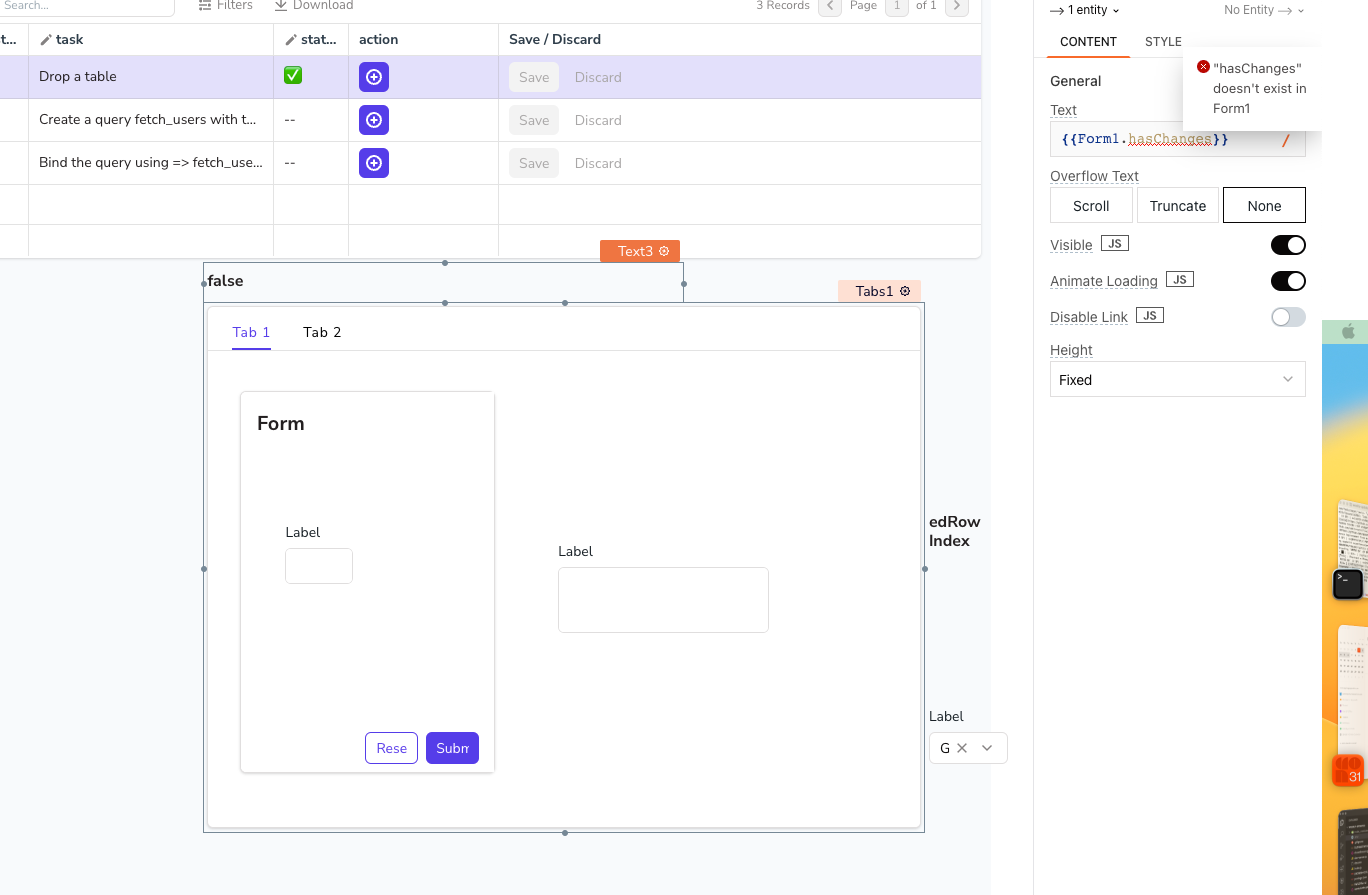
cc @ashit-rath could this be related to Linting?
Hmm behaviour is getting more complicated, everything works OK on first tab/form but when I go to another tab form.haschanges does not exist even for the form on that tab. If I edit the code and update to the same form.haschanges it does exist but only for the button I edited not the others. On v1.8.11 now...
Found that I can successfully test on form.haschanges === undefined though I get the red squiggly line... Will need to do some refactoring.
There are other complications as well with the buttongroup I use to switch tabs. In dev mode the configuration pane on the right keeps showing the config of the button group of the previous tab. Each tab has its own button group since it refers to the form on that tab. The previous button group gets selected because I click one of the buttons... Gets confusing real easy.... Especially since the name tag of the group hides behind he form...
The performance improvements are really good though. For a while it was near impossible to change anything on this over complex page.
Cheers
Ido
On Fri, 2 Dec 2022, 10:11 pm Somangshu Goswami, @.***> wrote:
Something has probably changed; the value evaluates correctly but the error on the property pane still exists. @nzidol https://github.com/nzidol can you check once?
cc @ashit-rath https://github.com/ashit-rath could this be related to Linting?
— Reply to this email directly, view it on GitHub https://github.com/appsmithorg/appsmith/issues/18369#issuecomment-1334961105, or unsubscribe https://github.com/notifications/unsubscribe-auth/ADH46HOERCLOP3TSOPB64GLWLG4NVANCNFSM6AAAAAASINFPBM . You are receiving this because you were mentioned.Message ID: @.***>
Thank you do much for this detailed response @nzidol. Also thanks for the kind words and letting us know that the performance if better. We have been working very hard to solve the problem and are still working on it further to make it even better.
The other problem you spoke of about the buttongroup on multiple tabs and the confusion you have looking at the property pane on the right. I understand the frustration. Right now, We open the open the property pane in case dev interacts with the widget. Since this is what is happening right now, it kinda expected. What is your expectation here? What would have helped you avoid the confusion?
We are still triaging the original challenge, this is surely a bug on our end, we will get this resolved soon.
We need to add a default value to the hasChanges meta property. Right now in the form widget, it gets initialised only when the widget loads i.e on click of the tab 2.
We need to add the following config to the Form widget, so it get's a default value even if it is not loaded yet.
static getMetaPropertiesMap(): Record<string, any> {
    return {
      hasChanges: false,
    };
  }
@somangshu Once we do this, we won't see the lint error.
the value evaluates correctly but the error on the property pane still exists.
This shouldn't ideally happen either way. @arunvjn / @ohansFavour could you guys give some insights here?

"What is your expectation here? What would have helped you avoid the confusion?"
Ideally I would not use a buttongroup at all but would have an event "beforeTabSelected"/"onTabClicked" on the tab component to prevent tab switching when changes have not been saved....
We are solving the first problem as pointed out by Ashit, we will introduce the default value for the meta property hasChanges so that is always present and does not lead to unforeseen errors
We will track you enhancement request separately
- Tab should have an event
beforeTabSelectedthat will allow user to run a function / query / api before the tab is switched; based on the promise returned (bool), the tab selection can work. cc @dilippitchika @ashit-rath - While using a common widgets across tabs in the edit mode, the dev is confused with the property pane that is open, Specially if the widget is responsible for changing the tabs cc @rohitagarwal88 @marks0351
There are other complications as well with the buttongroup I use to switch tabs. In dev mode the configuration pane on the right keeps showing the config of the button group of the previous tab. Each tab has its own button group since it refers to the form on that tab. The previous button group gets selected because I click one of the buttons... Gets confusing real easy.... Especially since the name tag of the group hides behind he form...
Thanks, that would be great. Although it is interesting that the code completion knows "hasChanges" should exist and the linter does not.
On a side note I do see sometimes some issues around the performance improvements, when editing the .hasChanges when deleting ".haschanges" then typing ".h" to select "hasChanges" from the dropdown there seems to be a clash between the code validation and the screen updates. Triggering "New" on the snipping tool actually refreshes the screen, hiding the initial error message, so it is likely a combination of deleting something, typing something to trigger a popup, selecting something from the popup and the screen update coming back with the red squiggle but not completing the screen update. Also in a large JS object editing near the bottom occasionally the window redraws from line 1. It is not very consistent in it's behavior and editing at the top or bottom of the JSObject seems to make a difference, so looks like a timing issue between sending code changes and receiving the response.
Note that my page is pretty complex with 7 tabs and around 100 fields, 8 JSObjects and 12 MongoDB queries. The application manages fairly complex PDF application forms but only around 100 a year.

@bharath31 can you check the above comment? it's related to linting and auto-complete challenges
@nzidol regarding the tabs problem, i want to understand if we allow the following experience would you still need the events on tabs
- Ability to disable a tab with JS
- Ability to show a tooltip on a disabled tab
With this, you can disable the next tab if the current tab's form has changes which are not saved. I also wanted to ask how does save work in the form, will the user have to click a button in the tab or somewhere else to save?
The save button is currently outside the tab and disabled when there are no changes. If you select a different tab and there are changes there is also a modal to save or clear changes. Thinking of moving the save button inside the tab but then need to find room for that and do that 7 times with small code changes....
Cheers
Ido
On Wed, 14 Dec 2022, 7:58 pm dilippitchika, @.***> wrote:
@nzidol https://github.com/nzidol regarding the tabs problem, i want to understand if we allow the following experience would you still need the events on tabs
- Ability to disable a tab with JS
- Ability to show a tooltip on a disabled tab
With this, you can disable the next tab if the current tab's form has changes which are not saved. I also wanted to ask how does save work in the form, will the user have to click a button in the tab or somewhere else to save?
— Reply to this email directly, view it on GitHub https://github.com/appsmithorg/appsmith/issues/18369#issuecomment-1350503976, or unsubscribe https://github.com/notifications/unsubscribe-auth/ADH46HPDOJGH6KZHS7E4Y7DWNFVZXANCNFSM6AAAAAASINFPBM . You are receiving this because you were mentioned.Message ID: @.***>
@ohansFavour can you help us bisect? This is a good opportunity because we know a version when this was working well.
@somangshu the root cause of this issue has been highlighted by @ashit-rath here. "We need to add a default value to the hasChanges meta property".
The only way to resolve this without back and forth is to fix the root cause. I have raised a PR to that effect.

We need to add a default value to the
hasChangesmeta property. Right now in the form widget, it gets initialised only when the widget loads i.e on click of the tab 2.We need to add the following config to the Form widget, so it get's a default value even if it is not loaded yet.
static getMetaPropertiesMap(): Record<string, any> {
    return {
      hasChanges: false,
    };
  }
@somangshu Once we do this, we won't see the lint error.
the value evaluates correctly but the error on the property pane still exists.
This shouldn't ideally happen either way. @arunvjn / @ohansFavour could you guys give some insights here?
@ashit-rath , the false positive lint error has been fixed here