

 apprenda
Look why gluster-healthz is reporting 0/1
Is this a BUG REPORT or FEATURE REQUEST?: BUG
What happened:
The gluster-healthz pod keeps getting restarted
gluster-healthz-pgcdc 0/1 Running 5795 27d
With logs:
port check failed for port 2049: dial tcp 127.0.0.1:2049: getsockopt: connection refused
, at 2018-04-10 13:51:47.673932851 +0000 UTC, error exit status 1
2018/04/10 13:51:49 Worker running /tcp-healthz-amd64 --ports 111,2049,38465,38466,38468,38469 to serve /healthz
2018/04/10 13:51:51 Worker running /tcp-healthz-amd64 --ports 111,2049,38465,38466,38468,38469 to serve /healthz
2018/04/10 13:51:53 Worker running /tcp-healthz-amd64 --ports 111,2049,38465,38466,38468,38469 to serve /healthz
2018/04/10 13:51:55 Worker running /tcp-healthz-amd64 --ports 111,2049,38465,38466,38468,38469 to serve /healthz
What you expected to happen: The pod to keep restarting.
How to reproduce it (as minimally and precisely as possible):
Anything else we need to know?:
Environment:
- Kismatic version (use
kismatic version): - Plan file Gist (remove sensitive information if any):
- Cloud provider or hardware configuration:
- OS (e.g. from /etc/os-release):
- Kernel (e.g.
uname -a):

I'm getting this issue, though I'm only posting here to add detail to @dkoshkin's Issue. I haven't played with this further enough to know if it has any other impact besides a failed healthcheck.
I used the Kistmatic Provision tool, to create a cluster on Digital Ocean. This went without any issue (Super slick by the way devs!) For what it's worth, I executed
$ ./provision do create -e 3 -m 2 -s -w 2
$ ./kismatic install apply -f kismatic-cluster.yaml
After a bit, the cluster comes up and I'm ready to go. I create a dashboard user, install it, and fire it up with a ./kismatic dashboard. Login without issue. I discovered the issue because EW RED BAD.
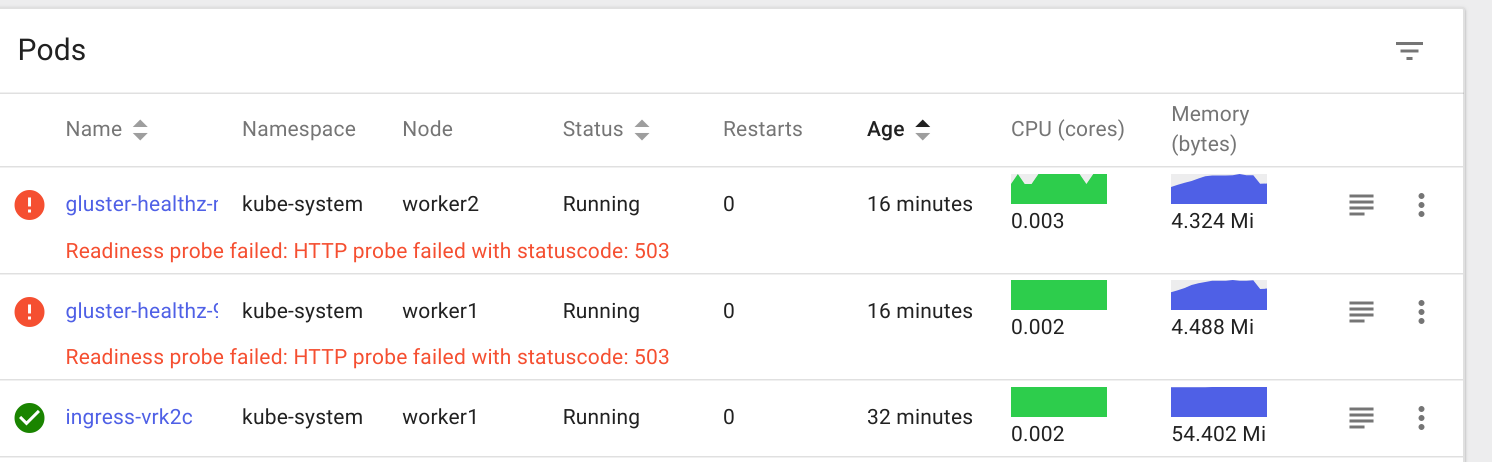
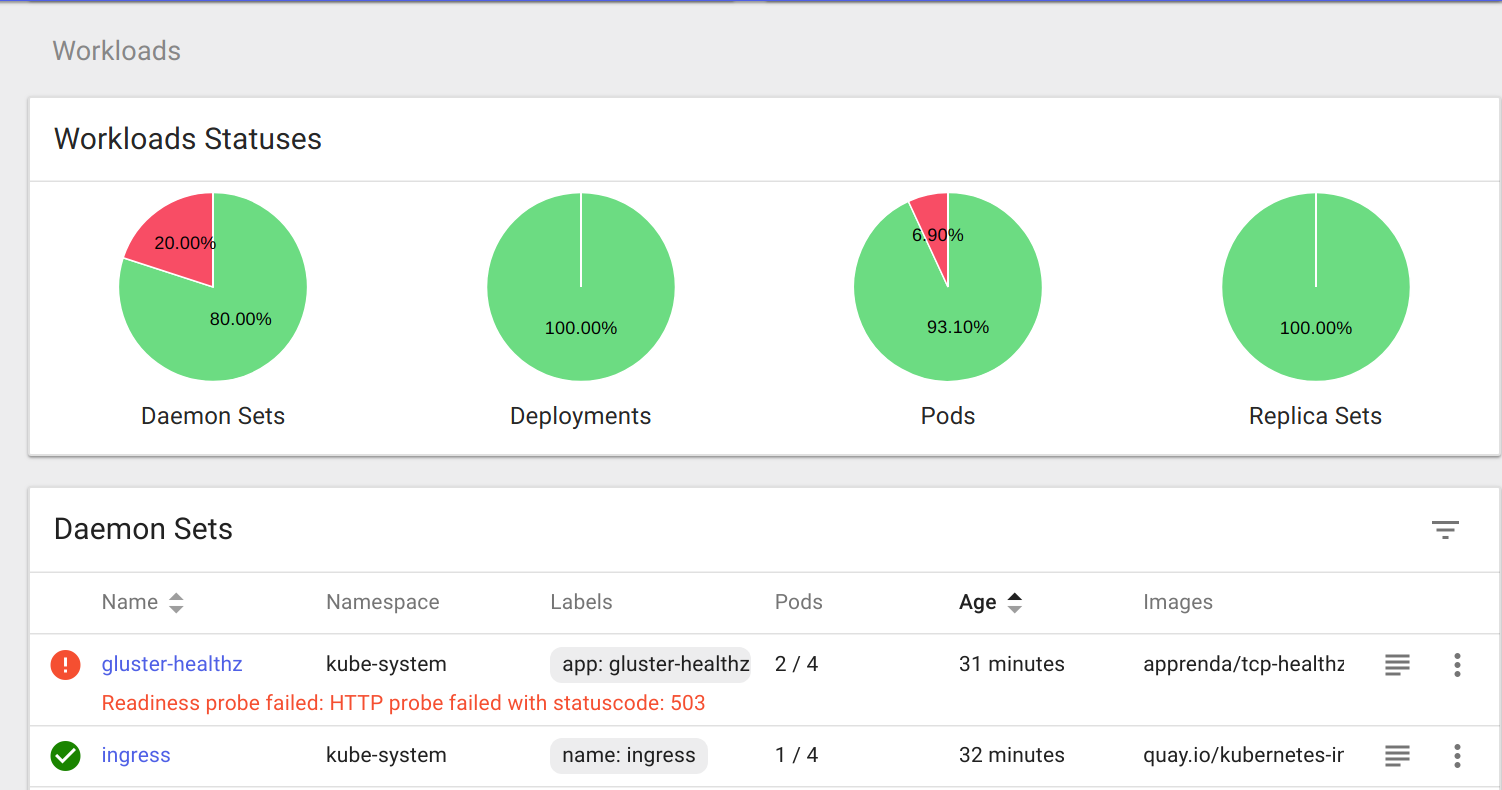
All the other services are up and healthy. I've tested a container deploy and it's smooth sailing.
I'm working on a pretty much brand new instance of Ubuntu 16 locally, fully patched / updated.
Kismatic:
  Version: 1.11.0
  Built: Thu May  3 16:18:14 UTC 2018
  Go Version: go1.9.4

Linux workhorse 4.13.0-41-generic #46~16.04.1-Ubuntu SMP Thu May 3 10:06:43 UTC 2018 x86_64 x86_64 x86_64 GNU/Linux
logs from a gluster-healthz pod
Port 111 OK
port check failed for port 2049: dial tcp 127.0.0.1:2049: getsockopt: connection refused
, at 2018-05-13 00:21:42.615523381 +0000 UTC, error exit status 1
2018/05/13 00:21:44 Worker running /tcp-healthz-amd64 --ports 111,2049,38465,38466,38468,38469 to serve /healthz
2018/05/13 00:21:46 Worker running /tcp-healthz-amd64 --ports 111,2049,38465,38466,38468,38469 to serve /healthz
2018/05/13 00:21:48 Worker running /tcp-healthz-amd64 --ports 111,2049,38465,38466,38468,38469 to serve /healthz
2018/05/13 00:21:50 Worker running /tcp-healthz-amd64 --ports 111,2049,38465,38466,38468,38469 to serve /healthz
2018/05/13 00:21:52 Worker running /tcp-healthz-amd64 --ports 111,2049,38465,38466,38468,38469 to serve /healthz
2018/05/13 00:21:52 Client ip 10.137.136.228:51420 requesting /healthz probe servicing cmd /tcp-healthz-amd64 --ports 111,2049,38465,38466,38468,38469
2018/05/13 00:21:52 Healthz probe on /healthz error: Result of last exec: ----------------------
tcp-healthz
Version = v1.0.0
Build date = Sun Jan 29 17:08:04 UTC 2017
Ports = [111 2049 38465 38466 38468 38469]
TCP connection timeout = 3s
----------------------
Port 111 OK
port check failed for port 2049: dial tcp 127.0.0.1:2049: getsockopt: connection refused
, at 2018-05-13 00:21:52.615840718 +0000 UTC, error exit status 1
2018/05/13 00:21:54 Worker running /tcp-healthz-amd64 --ports 111,2049,38465,38466,38468,38469 to serve /healthz
2018/05/13 00:21:56 Worker running /tcp-healthz-amd64 --ports 111,2049,38465,38466,38468,38469 to serve /healthz
2018/05/13 00:21:58 Worker running /tcp-healthz-amd64 --ports 111,2049,38465,38466,38468,38469 to serve /healthz
2018/05/13 00:22:00 Worker running /tcp-healthz-amd64 --ports 111,2049,38465,38466,38468,38469 to serve /healthz
2018/05/13 00:22:02 Worker running /tcp-healthz-amd64 --ports 111,2049,38465,38466,38468,38469 to serve /healthz
2018/05/13 00:22:02 Client ip 10.137.136.228:51468 requesting /healthz probe servicing cmd /tcp-healthz-amd64 --ports 111,2049,38465,38466,38468,38469
2018/05/13 00:22:02 Healthz probe on /healthz error: Result of last exec: ----------------------
tcp-healthz
Version = v1.0.0
Build date = Sun Jan 29 17:08:04 UTC 2017
Ports = [111 2049 38465 38466 38468 38469]
TCP connection timeout = 3s
----------------------
Port 111 OK
port check failed for port 2049: dial tcp 127.0.0.1:2049: getsockopt: connection refused
, at 2018-05-13 00:22:02.615931363 +0000 UTC, error exit status 1
2018/05/13 00:22:04 Worker running /tcp-healthz-amd64 --ports 111,2049,38465,38466,38468,38469 to serve /healthz
2018/05/13 00:22:06 Worker running /tcp-healthz-amd64 --ports 111,2049,38465,38466,38468,38469 to serve /healthz
2018/05/13 00:22:08 Worker running /tcp-healthz-amd64 --ports 111,2049,38465,38466,38468,38469 to serve /healthz
2018/05/13 00:22:10 Worker running /tcp-healthz-amd64 --ports 111,2049,38465,38466,38468,38469 to serve /healthz
2018/05/13 00:22:12 Worker running /tcp-healthz-amd64 --ports 111,2049,38465,38466,38468,38469 to serve /healthz
2018/05/13 00:22:12 Client ip 10.137.136.228:51516 requesting /healthz probe servicing cmd /tcp-healthz-amd64 --ports 111,2049,38465,38466,38468,38469
2018/05/13 00:22:12 Healthz probe on /healthz error: Result of last exec: ----------------------
tcp-healthz
Version = v1.0.0
Build date = Sun Jan 29 17:08:04 UTC 2017
Ports = [111 2049 38465 38466 38468 38469]
TCP connection timeout = 3s
----------------------
Port 111 OK
port check failed for port 2049: dial tcp 127.0.0.1:2049: getsockopt: connection refused
, at 2018-05-13 00:22:12.617218536 +0000 UTC, error exit status 1
2018/05/13 00:22:14 Worker running /tcp-healthz-amd64 --ports 111,2049,38465,38466,38468,38469 to serve /healthz
2018/05/13 00:22:16 Worker running /tcp-healthz-amd64 --ports 111,2049,38465,38466,38468,38469 to serve /healthz
