

 apache
ZEPPELIN-3472 No interpreter status is shown after restarting the individual interpreter.
What is this PR for?
Shows the interpreter status after restarting the individual interpreter.
What type of PR is it?
[Bug Fix]
What is the Jira issue?
How should this be tested?
Click on setting icon on note-book interpreter panel will be shown. click on refresh icon for the specific interpreter from the list user will promt to confirm do he want's to restart the interpreter. If yes depending on the api response the status has been shown in the form of (circle) color mapping below.
- GREEN -> Interpreter successfully restarted
- RED -> Error has been occure while restarting
on hovering the (circle) you will see success / error message for the respective interpreter.
Screenshots (if appropriate)
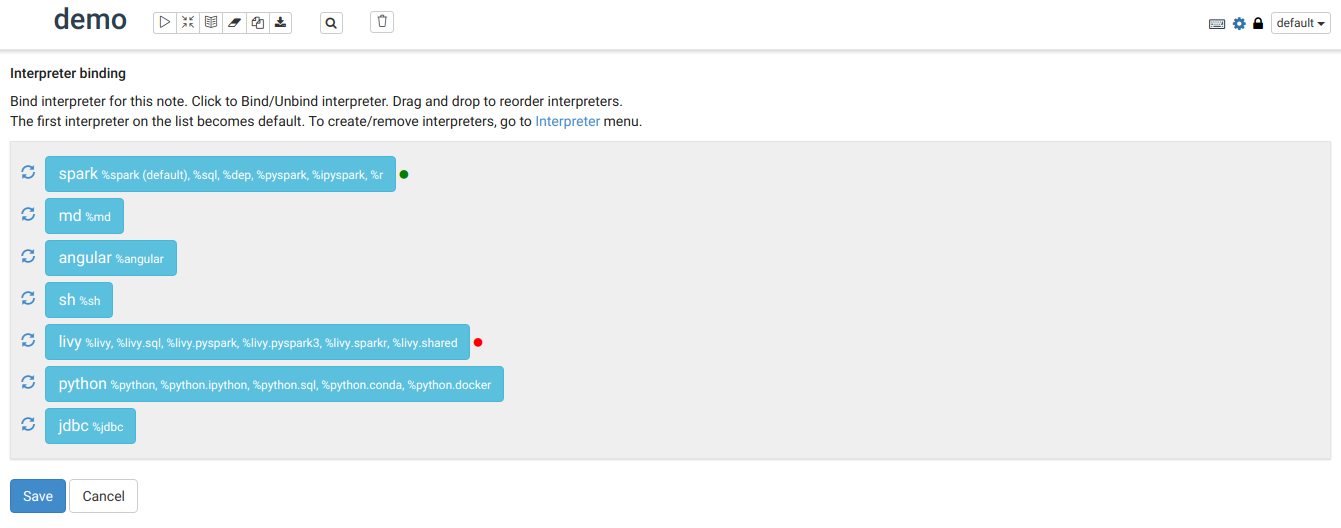
Questions:
- Does the licenses files need update?
- Is there breaking changes for older versions?
- Does this needs documentation?

I think it's a great idea to add something like this to also show status if an interpreter is running. So show a green icon - if interpreter is running/ or had been restarted successfully.
No icon - if it wasn't started.
Red icon 🔴 - if interpreter had issues restarting, or if it was terminated;
What do you think?
ps. Would be also nice to separate if interpreter was terminated on purpose - if it was killed through Lifecycle management (timed out)... this could be a yellow icon.


@Tagar Thanks for the comment.
if an interpreter was terminated on purpose - if it was killed through Lifecycle management (timed out)
- The generic error message is shown with the YELLOW color icon.
Lets say I restarted the interpreter. Between that time and the interpreter actually starting, what icon is shown for the "start in progress state?" A blinking green?
Also is this for the logical interpreter or the interpreter JVM process? E.g. in scoped mode interpreter (like Livy) will this be green if the Livy interpreter JVM is running or if the actual interpreter session for the that scope?

@bikassaha The current implementation is when the user confirms to restart of an interpreter the modal button text changes to "Saving Settings" with the spinner-icon and modal is there until the API response returns the status on that bases we show the color (circle) -> green, red, yellow.
Do we need to close the modal after the user confirmation and then show the blinking green (circle)?
I am guessing that would depend on whether we want to user to continue doing other stuff or make them wait for the interpreter to start/restart.
The interpreter page is kind of a global config place. For scoped mode interpreters or isolated mode or per note interpreters, each user/note could have their own interpreter instance and so the interpreter page may not be the best place to capture that. With %conf interpreter, now the admin could also consider locking down the interpreter page in order to prevent global interpreter restarts etc. With admin/user level settings locking down that page would be more important. So user visible setting may be better off where they are most applicable. On the notebook. What do you think? @felixcheung @sameer79
hmm, but I can think of the opposite case too - that the interpreter is per-note and the user wants to have access to restart it, and not get locked down. sounds like a broader issue with "where interpreter controls should go"

Thats a good point. Though I thought interpreter restart was available from the note itself. Is that not the case? Agree interpreter controls/settings between admin/user needs to be looked at in general.
@bikassaha @felixcheung This is an extension to https://github.com/apache/zeppelin/pull/1155
The green icon does not mean the interpreter is running, it only indicates the interpreter is ready to be run
- green - ready to run
- red - some error like download dependencies failed
- spin animation - it is in process of restarting to make the UI consistent with the interpreter setting page
let me know your thought/improvements if required.
isn't it better to the loading/status light on the interpreter tab like in the screen shot in https://github.com/apache/zeppelin/pull/1155?
It looks like there's many misunderstandings between people about what the status icon really means. Personally I would suggest to abandon this PR for now, as I think end users would also has the confusion about what that icon really means. status icon is nice to have but not must to have, so before we nail down what that status icon represent, we should not deliver such kind of feature. What user really care about is that when the interpreter fails to start, zeppelin frontend should tell the end user what's wrong and what should be done to fix that.
@sameer79 Or we could make it simple for now that the status icon means whether the interpreter restarting operation is successful just as what this PR did now IIUC. One concern is that when the restarting operation is failed, what user would get in frontend besides the red status icon. Because I think red status icon is not sufficient for users, user don't know what to do for this kind of failure. At least, frontend should tell user what's wrong in restarting interpreter.
The description says "on hovering the (circle) you will see success / error message for the respective interpreter." I wonder if that is going to show whats wrong in starting/restarting the interpreter.
hmm, I missed that statement in description. But I think it would be better to pop up a error message to users when it fails to restart. I don't think user would know to hover over that icon to see the error message.
BTW, another thing I'd like to clarify is that the restarting button doesn't means restarting interpreter for now. It is just terminate the interpreter but not start it. Interpreter starting happens when user run paragraph.This is a legacy issue we should fix.
I think the green light can be easily mis-interpreted. If you have any other suggestion on the icon to use perhaps we could revisit.