

 apache
Trafficserver v8.1.1 Debian's increasing RAM consumption over time
Hello,
We use trafficserver as a reverse proxy for one of our caching systems. It is a 128G RAM system with about 56 TB of storage, wherein we have configured a (safe) RAM cache size of 92G. We've also configured an Average Object Size of 128K. According to our calculations, we should see at least 10+ GB of free memory on the system, but the RAM utilization of the system simply doesn't seem to come down, even at low-traffic periods.
We typically hit 3-4 Gbps traffic and the RAM cache is almost always full, with a simple LRU configured. We have observed that the RAM utilization of the system has kept on increasing over time - and it has been OOM killed multiple times, causing traffic disruptions.
What I would like to understand is why the RAM consumption is exceeding the RAM cache size explicitly by such a huge margin.
The system is currently running at less than 2G of free RAM, with no other major processes running on the same.
Here is the output from the free command -
total: 125Gi
used: 122Gi
free: 961Mi
shared: 2.0Mi
buffers: 884Mi
cache: 800Mi
available: 1.5Gi
I can see via systemctl status trafficserver that trafficserver is using 122G RAM
`trafficserver.service - Apache Traffic Server is a fast, scalable and extensible caching proxy server. Loaded: loaded (/lib/systemd/system/trafficserver.service; enabled; vendor preset: enabled) Active: active (running) since Tue 2023-04-11 00:29:36 UTC; 1 weeks 1 days ago Docs: man:traffic_server(8) Main PID: 54560 (traffic_manager) Tasks: 49 (limit: 9830) Memory: 122.0G CPU: 6d 20h 1min 19.626s CGroup: /system.slice/trafficserver.service ├─54560 /usr/bin/traffic_manager ├─54569 /usr/bin/traffic_server -M --httpport 80:fd=8,443:fd=9:ssl:proto=http,443:fd=10:ipv6 └─54571 traffic_crashlog --syslog --wait --host x86_64-pc-linux-gnu --user trafficserver
Apr 11 00:29:36 dhairav systemd[1]: Started Apache Traffic Server is a fast, scalable and extensible caching proxy server.. Apr 11 00:29:36 dhairav traffic_manager[54560]: [E. Mgmt] log ==> [TrafficManager] using root directory '/usr' Apr 11 00:29:36 dhairav traffic_manager[54560]: NOTE: --- Manager Starting --- Apr 11 00:29:36 dhairav traffic_manager[54560]: NOTE: Manager Version: Apache Traffic Server - traffic_manager - 8.1.5 - (build # 081207 on Aug 12 2022 at 07:16:08) Apr 11 00:29:36 dhairav traffic_manager[54560]: NOTE: RLIMIT_NOFILE(7):cur(58981),max(58981) Apr 11 00:29:39 dhairav traffic_server[54569]: NOTE: --- traffic_server Starting --- Apr 11 00:29:39 dhairav traffic_server[54569]: NOTE: traffic_server Version: Apache Traffic Server - traffic_server - 8.1.5 - (build # 081207 on Aug 12 2022 at 07:16:08) Apr 11 00:29:39 dhairav traffic_server[54569]: NOTE: RLIMIT_NOFILE(7):cur(58981),max(58981) Apr 11 00:29:39 dhairav traffic_manager[54569]: Traffic Server 8.1.5 Aug 12 2022 07:16:08 localhost Apr 11 00:29:39 dhairav traffic_manager[54569]: traffic_server: using root directory '/usr' ` Now as a short-term solution, I could create a boot script to prevent an OOM kill by adding an exception for trafficserver processes, but I believe it will not solve the inherent memory leak or any misconfiguration we might have done. I suspect something to do with the cache index overhead, but we've taken that into account in our calculations as well while setting the safer RAM cache 92G value.
I'll be happy to attach my records.config file or anything else at my disposal to solve this.

ATS in 8.1.1 uses a freelist and will on free() or give back memory to the system. You can disable the freelist and use the memory allocator from the system's or compile in support for jemalloc by adding -F to proxy.config.proxy_binary_opts in records.config. https://docs.trafficserver.apache.org/en/8.1.x/admin-guide/files/records.config.en.html?highlight=binary_opts#proxy-config-proxy-binary-opts https://docs.trafficserver.apache.org/en/8.1.x/appendices/command-line/traffic_server.en.html
In 8.1.1 you can dump the memory allocation by sending SIGUSR1 to the process and a report will be generated in traffic.out. This might help to tell you where memory is being allocated.
https://docs.trafficserver.apache.org/en/8.1.x/appendices/command-line/traffic_server.en.html?highlight=sigusr1#signals

First of all, thanks for your time on this, highly appreciated.
I was able to get the output of the Memory allocations of the process using the SIGUSR1 command - and the results were surprising, and just like the ones posted here - https://www.mail-archive.com/[email protected]/msg15718.html. Our in-use memory output from the traffic report shows north of 90GB RAM allocation just to the memory/ioBufAllocator.
`
| Allocated | In-Use | Type Size | Free List Name |
|---|---|---|---|
| 2818572288 | 2518679552 | 2097152 | memory/ioBufAllocator[14] |
| 75094818816 | 72394735616 | 1048576 | memory/ioBufAllocator[13] |
| 17850957824 | 14342422528 | 524288 | memory/ioBufAllocator[12] |
| 2743074816 | 2159017984 | 262144 | memory/ioBufAllocator[11] |
| 6836715520 | 5769527296 | 131072 | memory/ioBufAllocator[10] |
| 1214251008 | 562626560 | 65536 | memory/ioBufAllocator[9] |
| 1529872384 | 675119104 | 32768 | memory/ioBufAllocator[8] |
| 232259584 | 215384064 | 16384 | memory/ioBufAllocator[7] |
| 148111360 | 116465664 | 8192 | memory/ioBufAllocator[6] |
| 25165824 | 18317312 | 4096 | memory/ioBufAllocator[5] |
| 262144 | 0 | 2048 | memory/ioBufAllocator[4] |
| 131072 | 0 | 1024 | memory/ioBufAllocator[3] |
| 65536 | 3584 | 512 | memory/ioBufAllocator[2] |
| 26247168 | 26214400 | 256 | memory/ioBufAllocator[1] |
| 16384 | 2432 | 128 | memory/ioBufAllocator[0] |
| 122880 | 85728 | 96 | memory/eventAllocator |
| 244800 | 151520 | 80 | memory/mutexAllocator |
| 385024 | 233600 | 64 | memory/ioBlockAllocator |
| 16401600 | 15257184 | 48 | memory/ioDataAllocator |
| 620160 | 614400 | 240 | memory/ioAllocator |
| 0 | 0 | 432 | memory/socksAllocator |
| 0 | 0 | 128 | memory/udpReadContAllocator |
| 0 | 0 | 160 | memory/udpPacketAllocator |
| 110592 | 35424 | 864 | memory/netVCAllocator |
| 0 | 0 | 128 | memory/UDPIOEventAllocator |
| 2490368 | 1377280 | 1024 | memory/sslNetVCAllocator |
| 15400960 | 13600128 | 64 | memory/RamCacheLRUEntry |
| 0 | 0 | 96 | memory/RamCacheCLFUSEntry |
| 614400 | 601760 | 160 | memory/openDirEntry |
| 0 | 0 | 48 | memory/evacuationKey |
| 8192 | 0 | 64 | memory/cacheRemoveCont |
| 36864 | 29664 | 96 | memory/evacuationBlock |
| 3681600 | 3571152 | 944 | memory/cacheVConnection |
| 0 | 0 | 16 | memory/DNSRequestDataAllocator |
| 118336 | 29584 | 29584 | memory/dnsBufAllocator |
| 163840 | 0 | 1280 | memory/dnsEntryAllocator |
| 4096 | 384 | 16 | memory/expiryQueueEntry |
| 8192 | 1536 | 64 | memory/refCountCacheHashingValueAllocator |
| 0 | 0 | 96 | memory/hostDBFileContAllocator |
| 1179648 | 4608 | 2304 | memory/hostDBContAllocator |
| 0 | 0 | 128 | memory/OneWayTunnelAllocator |
| 13369344 | 11757568 | 2048 | memory/hdrStrHeap |
| 14155776 | 12154880 | 2048 | memory/hdrHeap |
| 32768 | 1024 | 256 | memory/httpCacheAltAllocator |
| 0 | 0 | 3088 | memory/http2StreamAllocator |
| 0 | 0 | 3440 | memory/http2ClientSessionAllocator |
| 0 | 0 | 128 | memory/RemapPluginsAlloc |
| 122880 | 98880 | 192 | memory/httpServerSessionAllocator |
| 4546560 | 301920 | 8880 | memory/httpSMAllocator |
| 2088960 | 2040000 | 960 | memory/http1ClientSessionAllocator |
| 0 | 0 | 128 | memory/socksProxyAllocator |
| 5676130304 | 5676128064 | 32 | memory/MIMEFieldSDKHandle |
| 36864 | 0 | 288 | memory/INKVConnAllocator |
| 81920 | 9088 | 128 | memory/INKContAllocator |
| 40960 | 4736 | 32 | memory/apiHookAllocator |
| 0 | 0 | 512 | memory/FetchSMAllocator |
| 524288 | 33792 | 1024 | memory/ArenaBlock |
| 114273243904 | 104536640000 | TOTAL |
`
Is our only option running ATS with freelist disabled? If so, would there be any performance implications due to the same? Of-course we will performance test this, but anything specifically to look into would be helpful here. Also, as per the documentation - it has two options for disabling freelist: -F and -f, are they to be used in conjunction with each other? or simply a -F or a -f individually would do? If we are indeed disabling freelist, would you prefer us to then replace it with Jemalloc using the proxy binary options you have mentioned above?
Hi, we tried disabling the freelist on one of our servers so that it starts using the standard system malloc(). But we're still seeing OOM kills from the same -
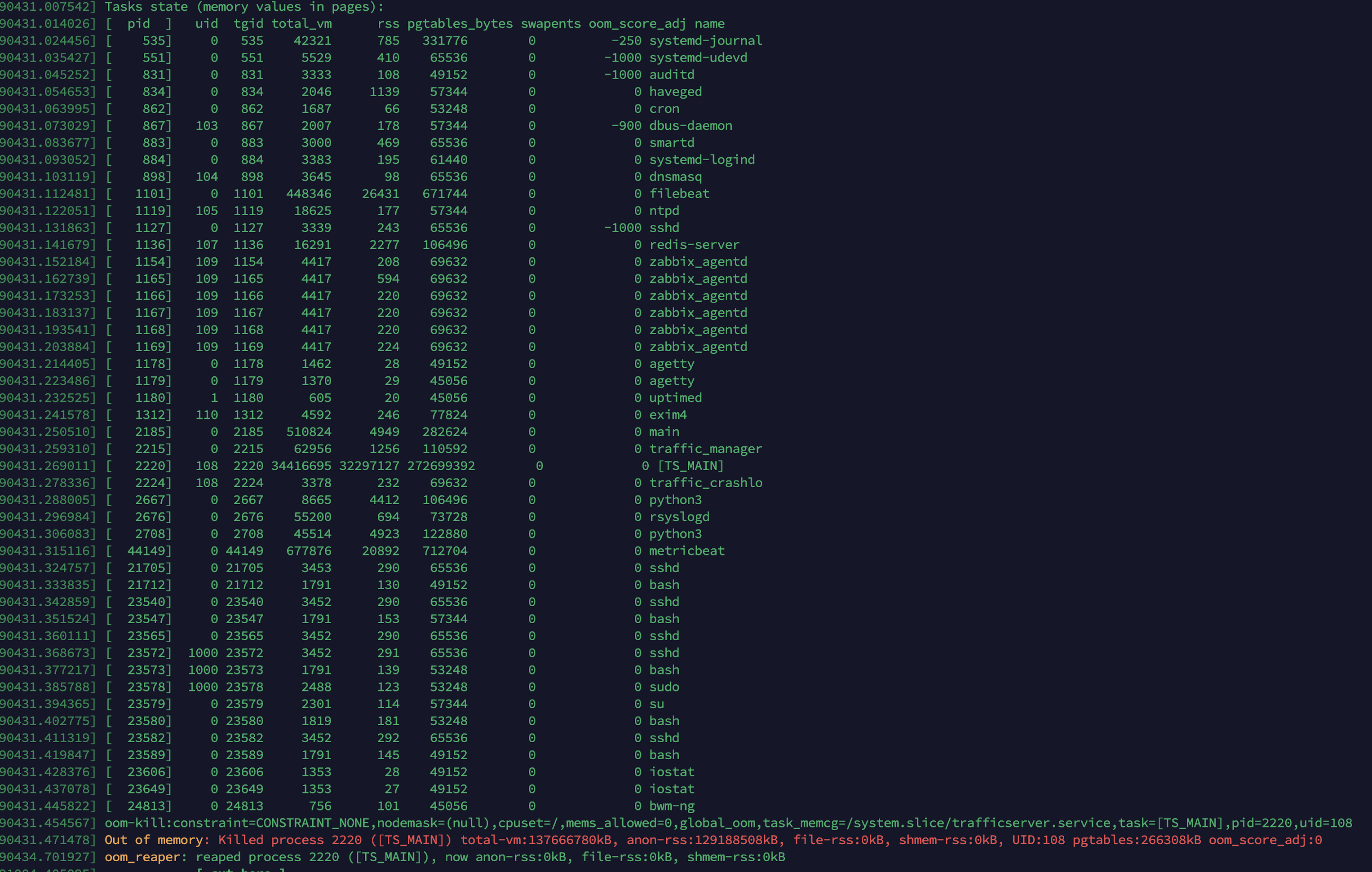
Is there anything else that we can try and configure ATS with to prevent these failures?
Hi @bryancall I have 2 builds of traffic_server binary ready, one is the standard one packaged with Debian 11, but I do not know if it is built with jemalloc support. Is there any document I can refer to for building debs/binaries for Debian?
I also have a custom compiled from source version of the traffic_server binary.
I have libjemalloc2 installed on the server.
For enabling the usage of jemalloc - do I need to disable Freelist as you've mentioned in your post? Should that be enough or do I need to specify to trafficserver anywhere that I want jemalloc to be used instead of the system's default malloc() and free?
One of the posts I've found suggests an LD_PRELOAD of the library when running a program where you want to use jemalloc, So I've gone ahead and modified the systemctl file to include the Environment variable to preload jemalloc like so -
#
#  Licensed to the Apache Software Foundation (ASF) under one
#  or more contributor license agreements.  See the NOTICE file
#  distributed with this work for additional information
#  regarding copyright ownership.  The ASF licenses this file
#  to you under the Apache License, Version 2.0 (the
#  "License"); you may not use this file except in compliance
#  with the License.  You may obtain a copy of the License at
#
#      http://www.apache.org/licenses/LICENSE-2.0
#
#  Unless required by applicable law or agreed to in writing, software
#  distributed under the License is distributed on an "AS IS" BASIS,
#  WITHOUT WARRANTIES OR CONDITIONS OF ANY KIND, either express or implied.
#  See the License for the specific language governing permissions and
#  limitations under the License.
#
[Unit]
Description=Apache Traffic Server is a fast, scalable and extensible caching proxy server.
Documentation=man:traffic_server(8)
After=network-online.target

[Service]
Type=simple
EnvironmentFile=-/etc/default/trafficserver
Environment="LD_PRELOAD=/usr/lib/x86_64-linux-gnu/libjemalloc.so.2"
PIDFile=/run/trafficserver/manager.lock
ExecStart=/usr/bin/traffic_manager $TM_DAEMON_ARGS
ExecReload=/usr/bin/traffic_ctl config reload

[Install]
WantedBy=multi-user.target
Is the above change enough? Or do I need to add something to /etc/default/trafficserver as well to get Jemalloc enabled? Also, will the above preload (systemd unit file) function properly for the prebuilt Debian version or will it only work for my custom --with-jemalloc enabled build?
CONFIG proxy.config.ssl.session_cache.size INT 10240 For everyone who comes here in search of a solution to memory leakage issues on deb11, try changing this value. I reduced it by a factor of 10, and miraculously, it solved the problem.

@cheluskin - I do not think we have the same issue here - I tried reducing the same with your config line and could not see a major difference in RAM Utilisation, but thank you for your suggestion. @bryancall Any answer to the above queries I have?