

 apache
Database Impersonification with PostgreSQL not working anymore
PostgreSQL impersonification is not working anymore
How to reproduce the bug
- Edit database -->Security-->Impersonate logged in user
- Wrong password for [logged_in user]
Expected results
When Impersonate logged in user is enabled the connection should use login and password from logged in user and not from configuration. (it was working couple of minor versions ago)
Actual results
- It uses appropriate login, from logged in user
- It uses wrong password, the one configured in connection.
Environment
(please complete the following information):
- superset version: 1.3.1
- python version: 3.8.10
Checklist
Make sure to follow these steps before submitting your issue - thank you!
- [ ] I have checked the superset logs for python stacktraces and included it here as text if there are any.
- [x] I have reproduced the issue with at least the latest released version of superset.
- [x] I have checked the issue tracker for the same issue and I haven't found one similar.
Additional context
Add any other context about the problem here.

Hi @Karlodun Thanks for reporting, I am not sure i understand it completely, can you provide more details?

As far as I remember, using a PostgreSQL database as a source, Impersonification was working couple of months (>1 year) ago:

Right now the connection uses the password provided in basic configuration:
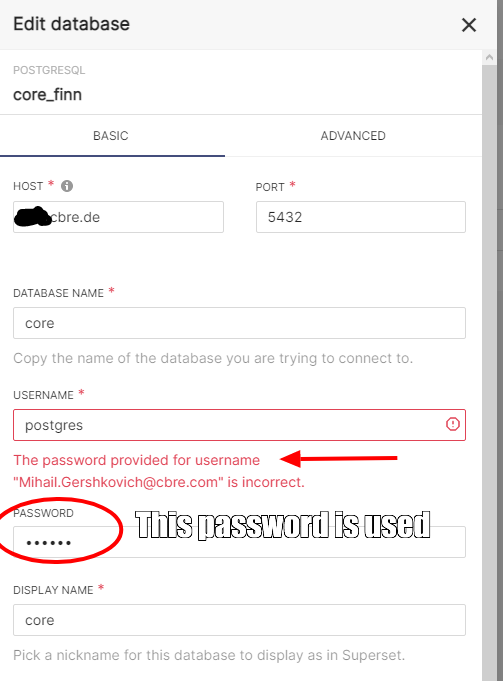
Impersonification is using my Superset login, which is right, but for some reason it is not taking the pwd anymore. Probably I had some changes in the configuration last time (or even code patch?), which I don't remember anymore.
We're going to have >20 Users in couple of months and >200 users over next two years. Their roles will be syncronized from security groups from AD via ldap2pg. We're using row level security, based on roles. It would be great to have impersonification working, so that every dashboard user would only see data which he is allowed to see via database.
https://github.com/apache/superset/blob/master/superset/db_engine_specs/base.py, lines 1050-1061
 @classmethod
    def modify_url_for_impersonation(
        cls, url: URL, impersonate_user: bool, username: Optional[str]
    ) -> None:
        """
        Modify the SQL Alchemy URL object with the user to impersonate if applicable.
        :param url: SQLAlchemy URL object
        :param impersonate_user: Flag indicating if impersonation is enabled
        :param username: Effective username
        """
        if impersonate_user and username is not None:
            url.username = username
I think what is missing here is something like: url.password = password # this line is not sufficient
Either this is missing, or probably it was never there and my bugreport should be replaced by a feature request.
@Karlodun thanks for the details, would you like to open a PR of your proposed solution, @betodealmeida can take a look?
@junlincc my proposal is not sufficient. I'd need to review more code to find out how to fix it. If someone should have some hint's where to start, I'd spend couple of hours (this year).
@Karlodun how did it work previously? Currently I see it takes username of logged in user and password from database connection. Previously it used password of logged in user to connect to db? No idea how it worked since password is hashed.

@mayurnewase is the password hashed on client side or server side? Sad but true: I don't remember anymore how I managed it to get the impersonisation work, but probably there is a way to get it working? For my php tools I do the following: PHP is storing the password in session variable, while the username is stored on client side . Then PHP tool uses the credentials to authenticate against the DBMS. It is not using the credentials which are saved in user tables in DBMS. Or (one of my tools) is using the credentials to connect the PHP session to DBMS, which takes care of authentication.
@Karlodun unfortunately I don't think this used to work the way you described. We only store the hash of the user password, and the impersonation has always worked by only replacing the username. Some databases have custom impersonation, but not Postgres.
One way to get this working would be via the DB_CONNECTION_MUTATOR function in superset_config.py. You could write a function that replaces username and password in the SQL Alchemy URI based on the logged in user, but you would have to read the passwords from somewhere other than Superset.

Hi,
I think this feature working would be a huge benefit in almost every enterprise context. We are just starting into our project, and we are missing it already!
I have been looking at this , and I don't think logging the authorized superset user into postgres using their password is a realistic option (it just makes all kinds of headaches worse). But it would be perfectly possible to have superset use "SET SESSION AUTHORIZATION" or "SET ROLE" when connecting to postgres.
The bad news is that that has to happen at a different point in time (and hence code).
Would people be interested in a pull request on this?

Closing this as stale since it's been silent for so long, and we're trying to steer toward a more actionable Issues backlog. If people are still encountering this in current versions (currently 3.x) please re-open this issue, open a new Issue with updated context, or raise a PR to address the problem. Thanks!


@tooptoop4 Unfortunately I was wrong, and betodealmeida was right. Postgres does not support a model of impersonation that is strong enough to be used here. If you want to (securely) be connected as a different user, you need to establish a separate connection for that user, no other way.