

 apache
页面内多图表实例联动场景下,如何关闭个别属性联动,例如关闭tooltip联动,其他行为联动保持正常
Version
4.9.0
Steps to reproduce
- 初始化10个图表,groupId设置为相同的,并执行echarts.connect(groupId)
- 鼠标浮动到某个图表上,默认显示所有图表的tooltip
What is expected?
多实例联动时,取消tooltip联动,即浮动到某个图表上时,只显示改图表的tooltip,其他图表的关闭掉,同时不影响如缩放联动等其他功能
What is actually happening?
想确认有没有方法关闭tooltip的联动效果

Hi! We've received your issue and please be patient to get responded. 🎉 The average response time is expected to be within one day for weekdays.
In the meanwhile, please make sure that you have posted enough image to demo your request. You may also check out the API and chart option to get the answer.
If you don't get helped for a long time (over a week) or have an urgent question to ask, you may also send an email to [email protected]. Please attach the issue link if it's a technical question.
If you are interested in the project, you may also subscribe our mailing list.
Have a nice day! 🍵
![echarts-bot[bot] avatar](https://avatars.githubusercontent.com/in/20872?v=4 "Published by a pub.dev verified publisher")
https://github.com/apache/incubator-echarts/blob/master/test/connect-manually.html 可以参考这个例子,手动触发 connect

https://github.com/apache/incubator-echarts/blob/master/test/connect-manually.html 可以参考这个例子,手动触发 connect
但是这个不是很方便,我还是赞同楼主的说法,联动的时候有没有办法设置哪些事件支持联动

https://github.com/apache/incubator-echarts/blob/master/test/connect-manually.html 可以参考这个例子,手动触发 connect
或者能否支持这样传入escapeConnect来避免被联动?
chartInstance.dispatchAction({ type: 'legendSelect', name: 'test', escapeConnect: true });
讲一下我最后的解决办法,仅供参考,非必要不建议改源码
图表联动,本质是某一图表触发action时,遍历当前group内的图表,dispatch对应的action,
解决的思路为,在遍历group,触发action前,判断eventType是否需要联动,不需要则不触发action
解决方法:
- 图表配置
options内增加要排除的联动属性disabledConnectEventTypes,string [] - 在这个方法内,判断如果是不需要联动的属性,不触发action
    each(eventActionMap, function (actionType, eventType) {
      chart._messageCenter.on(eventType, function (event) {
        var options = chart._model.option;
        // 过滤不需要联动的actionType
        var disabledConnectEventTypes = _.get(chart, '_model.option.customConf.disabledConnectEventTypes', []);
        if (disabledConnectEventTypes.includes(eventType)) return
        // 原有逻辑 ....
      });
    });
讲一下我最后的解决办法,仅供参考,非必要不建议改源码
图表联动,本质是某一图表触发action时,遍历当前group内的图表,dispatch对应的action,
解决的思路为,在遍历group,触发action前,判断
eventType是否需要联动,不需要则不触发action解决方法:
- 图表配置
options内增加要排除的联动属性disabledConnectEventTypes,string []- 在这个方法内,判断如果是不需要联动的属性,不触发action
    each(eventActionMap, function (actionType, eventType) {
      chart._messageCenter.on(eventType, function (event) {
        var options = chart._model.option;
        // 过滤不需要联动的actionType
        var disabledConnectEventTypes = _.get(chart, '_model.option.customConf.disabledConnectEventTypes', []);
        if (disabledConnectEventTypes.includes(eventType)) return
        // 原有逻辑 ....
      });
    });
你这个是修改源码了么
讲一下我最后的解决办法,仅供参考,非必要不建议改源码 图表联动,本质是某一图表触发action时,遍历当前group内的图表,dispatch对应的action, 解决的思路为,在遍历group,触发action前,判断
eventType是否需要联动,不需要则不触发action 解决方法:
- 图表配置
options内增加要排除的联动属性disabledConnectEventTypes,string []- 在这个方法内,判断如果是不需要联动的属性,不触发action
    each(eventActionMap, function (actionType, eventType) {
      chart._messageCenter.on(eventType, function (event) {
        var options = chart._model.option;
        // 过滤不需要联动的actionType
        var disabledConnectEventTypes = _.get(chart, '_model.option.customConf.disabledConnectEventTypes', []);
        if (disabledConnectEventTypes.includes(eventType)) return
        // 原有逻辑 ....
      });
    });
你这个是修改源码了么
是的,不建议改源码,我们是项目里有多处需要改的,就一并改了
讲一下我最后的解决办法,仅供参考,非必要不建议改源码 图表联动,本质是某一图表触发action时,遍历当前group内的图表,dispatch对应的action, 解决的思路为,在遍历group,触发action前,判断
eventType是否需要联动,不需要则不触发action 解决方法:
- 图表配置
options内增加要排除的联动属性disabledConnectEventTypes,string []- 在这个方法内,判断如果是不需要联动的属性,不触发action
    each(eventActionMap, function (actionType, eventType) {
      chart._messageCenter.on(eventType, function (event) {
        var options = chart._model.option;
        // 过滤不需要联动的actionType
        var disabledConnectEventTypes = _.get(chart, '_model.option.customConf.disabledConnectEventTypes', []);
        if (disabledConnectEventTypes.includes(eventType)) return
        // 原有逻辑 ....
      });
    });
你这个是修改源码了么
是的,不建议改源码,我们是项目里有多处需要改的,就一并改了
我看了下echarts源码找到了一种新的解决办法,就是使用batch方式,这样可以使用到escapeConnect属性
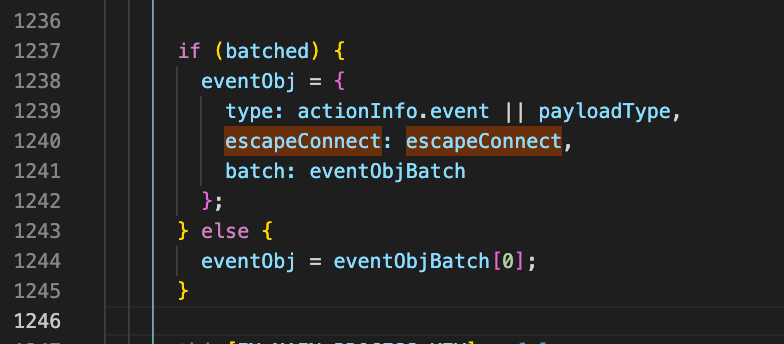
chartInstance.dispatchAction({
  type: 'legendUnSelect',
  escapeConnect: true,
  batch: [
    {
      name: key,
      selected: legendsSelected,
    },
  ],
});
可以试试这个
// 手动处理图表联动
this[this.state.chartsList[0]].echarts.util.each(chartInstances, (fromChart) => {
  this[this.state.chartsList[0]].echarts.util.each(chartInstances, (toChart) => {
    if (fromChart === toChart) {
      return;
    }
    // tooltip 联动
    fromChart.on('updateAxisPointer', (params) => {
      toChart.dispatchAction(
          toChart.makeActionFromEvent(params),
          true
      );
    });
    // toolbox 缩放按钮操作联动
    fromChart.on('globalcursortaken', (params) => {
      toChart.dispatchAction(
          toChart.makeActionFromEvent(params),
          true
      );
    });
    // 图表缩放联动
    fromChart.on('dataZoom', (params) => {
      const dictData = { type: 'dataZoom' };
      if (params.batch[0].startValue !== undefined) {
        dictData.startValue = params.batch[0].startValue;
        dictData.endValue = params.batch[0].endValue;
      } else {
        dictData.start = params.batch[0].start;
        dictData.end = params.batch[0].end;
      }
      toChart.dispatchAction(dictData, true);
    });
    // toolbox 重置按钮操作联动
    fromChart.on('restore', (params) => {
      toChart.dispatchAction(
          toChart.makeActionFromEvent(params),
          true
      );
    });
  });
});

https://github.com/apache/incubator-echarts/blob/master/test/connect-manually.html 可以参考这个例子,手动触发 connect
这个有效。不过还是希望未来增加相关的配置项,让用户可通过属性来配置来轻松规避这个问题。

I've run into this issue as well - it would be very helpful to be able to specify which features to include in connect (or which to exclude).
In my example, I'd like a shared legend across multiple charts, which includes hovering over a legend item and having it highlight in each chart. But I'd like to exclude tooltips from the connection.
I will give it a shot with the manual approach
