

 antimatter15
Stops after sampling parameters: temp = 0.100000, top_k = 40, top_p = 0.950000, repeat_last_n = 64, repeat_penalty = 1.300000
I tried compiling and running the pre made one. I have i7 windows 11 pro with 16 gb ram. It stops and goes back to command prompt after this:
main: seed = 1679872006 llama_model_load: loading model from 'ggml-alpaca-7b-q4.bin' - please wait ... llama_model_load: ggml ctx size = 6065.34 MB llama_model_load: memory_size = 2048.00 MB, n_mem = 65536 llama_model_load: loading model part 1/1 from 'ggml-alpaca-7b-q4.bin' llama_model_load: .................................... done llama_model_load: model size = 4017.27 MB / num tensors = 291
system_info: n_threads = 4 / 8 | AVX = 1 | AVX2 = 1 | AVX512 = 0 | FMA = 0 | NEON = 0 | ARM_FMA = 0 | F16C = 0 | FP16_VA = 0 | WASM_SIMD = 0 | BLAS = 0 | SSE3 = 0 | VSX = 0 | main: interactive mode on. sampling parameters: temp = 0.100000, top_k = 40, top_p = 0.950000, repeat_last_n = 64, repeat_penalty = 1.300000


Same issue. Based on some quick troubleshooting, issue is silent failure somewhere in the llama_eval function. This is also on the Windows build, also observed after building from source, also observed using the ggml-alpaca-13b-q4.bin weights.

Update: Traced it down to a silent failure in the function "ggml_graph_compute" in ggml.c. Wonder if it might be a multi-threading issue? However, still failed when number of threads set to one (used "-t 1" flag when running chat.exe).
Observed with both ggml-alpaca-13b-q4.bin and ggml-alpaca-7b-q4.bin weights on Win 10 machine.
Final update: Was able to at least reach the prompt by updating the CMAKELists.txt file so that the third line under "if (MSVC)" was "set(CMAKE_C_FLAGS "${CMAKE_C_FLAGS} -march=native")" (per GG's recommendation here: https://github.com/ggerganov/ggml/issues/29)
That did not fully resolve the issue, though - processing was unusably slow, and it failed silently was processing the first prompt.
The same problem - stopping (i7-3770k 16 gb ddr3 win10) I was able to fix and get the chat working - read this thread, applied the edit (see attach file). removed the use of all microcommands for the processor, recompiled the chat with this settings file cmake . cmake --build . --config Release and the chat started working, slowly, but it works. to all involved - thanks for the tip on the right direction of the path in solving the problem. I don’t know that I acted professionally or illiterately, but by selecting parameters, a working solution was found Good time for all =)
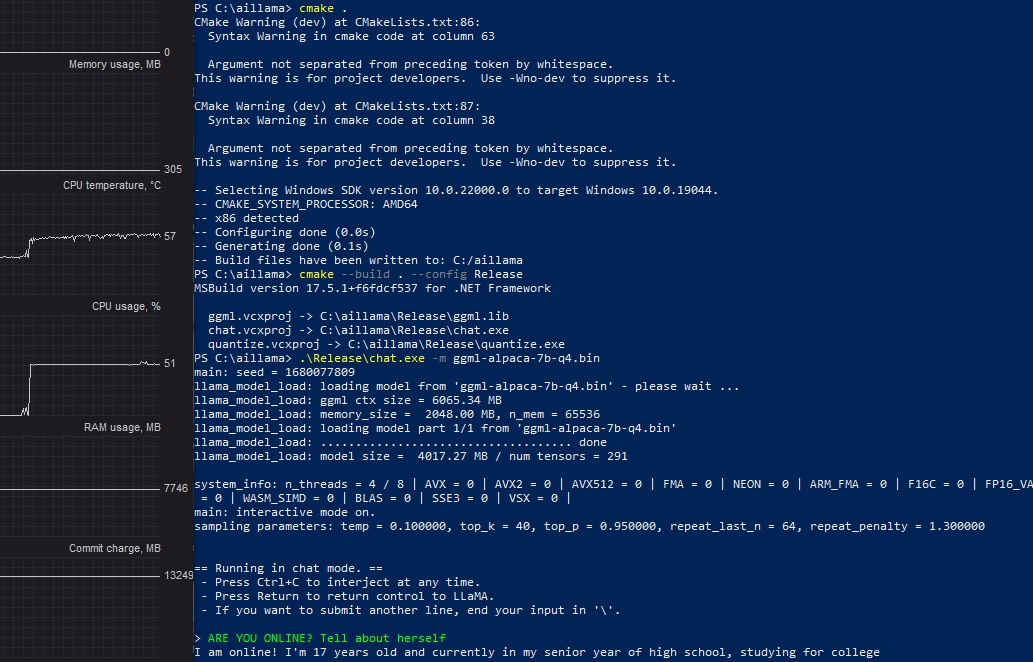
here is attach file and what i changed in default settings : CMakeLists.txt
option(LLAMA_ALL_WARNINGS_3RD_PARTY "llama: enable all compiler warnings in 3rd party libs" ON)
option(LLAMA_SANITIZE_THREAD "llama: enable thread sanitizer" ON) option(LLAMA_SANITIZE_ADDRESS "llama: enable address sanitizer" ON) option(LLAMA_SANITIZE_UNDEFINED "llama: enable undefined sanitizer" ON)
if (LLAMA_SANITIZE_UNDEFINED) set(CMAKE_C_FLAGS "${CMAKE_C_FLAGS} -march=native") set(CMAKE_CXX_FLAGS "${CMAKE_CXX_FLAGS} -march=native")
message(STATUS "x86 detected") if (MSVC) set(CMAKE_CXX_FLAGS "${CMAKE_CXX_FLAGS} -march=native") set(CMAKE_CXX_FLAGS_RELEASE "${CMAKE_CXX_FLAGS_RELEASE} -march=native") set(CMAKE_C_FLAGS "${CMAKE_C_FLAGS} -march=native") else() if(NOT LLAMA_NO_AVX) set(CMAKE_C_FLAGS "${CMAKE_C_FLAGS} -march=native") endif() if(NOT LLAMA_NO_AVX2) set(CMAKE_C_FLAGS "${CMAKE_C_FLAGS} -march=native") endif() if(NOT LLAMA_NO_FMA) set(CMAKE_C_FLAGS "${CMAKE_C_FLAGS} -march=native") endif() set(CMAKE_C_FLAGS "${CMAKE_C_FLAGS} -march=native")
