

 ankeetmaini
Support HTML tables
Many times developers want to present big data, and the most comfortable/accessible way would be using table tags. The problem with this solution that it impose using


A workaround that did the magic for me:
From docs: "The InfiniteScroll component can be used in three ways. Specify a value for the height prop if you want your scrollable content to have a specific height, providing scrollbars for scrolling your content and fetching more data. ..."
Adding the height prop <InfiniteScroll> and then placing the whole table body (not just rows) as children...
<InfiniteScroll
 dataLength={length}
 next={fetchMoreData}
 hasMore={true}
 scrollThreshold={0.8}
 height={240} // **<- seems important !!!**
 loader={<h4>Loading...</h4>}
 ...
>
  <TableBody is={"tbody"} overflow={"scroll"} display={"block"} >
   {data.map(rowData) => (
   ...
   ))}
  </TableBody>
</InfiniteScroll>
@fomson that workaround seems to result in broken html for the table...
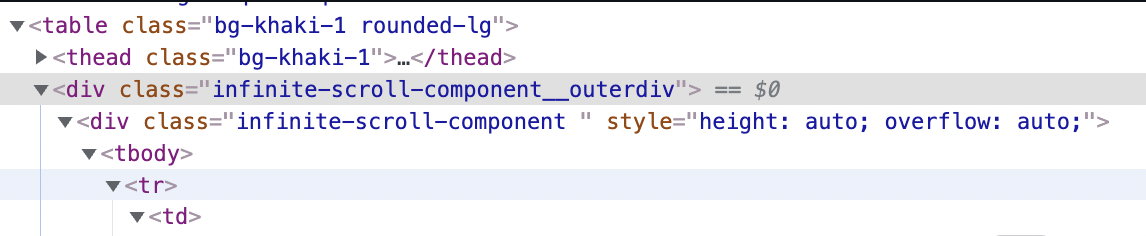
I think there needs to be some work done to react-infinite-scroll-component to support tables
@fomson seems like putting the entire <table> inside is the cash money though!
https://codesandbox.io/s/react-table-infinite-scroll-h7v5q?file=/src/App.js
@idowald this may mean we can close this issue?
we have some design issues, for example, we may want to render header outside of the component, just to make it sticky
