

 angular
bug(form-field): Labels not vertically aligned correctly when using custom densities
Is this a regression?
- [ ] Yes, this behavior used to work in the previous version
The previous version in which this bug was not present was
No response
Description
I'd like to define multiple densities for form-fields in the same style sheet as described in the theming documentation. However, the default density (0 in my case) is causing the other densities to not vertically align the labels correctly.
It seems that there is styling being applied when using the default theme that is not being overridden correctly in the density mixin.
As a workaround I found that I was able to get the expected layout if I used color($theme), typography($theme), and wrapped density(0); in a CSS selector that excluded the other densities instead of the theme mixin.
Workaround:
// @include mat.all-component-themes($theme);

@include mat.form-field-color($theme);
@include mat.form-field-typography($theme);

.mat-mdc-form-field:not(.density-1):not(.density-2):not(.density-3):not(.density-4) {
  @include mat.form-field-density(0);
}

.density-1 {
  @include mat.form-field-density(-1);
}

.density-2 {
  @include mat.form-field-density(-2);
}

.density-3 {
  @include mat.form-field-density(-3);
}

.density-4 {
  @include mat.form-field-density(-4);
}
To get the labels to appear on fill, I had to set this variable (this is a documented, expected limitation):
@use '@material/textfield' as mdc-textfield;
mdc-textfield.$minimum-height-for-filled-label: 40px;
Reproduction
See https://stackblitz.com/edit/angular-n5jrgg-ezusf8?file=src/theme.scss
Steps to reproduce:
- Start with stackblitz for form-field from docs.
- Define classes for form-field densities below
@include mat.all-component-themes($theme);
.density-1 {
  @include mat.form-field-density(-1);
}

.density-2 {
  @include mat.form-field-density(-2);
}

.density-3 {
  @include mat.form-field-density(-3);
}

.density-4 {
  @include mat.form-field-density(-4);
}
- Update component to show all densities and appearances
Expected Behavior
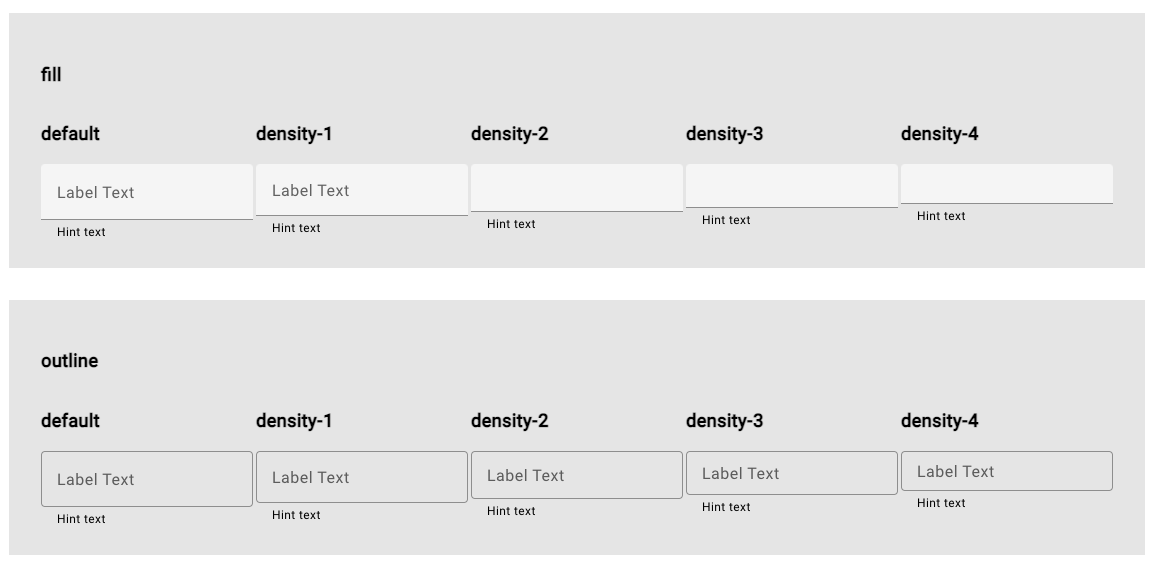
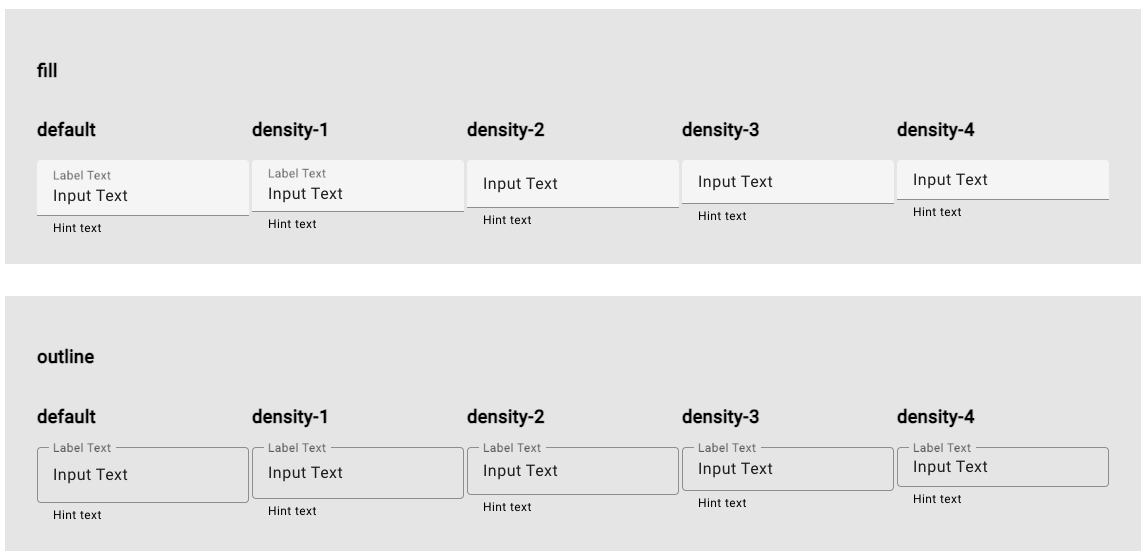
All labels should aligned in the center of the inputs without values. Floating labels should be aligned correctly above the input values
Using workaround described above:
Inputs with labels and no values:
After adding values to each input:
Actual Behavior
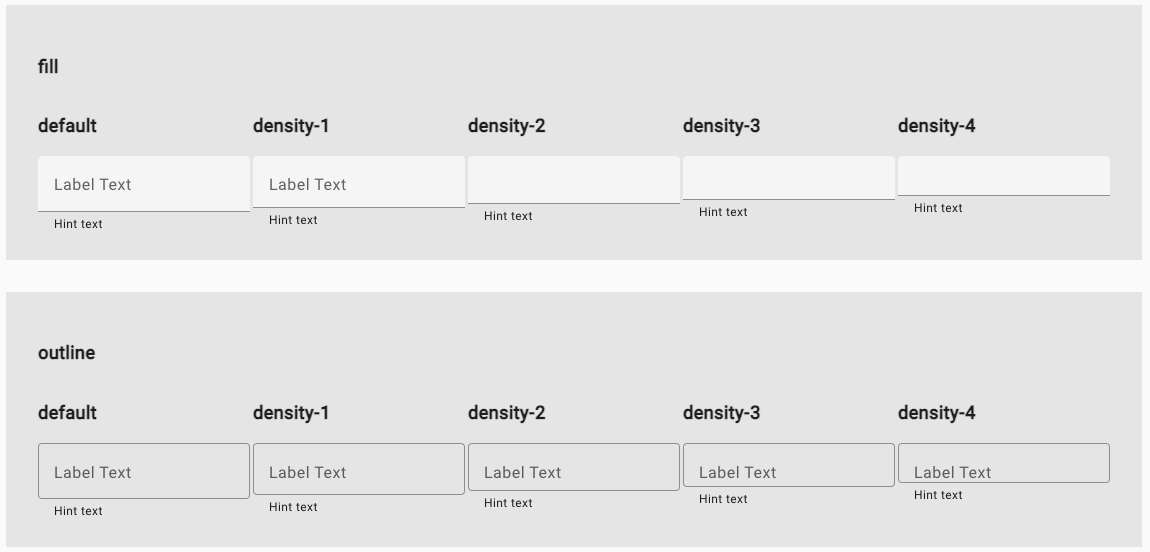
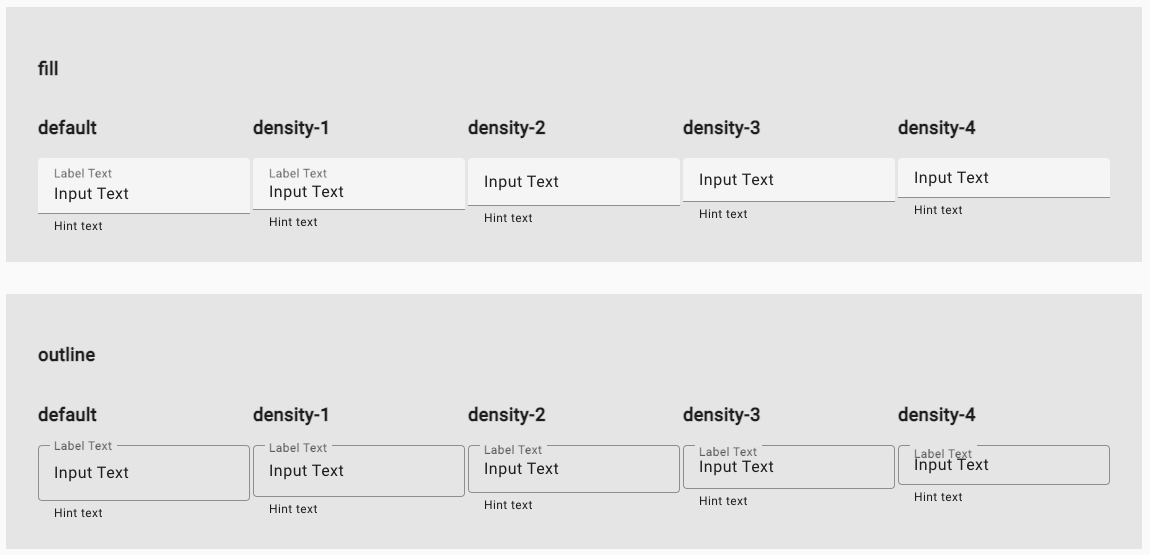
Labels are not vertically aligned to the middle and floating labels are not placed correctly at the top of the inputs
Inputs with labels and no values:
After adding values to each input:
Environment
- Angular: 15.0.0
- CDK/Material: 15.0.0
- Browser(s): Chrome
- Operating System (e.g. Windows, macOS, Ubuntu): macOS

The problem is that you're setting the density class on the form field directly. I've sent out #26075 to fix it, but until then you can work around it by moving the density class to a parent element.

This issue has been automatically locked due to inactivity. Please file a new issue if you are encountering a similar or related problem.
Read more about our automatic conversation locking policy.
This action has been performed automatically by a bot.
![angular-automatic-lock-bot[bot] avatar](https://avatars.githubusercontent.com/in/40213?v=4 "Published by a pub.dev verified publisher")