

 andyvorld
G Pro Superlight showing NAN?
Hi I'm tired of the ghub software, so when I did a reformat I searched for battery app that would be simple and just have battery status and nothing else.
https://i.imgur.com/DAiL7Ar.png
My device is found but battery status is not shown.
I have not installed any Logitech software after reformat, is that a requirement for this software to work?
Also it shows up as "Pro X Wireless" and not Pro X Superlight, its 2 different models/revisions, not sure if that has any importance to it.

The name shown is the device name that the mouse's onboard chip reports. This issue has been documented before here https://github.com/andyvorld/LGSTrayBattery/issues/18#issuecomment-852021508
I just currently don't have the hardware to develop the new protocol. Best I can do is to go at it blind, but no promises as I started this project as a way to play around with c#.

Forgot to update this issue, but I may have implemented the required protocol in version 2.1.0, but v2.1.1 was just released, so try that out first.
Hi I tested and the battery is sadly still not shown, if I install the logitech software the battery is shown, but I want to avoid installing their drivers and software :)
Thanks for the support so far.
Forgot to update this issue, but I may have implemented the required protocol in version 2.1.0, but v2.1.1 was just released, so try that out first.
forgot to add picture
First one dongle and wireless https://i.imgur.com/lAcf71O.png
Second is with cable direct into mouse https://i.imgur.com/nuvcdfY.png
Could you please double check which version you are running? As the url seems a bit wierd.
Could you also send a screenshot of http://localhost:12321/devices with the mouse wireless and wired.
Is your system language set to show decimals with . or ,? E.g. 1 is 1.0 or 1,0.
Is your system language set to show decimals with
.or,? E.g. 1 is1.0or1,0.
How do I check this? Never encountered any issues with other softwares of this mention, I have not setup any special language or chars, Danish follows the default standards besides the Nordic letters we have ÆØÅ
--
Wireless https://i.imgur.com/OpnynAy.png
Cable https://i.imgur.com/73XoSvX.png
This is with G Pro Superlight version.
My OS Windows 10 Pro Danish,English
https://i.imgur.com/WoyIIeN.png
Yeah, I am not really sure what is going on. As I don't have a new logitech device on hand to do testing with.
I made a dev build that disables detecting system cultures.
Could you please take a screen shot of http://localhost:12321/devices as well as the device page for both wire and wireless. Restarting the program between plugging/unplugging the mouse, as it current cannot detect hot plugging.
Release_v2_1_1-dev.zip Note this is the standalone variant, which requires dotNet 6 installed, https://dotnet.microsoft.com/en-us/download/dotnet/thank-you/runtime-6.0.9-windows-x64-installer.
Yeah, I am not really sure what is going on. As I don't have a new logitech device on hand to do testing with.
I made a dev build that disables detecting system cultures. Could you please take a screen shot of
http://localhost:12321/devicesas well as the device page for both wire and wireless. Restarting the program between plugging/unplugging the mouse, as it current cannot detect hot plugging.Release_v2_1_1-dev.zip Note this is the standalone variant, which requires dotNet 6 installed, https://dotnet.microsoft.com/en-us/download/dotnet/thank-you/runtime-6.0.9-windows-x64-installer.
Sure, done.
Wirless https://i.imgur.com/SjPKwHK.png
https://i.imgur.com/gagZ46c.png
Wired ( not finding anything now even after restarting program ) https://i.imgur.com/nWTXawv.png
The results are really weird, as it seems its showing a malformed xml file in firefox?.
But you can see that the mouse is at 76% battery.
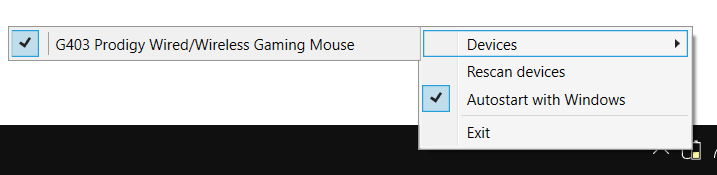
When you right click the tray icon and hover over the devices list do you see anything?
As the browser image suggests that it is pulling the data as expected at least in the wireless mode.
Hey made a video, first is wireless second time is wired.
I noticed after pressing device under devices being on wireless it showed the percentage so obvious there's an issue from starting the program and not scanning/selecting the unit in beginning?
https://streamable.com/qh7ewn
Thanks for the video, I guess I need to update the instructions. As it seems for wireless its working as indented. When you launch the program for the first time it will default to nothing selected, and you need to select the device before it remembers to reselect on subsequent launches.
I am not really sure what is wrong with it in wired mode, as some mice may potentially not show their battery levels when wired, and they stop communicating over the wireless connection when connected.
Thanks for the video, I guess I need to update the instructions. As it seems for wireless its working as indented. When you launch the program for the first time it will default to nothing selected, and you need to select the device before it remembers to reselect on subsequent launches.
I am not really sure what is wrong with it in wired mode, as some mice may potentially not show their battery levels when wired, and they stop communicating over the wireless connection when connected.
Hey relaunching the program after selecting, it does not remember the selection on my system...
Battery level and charge state is showed in logitech software when in wired as we already know, but you may be right, you might need to listen on something else when its wired?
I also just checked old version Release_v2_0_7-standalone.zip
The mouse is shown when wired but showing the NaN, after that release it does no longer show when wired.
I have a g pro superlight and use this app and it works for wireless mode for me (battery percentage is shown). it detects it as "Pro X Wireless" as OP mentioned.
it only stops working when wired, which is no big deal imo, as I mostly use it wireless (as intended). the only inconvenience is to detach the cable and restart the app to see the updated percentage correctly (I decided to stop trying to refresh it inside the app)
