

 android
Aspect ratio not considering custom sized views / AutoFitSurfaceView is stretched
Hi!
I'm developing an abstraction over the Camera2 API and found this sample to be very useful, so thanks!
I'm currently stuck with one issue though, and I can't seem to resolve that (since 2 days now), I keep finding old Camera (v1) related S/O threads and no answers in this repo's Issues/PRs.
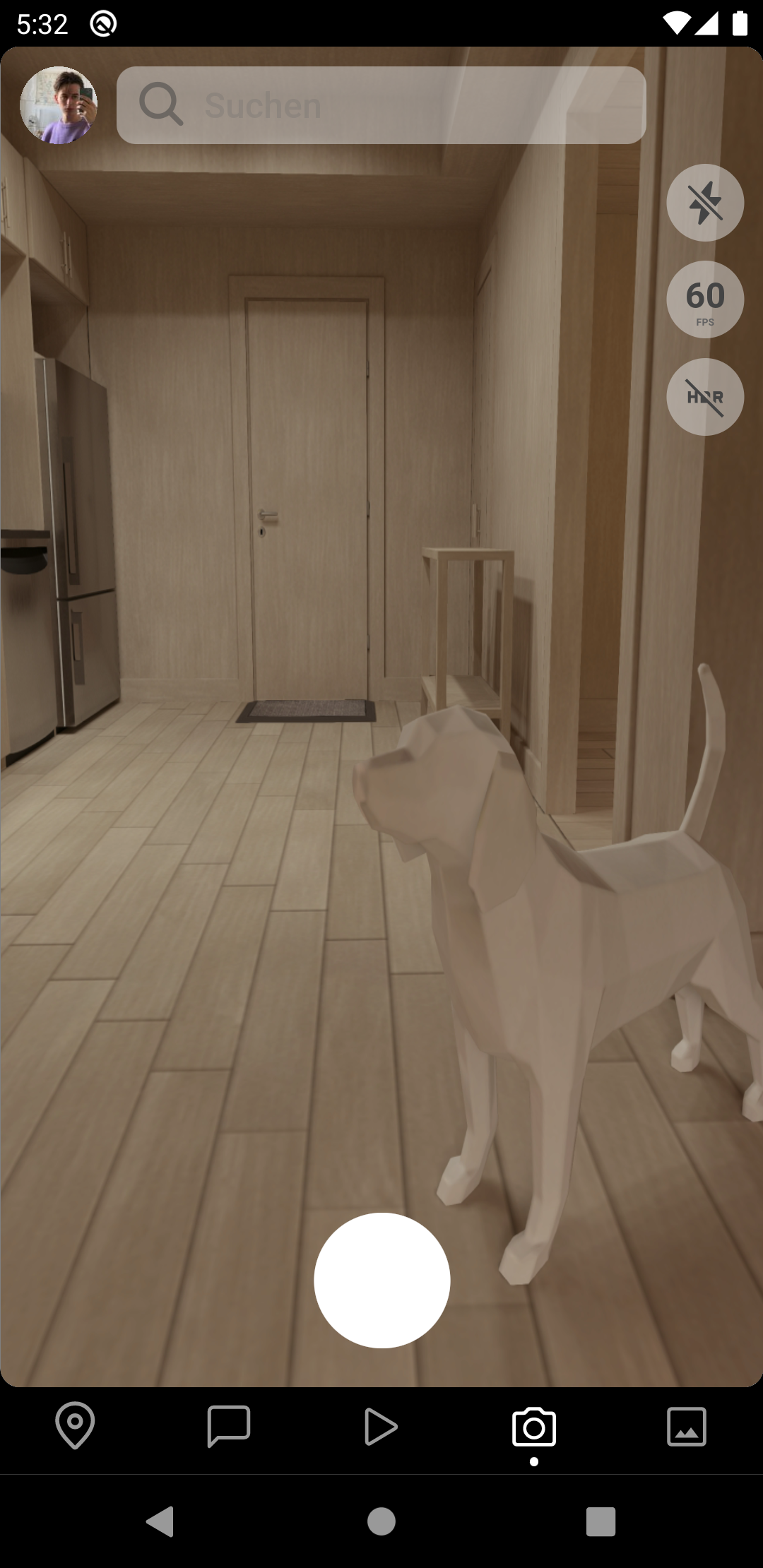
My Preview (SurfaceView/TextureView) is stretched. Here's how it looks:
| Preview (using the `AutoFitSurfaceView`) | Actual Photo with resizeMode/scaleType "cover" |
|---|---|
|

|
as you can see, the first image is really weirdly stretched while the photo being shot is actually in correct dimensions.
I'm pretty sure that the cause of the problem is the AutoFitSurfaceView which only uses the display size for aspect ratio calculation, but that obviously doesn't work if the SurfaceView is not the same size as the phone display, as seen in my screenshot. (Bottom Bar & Status Bar takes away some space)
I thought maybe someone here would be so kind to help me out here. 😄
Thanks!
EDIT
Some extra context: I create the AutoFitSurfaceView in my custom view's init, but I also tried the onAttachedToWindow and got the same result. I don't have a Fragment or Activity in this context, since I'm writing a react native library.
Anyways, here's how I initialize the AutoFitSurfaceView:
class CameraView(context: Context) : FrameLayout(context) {

    // ...

    init {
        // ...

        surfaceView = AutoFitSurfaceView(context)
        surfaceView.layoutParams = LayoutParams(
                LayoutParams.MATCH_PARENT,
                LayoutParams.MATCH_PARENT)
        surfaceView.holder.addCallback(object: SurfaceHolder.Callback {
            override fun surfaceDestroyed(holder: SurfaceHolder) = Unit
            override fun surfaceChanged(holder: SurfaceHolder, format: Int, width: Int, height: Int) = Unit
            override fun surfaceCreated(holder: SurfaceHolder) {
                // Selects appropriate preview size and configures view finder
                val previewSize = getPreviewOutputSize(surfaceView.display, characteristics, SurfaceHolder::class.java)
                Log.d(REACT_CLASS, "View finder size: ${surfaceView.width} x ${surfaceView.height}")
                Log.d(REACT_CLASS, "Selected preview size: $previewSize")
                surfaceView.setAspectRatio(previewSize.width, previewSize.height)

                // To ensure that size is set, initialize camera in the view's thread with the found previewSize
                surfaceView.post { configureSession(previewSize) }
            }
        })
        addView(surfaceView)

        // ...
Also, I found this answer on a similar Stackoverflow question which creates a custom subclass of the SurfaceView which should automatically resize with the Camera - but this doesn't use the Camera2 API, I think that's the old Camera 1 API which won't work for me.


Hi @buntupana!
Since I'm working with a different renderer (React Native) I don't have an XML Layout. This should not make a difference tho, as I just create everything programmatically.
Here's my CameraView which I then simply render at whatever size:
class CameraView(context: Context) : RelativeLayout(context), LifecycleEventListener {
    internal var cameraThread: HandlerThread? = null
    internal var cameraHandler: Handler? = null
    internal var cameraDevice: CameraDevice? = null
    internal val cameraExecutor: Executor by lazy {
        Executors.newSingleThreadExecutor()
    }

    internal var imageReader: ImageReader? = null
    internal var imageThread: HandlerThread? = null
    internal var imageHandler: Handler? = null

    internal var captureSession: CameraCaptureSession? = null
    internal var characteristics: CameraCharacteristics? = null

    internal val surfaceView: AutoFitSurfaceView

    internal val cameraManager: CameraManager by lazy {
        context.applicationContext.getSystemService(Context.CAMERA_SERVICE) as CameraManager
    }
    private var previewCaptureRequest: CaptureRequest.Builder? = null

    private val lifecycleExecutor = Executors.newSingleThreadExecutor().asCoroutineDispatcher()
    private val cameraMutex = Mutex()
    private var isHostActive = false
    private val isCameraLifecycleActive: Boolean
        get() = isActive && isHostActive && isAttachedToWindow

    init {
        surfaceView = AutoFitSurfaceView(context).apply {
            layoutParams = LayoutParams(LayoutParams.MATCH_PARENT, LayoutParams.MATCH_PARENT)
        }
        viewFinder.holder.addCallback(object : SurfaceHolder.Callback {
            override fun surfaceDestroyed(holder: SurfaceHolder) = Unit

            override fun surfaceChanged(
                    holder: SurfaceHolder,
                    format: Int,
                    width: Int,
                    height: Int) = Unit

            override fun surfaceCreated(holder: SurfaceHolder) {
                val previewSize = getPreviewOutputSize(surfaceView.display, characteristics!!, SurfaceHolder::class.java)
                surfaceView.setAspectRatio(previewSize.width, previewSize.height)

                surfaceView.post {
                    configureSession()
                    configurePreview()
                }
            }
        })
        addView(surfaceView)
    }

    override fun onAttachedToWindow() {
        super.onAttachedToWindow()
        Log.i(REACT_CLASS, "onAttachedToWindow() called")
        GlobalScope.launch {
            configureSession()
        }
    }

    /**
     * Configures the camera capture session. This should only be called when the camera device changes.
     */
    private suspend fun configureSession() {
        Log.d(REACT_CLASS, "Configuring session...")
        if (ContextCompat.checkSelfPermission(context, Manifest.permission.CAMERA) != PackageManager.PERMISSION_GRANTED) {
            return invokeOnError("Camera permission denied!")
        }
        if (ContextCompat.checkSelfPermission(context, Manifest.permission.RECORD_AUDIO) != PackageManager.PERMISSION_GRANTED) {
            return invokeOnError("Microphone permission denied!")
        }
        if (cameraId == null) {
            return invokeOnError("No device set.")
        }

        // Pick correct CameraID
        characteristics = cameraManager.getCameraCharacteristics(cameraId!!)
        this.zoom = characteristics!!.neutralZoomPercent.toDouble()
        val configuration = characteristics!!.get(CameraCharacteristics.SCALER_STREAM_CONFIGURATION_MAP)!!

        // Open the CameraDevice (automatically closes any other open devices)
        cameraDevice = openCamera(cameraManager, cameraId!!, cameraHandler!!)

        // Select JPEG or DEPTH_JPEG if depth delivery is enabled
        var pixelFormat = ImageFormat.JPEG
        if (enableDepthData) {
            if (Build.VERSION.SDK_INT >= Build.VERSION_CODES.Q)
                pixelFormat = ImageFormat.DEPTH_JPEG // TODO: Use DEPTH16 or something that's available below Android Q?
            else
                invokeOnError("Depth data is only available on Android Q (API 29) and above! Defaulting to JPEG.")
        }

        // Initialize an image reader which will be used to capture still photos
        val imageOutputSizes = configuration.getOutputSizes(pixelFormat)
        val imageOutputSize: Size
        if (format != null) {
            // User has passed a custom format={...}, so select that output size.
            imageOutputSize = Size(format!!.getInt("photoWidth"), format!!.getInt("photoHeight"))
            if (!imageOutputSizes.contains(imageOutputSize))
                return invokeOnError("The selected format could not be found in the Scaler Stream Configuration Map! " +
                        "(Photo size $imageOutputSize is not supported for the pixel format ${parseFormat(pixelFormat)})")
        } else {
            // User didn't select any custom format={...}, so default to the highest possible size
            imageOutputSize = imageOutputSizes.maxBy { it.width * it.height }!!
        }
        imageReader = ImageReader.newInstance(imageOutputSize.width, imageOutputSize.height, pixelFormat, IMAGE_BUFFER_SIZE)
        Log.d(REACT_CLASS, "Selected a photo size of $imageOutputSize")

        // Video capture
        val videoOutputSizes = configuration.getOutputSizes(MediaRecorder::class.java)
        val videoOutputSize: Size
        if (format != null) {
            // User has passed a custom format={...}, so select that output size.
            videoOutputSize = Size(format!!.getInt("videoWidth"), format!!.getInt("videoHeight"))
            if (!videoOutputSizes.contains(videoOutputSize))
                return invokeOnError("The selected format could not be found in the Scaler Stream Configuration Map! " +
                        "(Video size $videoOutputSize is not supported for the MediaRecorder)")
        } else {
            // User didn't select any custom format={...}, so default to the highest possible size
            videoOutputSize = videoOutputSizes.maxBy { it.width * it.height }!!
        }
        // TODO: Create MediaRecorder with videoOutputSize
        Log.d(REACT_CLASS, "Selected a video size of $videoOutputSize")

        // Preview
        // TODO: SurfaceHolder for low-power, SurfaceTexture for OpenGL accelerated
        var previewOutputSizes = configuration.getOutputSizes(SurfaceHolder::class.java)
        if (fps != null) {
            // User has specified custom FPS, so let's filter out all previewOutputSizes that don't support the target FPS
            val fps = fps!!.toInt()
            if (!characteristics!!.supportsFps(fps)) {
                // The normal preview size doesn't support the target FPS, so it has to be a high-speed video session (120+ FPS)
                val highSpeedSizesWithTargetFps = configuration.highSpeedVideoSizes.filter { size ->
                    configuration.getHighSpeedVideoFpsRangesFor(size).any { it.upper >= fps && it.lower <= fps }
                }
                if (highSpeedSizesWithTargetFps.any()) {
                    previewOutputSizes = highSpeedSizesWithTargetFps.toTypedArray()
                } else {
                    return invokeOnError("The target FPS $fps could not be selected because no preview format supports it!")
                }
            }
        }
        // Selects the preview size which matches the actual view size as close as possible.
        val viewSize = Size(surfaceView.width, surfaceView.height)
        val previewOutputSize = previewOutputSizes
                .filter { it.bigger >= viewSize.bigger && it.smaller >= viewSize.smaller } // filter out sizes that are smaller than the view
                .sortedWith(compareBy({ abs(it.bigger - viewSize.bigger) }, { abs(it.smaller - viewSize.smaller) })) // order by closest matching
                .firstOrNull()
                ?: previewOutputSizes.maxBy { it.height * it.width }!! // if no size has been found, just select the maximum.
        Log.d(REACT_CLASS, "Selected a preview size of $previewOutputSize")

        // Configure Frame Rate (FPS)
        var isHighSpeedSession = false
        previewCaptureRequest = cameraDevice!!.createCaptureRequest(CameraDevice.TEMPLATE_PREVIEW).apply { addTarget(surfaceView.holder.surface) }
        if (fps != null) {
            val frameDuration = ((1 / fps!!) * 1000000000).toLong() // duration of a single frame in nanoseconds
            val fps = fps!!.toInt()

            if (characteristics!!.supportsFps(fps)) {
                // We found a non-high-speed video range that matches the desired FPS.
                previewCaptureRequest!!.set(CaptureRequest.CONTROL_AE_TARGET_FPS_RANGE, Range(fps, fps))
                // TODO: previewCaptureRequest!!.set(CaptureRequest.SENSOR_FRAME_DURATION, frameDuration)
            } else {
                // The normal preview size doesn't support the target FPS, so it has to be a high-speed video session (120+ FPS)
                val highSpeedFpsRanges = configuration.getHighSpeedVideoFpsRangesFor(imageOutputSize)
                val containsHighSpeedFps = highSpeedFpsRanges.any { it.upper >= fps && it.lower <= fps }
                if (containsHighSpeedFps) {
                    previewCaptureRequest!!.set(CaptureRequest.CONTROL_AE_TARGET_FPS_RANGE, Range(fps, fps))
                    // TODO: previewCaptureRequest!!.set(CaptureRequest.SENSOR_FRAME_DURATION, frameDuration)
                    isHighSpeedSession = true
                } else {
                    return invokeOnError("The target FPS $fps could not be selected because no format supports it!")
                }
            }
        }

        // Start a capture session with the given surface output targets and automatically close any other open sessions
        val targets = listOf(surfaceView.holder.surface, imageReader!!.surface)
        captureSession = if (Build.VERSION.SDK_INT >= Build.VERSION_CODES.P) {
            createCaptureSession(cameraDevice!!, targets, cameraExecutor, isHighSpeedSession)
        } else {
            @Suppress("DEPRECATION")
            createCaptureSession(cameraDevice!!, targets, cameraHandler!!, isHighSpeedSession)
        }

        Log.d(REACT_CLASS, "Session configured!")
        invokeOnInitialized()
    }

    /**
     * Update the repeating preview request. Because of the stupid android.hardware.camera2 API design, this also controls zoom and flash.
     */
    private fun configurePreview() {
        Log.i(REACT_CLASS, "configurePreview() was called (isActive: $isActive)")
        if (isActive) {
            if (cameraDevice == null || captureSession == null || previewCaptureRequest == null)
                return invokeOnError("Failed to enable camera preview! The camera device and/or capture session are not set up yet!")

            // Zoom
            previewCaptureRequest!!.zoom(zoom.toFloat(), characteristics!!)
            // Torch
            if (torch == "on") {
                previewCaptureRequest!!.set(CaptureRequest.FLASH_MODE, CaptureRequest.FLASH_MODE_TORCH)
                previewCaptureRequest!!.set(CaptureRequest.CONTROL_AE_MODE, CaptureRequest.CONTROL_AE_MODE_ON)
            } else {
                previewCaptureRequest!!.set(CaptureRequest.FLASH_MODE, CaptureRequest.FLASH_MODE_OFF)
                previewCaptureRequest!!.set(CaptureRequest.CONTROL_AE_MODE, null)
            }

            if (Build.VERSION.SDK_INT >= Build.VERSION_CODES.M && captureSession is CameraConstrainedHighSpeedCaptureSession) {
                // The camera session is set up as a High-Speed capture session, so we want to request a high-speed preview.
                val session = captureSession as CameraConstrainedHighSpeedCaptureSession
                val highSpeedCaptureRequests = session.createHighSpeedRequestList(previewCaptureRequest!!.build())
                session.setRepeatingBurst(highSpeedCaptureRequests, null, cameraHandler!!)
            } else {
                // The camera session is set up as a normal capture session, preview with normal FPS range to the surface
                captureSession!!.setRepeatingRequest(previewCaptureRequest!!.build(), null, cameraHandler!!)
            }
        } else {
            captureSession?.stopRepeating()
        }
    }

    // ...
}
(Note: For the sake of demonstrating the concept, I have removed quite a bit of logic from this revolving around locking and synchronization, in this example the SurfaceView gets created and already assumes that a session has been configured (characteristics are not null))
@buntupana no, since that sizes the AutoFitSurfaceView to full-screen. I'm assuming if you add a bottom margin, it would look stretched too, I'll test that as soon as I can.
The problem with your view is that the SurfaceView is not cropping center. Check in your AutoFitSurfaceView what are the values of width height and what are the values of the result newWidth and newHeight...these last ones should be equal or bigger than the original ones
I had the same problem. In my case solution was to change the root layout to FrameLayout. And AutoFitSurfaceView should be a child of the root. Previously root was ConstraintLayout.

I had the same problem. In my case solution was to change the root layout to
FrameLayout. AndAutoFitSurfaceViewshould be a child of the root. Previously root wasConstraintLayout.
This bothered me for the whole afternoon trying to figure out why ConstraintLayout prevents the cropping of the surface view, any idea of the reason?

El lun., 27 de diciembre de 2021 6:30 a. m., DavidRobin < @.***> escribió:
I had the same problem. In my case solution was to change the root layout to FrameLayout. And AutoFitSurfaceView should be a child of the root. Previously root was ConstraintLayout.
This bothered me for the whole afternoon trying to figure out why ConstraintLayout prevents the cropping of the surface view, any idea of the reason?
— Reply to this email directly, view it on GitHub https://github.com/android/camera-samples/issues/344#issuecomment-1001467203, or unsubscribe https://github.com/notifications/unsubscribe-auth/ATGTKME777U7KADWKFYDNGLUTAW2DANCNFSM4VTIHWFQ . Triage notifications on the go with GitHub Mobile for iOS https://apps.apple.com/app/apple-store/id1477376905?ct=notification-email&mt=8&pt=524675 or Android https://play.google.com/store/apps/details?id=com.github.android&referrer=utm_campaign%3Dnotification-email%26utm_medium%3Demail%26utm_source%3Dgithub.
You are receiving this because you are subscribed to this thread.Message ID: @.***>
