

 analogcode
New experimental CarPlay branch 🚘📲
Hey everyone!
Edit: The CarPlay support is now part of the main project, enabled in the SwiftRaion-CarPlay Target.
~~I created a new branch that supports CarPlay for the SwiftRadio~~
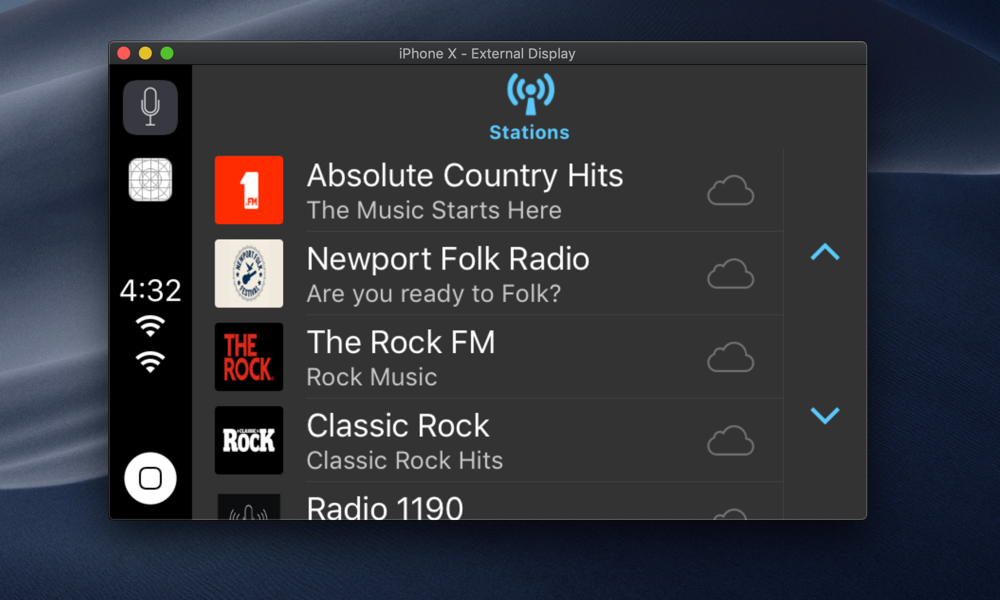
Also I created a step by step post to show how to implement this feature:
Add CarPlay support to Swift Radio
Cheers 🎉


You don't need a such workaround to make it to work on simulator.
            // Workaround to make the Now Playing working on the simulator:
            // Source: https://stackoverflow.com/questions/52818170/handling-playback-events-in-carplay-with-mpnowplayinginfocenter
            UIApplication.shared.endReceivingRemoteControlEvents()
            UIApplication.shared.beginReceivingRemoteControlEvents()
I have a radios application that support carPlay too and run in simulator without workaround (written in objC).
- (void)playableContentManager:(MPPlayableContentManager *)contentManager initiatePlaybackOfContentItemAtIndexPath:(NSIndexPath *)indexPath completionHandler:(void (^)(NSError * _Nullable))completionHandler {

    SHOUTcastAPI *shout = _appDelegate.shoutCastAPI;

    NSUInteger indexCount = indexPath.length;
    NSUInteger tabIndex = [indexPath indexAtPosition:[indexPath length] - 1];

    Station *station;

    if ([indexPath indexAtPosition:0] == 1 && indexCount == 2) { // FAVORITES
        self.stations = [shout getFavoritesStations];
        station = self.stations[tabIndex];
    }
    else if ([indexPath indexAtPosition:0] == 2 && indexCount == 2) { // TOP 500
        station = [shout getTopStationForIndex:tabIndex];
        self.stations = [shout getTopStations];
    }
    else {
        if (indexCount == 3) {
            station = [shout getStationForIndex:tabIndex indexOfGenre:(unsigned long)[indexPath indexAtPosition:1]];
            self.stations = [shout getStationsForIndexOfGenre:(unsigned long)[indexPath indexAtPosition:1]];
        }
        else {
            station = [shout getStationForIndex:tabIndex indexOfSubgenre:[indexPath indexAtPosition:2] indexOfGenre:(unsigned long)[indexPath indexAtPosition:1]];
            self.stations = [shout getStationsForIndexOfSubgenre:(unsigned long)[indexPath indexAtPosition:2] indexOfGenre:(unsigned long)[indexPath indexAtPosition:1]];
        }
    }
    dispatch_async(dispatch_get_main_queue(), ^{
        _station = station;
        [self play];

        completionHandler(nil);
    });

    // Update MPNowPlayingInfo
    [self updateUIWithTitle:nil andAlbumTitle:nil andArtwork:nil];
}
- (void)updateUIWithTitle:(NSString *)title andAlbumTitle:(NSString *)albumTitle andArtwork:(UIImage *)artworkImage
{
    // UI Update
    dispatch_async(dispatch_get_main_queue(), ^{
                ...
                ...
                NSMutableDictionary *nowPlayingInfo = [[MPNowPlayingInfoCenter defaultCenter].nowPlayingInfo mutableCopy];
                if (!nowPlayingInfo) {
                    nowPlayingInfo = [[NSMutableDictionary alloc] init];
                }

                nowPlayingInfo[MPMediaItemPropertyArtist] = _stationLabel.text;
                nowPlayingInfo[MPMediaItemPropertyAlbumTitle] = albumTitle ? albumTitle : JMOLocalizedString(@"Unknown album", @"");
                nowPlayingInfo[MPMediaItemPropertyTitle] = _songLabel.text;
                nowPlayingInfo[MPMediaItemPropertyArtwork] = itemArtwork;
                if ([[[UIDevice currentDevice] systemVersion] floatValue] >= 10.0) {
                    nowPlayingInfo[MPNowPlayingInfoPropertyIsLiveStream] = @(1.0);
                    nowPlayingInfo[MPNowPlayingInfoPropertyMediaType] = @(MPNowPlayingInfoMediaTypeAudio);
                }
                nowPlayingInfo[MPNowPlayingInfoPropertyPlaybackRate] = self.isPlaying ? @(1.0) : @(0.0);
                nowPlayingInfo[MPNowPlayingInfoPropertyDefaultPlaybackRate] = self.isPlaying ? @(1.0) : @(0.0);

                [MPNowPlayingInfoCenter defaultCenter].nowPlayingInfo = nowPlayingInfo;
                ....
    });
MPNowPlayingInfoPropertyPlaybackRate is very important:
The documentation say:
MPNowPlayingInfoCenter Use MPNowPlayingInfoCenter to populate the CarPlay Now Playing screen with information. MPNowPlayingInfoCenter allows you to specify metadata such as title, artist, elapsed time, playback queue, playback rate and album artwork. When running your app in the Simulator, the media playback features are not the same as running on iPhone. On iPhone running CarPlay, the play button in the CarPlay Now Playing screen is automatically managed by iOS and changes state based on whether audio is playing. In contrast, the play button in the Simulator relies on the state of the playback rate in Now Playing Info Center. You should ensure that Now Playing Info Center always has the correct playback rate. When playback is stopped, be sure to set the MPNowPlayingInfoPropertyPlaybackRate property to 0.0. Apple recommends you always supply a MPMediaItemPropertyPersistentID property. If your app has the concept of a playback queue, set MPNowPlayingInfoPropertyPlaybackQueueIndex and MPNowPlayingInfoPropertyPlaybackQueueCount. Starting in iOS 10, this information is shown on the Now Playing screen. If your app plays live streaming content, set MPNowPlayingInfoPropertyIsLiveStream to YES.


The best player and the best tutorial for Apple Car Play. I did try blatantly to implement the same by my own a time ago and now seeing your code so clean and detailed only i can say KUDOS! Thanks for share!

@fethica But if we have not a paid account developer, we cannot test it with real phone?? When I opened https://developer.apple.com/contact/carplay/ it said that I have not the permission to view this page 🤨 Is there a solution for "free" out there ?

@DavidKalajdzic if you can't access the CarPlay form page with a regular account, so I think you have to get a paid developer account!
Even with this workaround - UIApplication.shared.endReceivingRemoteControlEvents() UIApplication.shared.beginReceivingRemoteControlEvents()
Nowplaying screen not appearing on the simulator, what could be the reason? Please help.

This works beautifully on XCode 10 but not so on XCode 11.0 beta (11M336w) running iOS 13... Anyone else just get a blue button?


This is an Apple Simulator Bug in Xcode 11 beta. It works fine in a car!
This is an Apple Simulator Bug in Xcode 11 beta. It works fine in a car!
Hi, I did try in my Hyundai car CarPlay but it still shows blue icon.

Please contact Hyundai! I have a BMW and it works fine with my app and with this example!
Please contact Hyundai! I have a BMW and it works fine with my app and with this example!
And you being a developer for some reason thought contacting Hyundai will solve the problem? Didn't you said above it was bug in Xcode 11? And I am using latest version of Xcode, not the beta version.
I tried with another CarPlay head unit, its a some problem. I bet your BMW was custom made with stable Xcode installed lol.
I said it is a bug in Xcode 11 using the example on simulator. Works fine in my car either with Xcode 10 or 11.
Works fine using iOS 12, but any version of iOS 13 presents the bugs mentioned above and it is impossible to get it working in the CarPlay simulator.

Hi Fethica, Hope you doing well. I made an navigation app for my apple car play. Its icon and start screen is displaying fine over the carplay simulator but the map is not displaying. Is there any way by which we can show only map directly to carplay screen instead of home screen.
Regards Sj

Hello,
Just offering insight here: the issue is a bug that Apple needs to fix with iOS 13 and CarPlay in the simulator.
Instead of using an iOS 13 simulator, choose an iOS 12 simulator and it should work.
On Jan 30, 2020, at 11:08 AM, Swapangeet [email protected] wrote:
Hi Fethica, Hope you doing well. I made an navigation app for my apple car play. Its icon and start screen is displaying fine over the carplay simulator but the map is not displaying. Is there any way by which we can show only map directly to carplay screen instead of home screen.
Regards Sj
— You are receiving this because you commented. Reply to this email directly, view it on GitHub, or unsubscribe.
Hello, Just offering insight here: the issue is a bug that Apple needs to fix with iOS 13 and CarPlay in the simulator. Instead of using an iOS 13 simulator, choose an iOS 12 simulator and it should work. … On Jan 30, 2020, at 11:08 AM, Swapangeet @.***> wrote: Hi Fethica, Hope you doing well. I made an navigation app for my apple car play. Its icon and start screen is displaying fine over the carplay simulator but the map is not displaying. Is there any way by which we can show only map directly to carplay screen instead of home screen. Regards Sj — You are receiving this because you commented. Reply to this email directly, view it on GitHub, or unsubscribe.
Dan can we run both on same machine or we should remove one of it as the later version will ask for update. Thanks