

 almarklein
Clearing Browser Cache removes all history, despite .db file still existing
I've really really been loving TimeTagger for the last few months. I always thought about exporting my stuff and then would think "well let me build it up more!"
I had to clear my cache and then when I opened TimeTagger again it showed me a few errors. First, it couldn't find the server again, and when I finally had it running again, I was logged out and it had no history, which is a bummer. I can confirm that I have a jwt.key file and a users/default-{string}.db dir + file within my time tagger directory. I'm assuming that's the db the app was originally using, but I can't access it or have the app read it.
I also didn't see clearing the cache as something to be aware of in the docs, but perhaps I missed something. Is this an unintended functionality? Happy to help contribute if that's helpful, but wanted to file an issue first and see if there's somethign else I should try.

To be honest, I don't know what the expected behavior is when the cache is cleared. TimeTagger does not use cookies, but it uses localStorageand indexedDB. When you logout, both are cleared, so I would expect that when the browser cache is cleared it would be as if you'd log out. What did you clear and what browser is this in? Maybe I can try to reproduce this.
Also, where you using the "localhost" user, or a username-password credential?
The client keeps track of the server time of the last update. So when its own data is erased, but that server-time variable is intact, it will happily believe that it is up to date. Therefore, what you could at least try, is logging out and then in again.
Another thing you could try is opening the dev console and typing store._force_reset(). This will bump a server time flag in your db, causing a full reload on the client side.

Great questions. I have a _timetagger dir that I thought I used to configure a user as I remember using the hashing site linked in your docs, but I can't find the original config file. That, and there are no users in my password manager or notes app, so I'm guessing I used localhost. Lesson learned. I wish I paid more attention to where it was running when I opened the chrome app.
What I think I'm confused about is when I got it working one day, even if my computer restarted, I was able to access my history. So I know I wasn't running it in docker or my terminal. Unless it can run locally as a daemon? But I didn't find anything on that.
This is all pointing me to your first comment regarding localStorage and indexedDB, which makes sense why everything "stopped working" when I cleared the cache. Simply restarting still kept the old state and data.
I'm on Chrome 105.0.5195.102 and likely using localhost user, as far as I can tell.
Going to run it as a daemon with a local db so I don't make a silly mistake like this again!
Thanks for a fantastic app. Would love to contribute if I see anything the community needs or if you need any help.
Here's the output of store._force_reset(). Let me know if you want anything expanded, I'll keep the window open.
Promise {<pending>}
[[Prototype]] : Promise
catch : ƒ catch()
constructor : ƒ Promise()
finally : ƒ finally()
then : ƒ then()
Symbol(Symbol.toStringTag) : "Promise"
[[Prototype]] : Object
[[PromiseState]] : "fulfilled"
[[PromiseResult]] : null
What I think I'm confused about is when I got it working one day, even if my computer restarted, I was able to access my history. So I know I wasn't running it in docker or my terminal. Unless it can run locally as a daemon?
Well yes, the client can run "offline". The sync indicator will show a cross to indicate that there is no connection with the server.
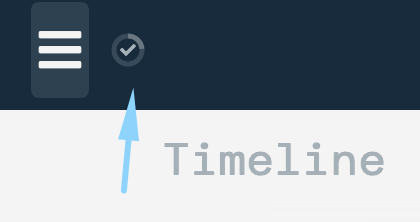
The changes are stored locally (in indexedDB), and when the connection with the server is restored, it will push all pending updates to it. However, if the cache is cleared before this happens, you lose the data ... sounds a bit like that is what happened in your case.
Looks like #230 is relevant here - it would be good to document that little widget better, and redesign it a bit, e.g. making the disconnect icon a bit more clear / alarming.
Thanks, I think we can conclude that yes, that's what happened in my case. I think this way of running the server is what lead to my confusion.
I think this "offline" version with indexedDB is a bit lacking in the documentation and may have led to the confusion. It was very clear how to self-host via Docker, download via pip & create your own .py file and run it that way, and using a demo or login/paid with timetagger.app was also clear.
But how did I initialize the browser-hosted version? All I remember doing was Chrome asking me if I wanted to download the Chrome app and I started using it. I can't remember how I got to that point where I was utilizing the browser's indexedDB, instead of localstorage. Perhaps some really basic documentation on this option and what the UX will be?
For people using the hosted version (timetagger.app) this is much less of a problem, since I make sure that the server is up. Indeed for self-hosters this is something they need to do themselves, and if you forget, it's not that obvious in the application, except for that little cross i mentioned earlier.
So I agree we need three things:
- Stress in the docs for self-hosters that they must make sure the server is running, and that the app works even if its not.
- Better docs on the sync indicator.
- An improved sync indicator that more clearly shows when its disconnected using an icon that's more appropriate, and perhaps some text.