

 allusion-app
Timer and practice automation
Totally fine if this is out of scope for the project, but I would be willing to make a PR for this, just wanted to judge interest.
I started drawing again recently and this has been really nice for managing references, but I was thinking it would be nice if I could use it for automated gesture drawing practice, so the idea is basically:
Have a button that pulls up a dialog with a timer setting and a tags selector, once you've entered the time per drawing and tags/query, it would switch to showing a single random image from the given search query for the time, and then switch to a new one (perhaps give the option for a cool down between each one).

We actually think it'd be a good addition! It suits the target audience pretty well. There have been no real contributions made from someone outside of the team yet, so if you're down to make a PR, it'd be interesting to hear what that's like. We could give you some pointers to how we would approach it if you'd like. Your proposal sounds alright, but it might be simpler to make use of the existing search functionality, e.g. by just adding a "play" button in the toolbar of the full-size image viewer, that opens a such a dialog with a "time" and "randomize" option. Feel free to try something else though!

No that sounds great, it's basically the same idea I think as long as the functionality remains the same, I'm not a stickler on specifics on the UI or implementation.
I just got back from vacation so I should have some time to look at this hopefully soon, glad to hear that you think it fits the use case of it and I'll make sure to make notes on anything I find confusing/unclear about build process / code styling / etc etc.
But yeah, feel free to drop some more ideas if you already have them for this :)
Cool, that'd be nice! What I had in mind: By adding the ⏯️ button to the full-size image viewer (what we call Slide mode internally), you can
- make a slideshow of all images that are shown in the gallery by using it in the main window, or
- make a selection of images in the gallery and open those in the preview window (using spacebar in the gallery view) and use the ⏯️ button in there
So it would be quite flexible to choose which images to include in the slideshow. Made a quick mockup in here:

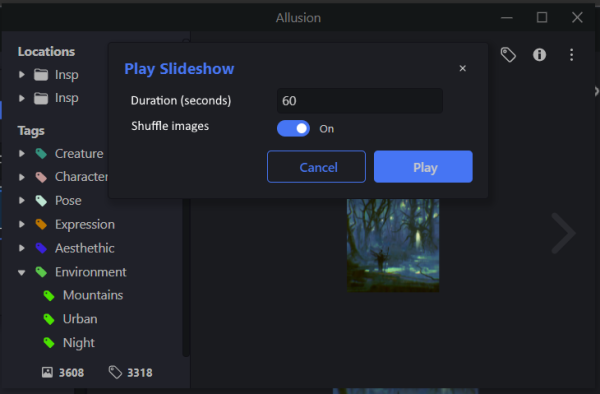
Implementation wise: The toolbar section where that button can be added is here. We use the UIStore as the central place for all logic and data tied to the UI. The image shown in the SlideView is stored in the UIStore as firstItem, as in index of the fileList stored in the FileStore. Incrementing that firstItem every X seconds would be all that's needed to make it an automated slideshow, which would fit well as playSlideshow/stopSlideshow methods on the UIStore. If the "Shuffle images" toggle is enabled, I think we can just shuffle the items in the fileList in the playSlideshow method
Adding the dialog would be the most cumbersome, but we have some existing modals that can be used as an example, like this one
I don't want to spoil the fun of figuring stuff out yourself too much, so feel free to disregard this, or ask away if there's anything too unclear 😃
No, that's perfect, hopefully shouldn't take long to get something testable!
Thanks.