

 alievk
The CUDA related issue collection
This is for discussion and reference to CUDA related issues. So please don't post your issue here, and rather file a new one, then I might add it here for easy/later reference, if at all relevant.
Problem A
For the Error:
RuntimeError: CUDA error: no kernel image is available for execution on the device
From [1]:
Or go back at compiling binaries for CUDA architectures 3.0 and up, instead of 3.7 and up as per (starting from) PyTorch 1.3.1. The following issue has a discussion on this: 31285. Ideally, PyTorch should support CUDA architectures matching CUDA toolkit support. That is if CUDA 10.1 supports compute capability 3.0 and up, and PyTorch is compiled against CUDA 10.1, then PyTorch should also support archs from 3.0 and up.
From [2]
Yes, arch 3.5 is supported by CUDA 10.1. But starting from 1.3.1, we start to compile binaries only for arch 3.7 and up. That caused the issue you mentioned. ... Why then torch.cuda.is_available() function is returning True? Should its semantics be CUDA is available /to be used by PyTorch/? ... I tried tensorflow 2.1 in the same machine, with the same configuration, and it worked from the conda package, without need to compile it from source. My suggestion is for PyTorch be compiled with CUDA archs matching the CUDA toolkit support. For CUDA 10.1 is 3.0 forward. I don't understand this decision to have it for arch 3.7 and up.
Problem B
Another related issue that seem to pop-up often is:
The program can't start because cudart64_101.dll is missing from your computer.
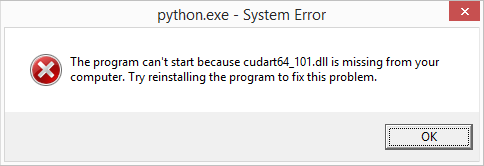
But you know you have installed CUDA somewhere...
See:
- [1] https://github.com/pytorch/pytorch/issues/36062
- [2] https://github.com/pytorch/pytorch/issues/31285
- [3] https://github.com/pytorch/pytorch/issues/36066
- [4] https://github.com/tensorflow/tensorflow/issues/36111
- [5] https://github.com/tensorflow/tensorflow/issues/17101 (old)
- [6] https://www.dll-files.com/cudart64_101.dll.html
- [7] https://stackoverflow.com/questions/57528027/importerror-could-not-find-cudart64-100-dll
Related issues:
- #48
- #51
- #58
- #63
- #65
- #70
- #94

I managed to resolve Problem B.
Here assuming you already have CUDA 10.2 with cudart64_102.dll.
However, I did not notice any improvement on the frame rate, so I am still not sure CUDA is actually working or running, but at least I don't get any error message anymore. This is what I did so far.
# Open your conda CMD shell

# Update and get the latest conda
conda update -n base -c defaults conda
The issue seem to be that conda can't find the correct PATH to the CUDA binaries in its own environment. (As was noted in [4].) So you need to copy the CUDA dll to a place where to OS always look. At first I was hoping that the windows tools regsvr32.exe would to the trick. But that did nothing for conda.
The conda installation location(s) for the DLL's are found here:
C:\Users\xxxx\miniconda3\envs\avatarify\Library\bin\cudart64_101.dll
C:\Users\xxxx\miniconda3\pkgs\cudatoolkit-10.1.243-h74a9793_0\Library\bin\cudart64_101.dll
Both DLLs are the same so copy either one to:
- (a)
C:\Program Files\NVIDIA GPU Computing Toolkit\CUDA\v10.2\bin\cudart64_101.dll - (b)
C:\Windows\System32\cudart64_101.dll
You can also download the DLL binary from [6] or you can even copy your cudart64_102.dll into cudart64_101.dll, which also works.
# Open an admin Powershell
cd C:\Program Files\NVIDIA GPU Computing Toolkit\CUDA\v10.2\bin\
cp C:\Users\xxxx\miniconda3\envs\avatarify\Library\bin\cudart64_101.dll .
cp .\cudart64_101.dll C:\Windows\System32\cudart64_101.dll
Now all you have to do is restarting "Windows Explorer", using SysInternals app called Process Explorer, or reboot your PC. I also tried using Chocolatey's refreshenv, to refresh registry, but that didn't work either. Probably because the Conda shell is so different (or sandboxed) from the other OS shells available.
Here's what I got from running on an old GTX 850M:
C:\Program Files\NVIDIA GPU Computing Toolkit\CUDA\v10.2\extras\demo_suite\deviceQuery.exe
(avatarify) D:\avatarify\avatarify>"C:\Program Files\NVIDIA GPU Computing Toolkit\CUDA\v10.2\extras\demo_suite\deviceQuery.exe"

C:\Program Files\NVIDIA GPU Computing Toolkit\CUDA\v10.2\extras\demo_suite\deviceQuery.exe

Starting...

 CUDA Device Query (Runtime API) version (CUDART static linking)

Detected 1 CUDA Capable device(s)

Device 0: "GeForce GTX 850M"
  CUDA Driver Version / Runtime Version          10.2 / 10.2
  CUDA Capability Major/Minor version number:    5.0
  Total amount of global memory:                 4096 MBytes (4294967296 bytes)
  ( 5) Multiprocessors, (128) CUDA Cores/MP:     640 CUDA Cores
  GPU Max Clock rate:                            902 MHz (0.90 GHz)
  Memory Clock rate:                             1001 Mhz
  Memory Bus Width:                              128-bit
  L2 Cache Size:                                 2097152 bytes
  Maximum Texture Dimension Size (x,y,z)         1D=(65536), 2D=(65536, 65536), 3D=(4096, 4096, 4096)
  Maximum Layered 1D Texture Size, (num) layers  1D=(16384), 2048 layers
  Maximum Layered 2D Texture Size, (num) layers  2D=(16384, 16384), 2048 layers
  Total amount of constant memory:               zu bytes
  Total amount of shared memory per block:       zu bytes
  Total number of registers available per block: 65536
  Warp size:                                     32
  Maximum number of threads per multiprocessor:  2048
  Maximum number of threads per block:           1024
  Max dimension size of a thread block (x,y,z): (1024, 1024, 64)
  Max dimension size of a grid size    (x,y,z): (2147483647, 65535, 65535)
  Maximum memory pitch:                          zu bytes
  Texture alignment:                             zu bytes
  Concurrent copy and kernel execution:          Yes with 4 copy engine(s)
  Run time limit on kernels:                     Yes
  Integrated GPU sharing Host Memory:            No
  Support host page-locked memory mapping:       Yes
  Alignment requirement for Surfaces:            Yes
  Device has ECC support:                        Disabled
  CUDA Device Driver Mode (TCC or WDDM):         WDDM (Windows Display Driver Model)
  Device supports Unified Addressing (UVA):      Yes
  Device supports Compute Preemption:            No
  Supports Cooperative Kernel Launch:            No
  Supports MultiDevice Co-op Kernel Launch:      No
  Device PCI Domain ID / Bus ID / location ID:   0 / 1 / 0
  Compute Mode:
     < Default (multiple host threads can use ::cudaSetDevice() with device simultaneously) >

deviceQuery, CUDA Driver = CUDART, CUDA Driver Version = 10.2, CUDA Runtime Version = 10.2, NumDevs = 1, Device0 = GeForce GTX 850M
Result = PASS
You can also check with the nvidia-smi tool:
C:\Program Files\NVIDIA Corporation\NVSMI\nvidia-smi

+-----------------------------------------------------------------------------+
| NVIDIA-SMI 442.19       Driver Version: 442.19       CUDA Version: 10.2     |
|-------------------------------+----------------------+----------------------+
| GPU  Name            TCC/WDDM | Bus-Id        Disp.A | Volatile Uncorr. ECC |
| Fan  Temp  Perf  Pwr:Usage/Cap|         Memory-Usage | GPU-Util  Compute M. |
|===============================+======================+======================|
|   0  GeForce GTX 850M   WDDM  | 00000000:01:00.0 Off |                  N/A |
| N/A   62C    P8    N/A /  N/A |    100MiB /  4096MiB |      0%      Default |
+-------------------------------+----------------------+----------------------+

+-----------------------------------------------------------------------------+
| Processes:                                                       GPU Memory |
|  GPU       PID   Type   Process name                             Usage      |
|=============================================================================|
|  No running processes found                                                 |
+-----------------------------------------------------------------------------+
Hi, i've got a Quadro K4200, and compute compatibilty version is 3.0. Same error : RunetimeError: CUDA error: no kernel image is available for execution on the device.
Please could you send a link or procedure that solve the problem? thanks!


need to compile Pytorch from source
Unfortunately those instructions are horrible... :thinking:

PLEASE!!
I am testing run with a very old a gt 740 video card, is there any way to run the script with it? this error appears !! how solve ?

@modestlypart Pytorch is complaining your GPU is a way too old
One possible solution is to compile Pytorch from source (not easy) or wait until we release remote GPU solution.


Is it not working again
On Dec 22, 2022 at 8:34 AM, <Dennisogbe @.***)> wrote:
Is avatarify not working again
— Reply to this email directly, view it on GitHub (https://github.com/alievk/avatarify-python/issues/98#issuecomment-1362910210), or unsubscribe (https://github.com/notifications/unsubscribe-auth/AZ2LP35ENNUALC5GZQLQUZ3WORRGJANCNFSM4MNNTUJQ). You are receiving this because you are subscribed to this thread.Message ID: @.***>

Still working
Someone installed for me on the GitHub and it works fine
Is it not working again
On Dec 22, 2022 at 8:34 AM, <Dennisogbe @.***)> wrote:
Is avatarify not working again
— Reply to this email directly, view it on GitHub (https://github.com/alievk/avatarify-python/issues/98#issuecomment-1362910210), or unsubscribe (https://github.com/notifications/unsubscribe-auth/AZ2LP35ENNUALC5GZQLQUZ3WORRGJANCNFSM4MNNTUJQ). You are receiving this because you are subscribed to this thread.Message ID: @.***>

Is avatarify not working again It works fine someone installed for me on the GitHub and it worked fine