

 alievk
i tried solving conda environment with libmamba not getting it please help
Describe the bug
To Reproduce
(base) C:\Users\umoek>git clone https://github.com/alievk/avatarify-python.git Cloning into 'avatarify-python'... remote: Enumerating objects: 1477, done. Receiving objects: 91% (1345/1477), 5.04 MiB | 1.57 MiB/sremote: Total 1477 (delta 0), reused 0 (delta 0), pack-reused Rece Receiving objects: 100% (1477/1477), 5.65 MiB | 1.66 MiB/s, done. Resolving deltas: 100% (953/953), done.
(base) C:\Users\umoek>cd avatarify-python
(base) C:\Users\umoek\avatarify-python>scripts\install_windows.bat conda found
CondaValueError: You have chosen a non-default solver backend (libmamba) but it was not recognized. Choose one of: classic
EnvironmentNameNotFound: Could not find conda environment: avatarify
You can list all discoverable environments with conda info --envs.
CondaValueError: You have chosen a non-default solver backend (libmamba) but it was not recognized. Choose one of: classic
CondaValueError: You have chosen a non-default solver backend (libmamba) but it was not recognized. Choose one of: classic
CondaValueError: You have chosen a non-default solver backend (libmamba) but it was not recognized. Choose one of: classic
The system cannot find the file specified. Cloning into 'fomm'... remote: Enumerating objects: 211, done. remote: Total 211 (delta 0), reused 0 (delta 0), pack-reused 211 Receiving objects: 100% (211/211), 58.16 MiB | 5.37 MiB/s, done. Resolving deltas: 100% (108/108), done.
Usage:
pip install [options]
option --use-feature: invalid choice: '2020-resolver' (choose from 'fast-deps', 'truststore', 'no-binary-enable-wheel-cache')
(base) C:\Users\umoek\avatarify-python> Info (please complete the following information):
- OS (e.g., Linux):
- GPU model:
- Any other relevant information:
Screenshots
Logs

you can easily bypass this solving environment by editing your script\install_windows.bat
change this the line of code there to this exactly
call conda create -y -n %CONDA_ENV_NAME% python=3.10.11
note (just replace the version of that line of code : python version (3.10.11) to the version of python you are using)

also, you can as well press CTRL C on you keyboard, this will interupt the code, and the type N and enter to continue, this will still proogress and run to completion then you can as well dowload other dependencies with
pip install pyyaml pip install requests pip install scipy pip install scikit-learn pip install face_alignment pip install sklearn conda install -c conda-forge scikit-learn pip install pandas
depends on the issues the windows prompt. just download those dependensies
Hello @seegunz I keep having this issue after running the entire process for a Nvidia RTX 3070:
(base) C:\Users\Public\Avatarifiy\avatarify-python>run_windows.bat
[1682755986.954881] Loading Predictor
Traceback (most recent call last):
File "afy/cam_fomm.py", line 216, in
Please Please what am I doing wrong? Any help will be appreciated

Hello @seegunz I keep having this issue after running the entire process for a Nvidia RTX 3070:
(base) C:\Users\Public\Avatarifiy\avatarify-python>run_windows.bat [1682755986.954881] Loading Predictor Traceback (most recent call last): File "afy/cam_fomm.py", line 216, in from afy import predictor_local File "C:\Users\Public\Avatarifiy\avatarify-python\afy\predictor_local.py", line 2, in import torch ModuleNotFoundError: No module named 'torch'
Please Please what am I doing wrong? Any help will be appreciated
run this code below
pip uninstall torch pip cache purge pip install torch -f https://download.pytorch.org/whl/torch_stable.html
Hello @seegunz I keep having this issue after running the entire process for a Nvidia RTX 3070:
(base) C:\Users\Public\Avatarifiy\avatarify-python>run_windows.bat [1682755986.954881] Loading Predictor Traceback (most recent call last): File "afy/cam_fomm.py", line 216, in from afy import predictor_local File "C:\Users\Public\Avatarifiy\avatarify-python\afy\predictor_local.py", line 2, in import torch ModuleNotFoundError: No module named 'torch'
Please Please what am I doing wrong? Any help will be appreciated
You need to re install pytorch if you havent already done that

Sorry i did this process and it works but it was slow kind of dragging not moving as i was why and any solution for that.?

You probably had it running wit cpu and not GPU. I hope you are using an Nvidia enabled system.
If you have nvidia GPU Rtx or gtx dm now let's fix the lagging
+234 811 513 3627

ImportError: DLL load failed. The specified module could not be found error. please help

Pip Install Pillow==9.0.0
On Wed, Jun 21, 2023 at 7:58 PM MonsieurJay @.***> wrote:
ImportError: DLL load failed. The specified module could not be found error. please help [image: avatar] https://user-images.githubusercontent.com/137331330/247697840-e25c62e2-b13a-424f-a98a-0f7da7737695.png
— Reply to this email directly, view it on GitHub https://github.com/alievk/avatarify-python/issues/576#issuecomment-1601416841, or unsubscribe https://github.com/notifications/unsubscribe-auth/AKL6YJ3NFTRLLNFP7PACT33XMM75VANCNFSM6AAAAAAXJJRESE . You are receiving this because you commented.Message ID: @.***>
-- MICKYGEM💎
Pls help I've followed all your instructions but thus error keeps coming up
What’s app text 🥹🥹
On Fri, Jun 23, 2023 at 4:53 PM MonsieurJay @.***> wrote:
[image: error msg] https://user-images.githubusercontent.com/137331330/248314684-f2ea650c-836f-4c8b-9081-7a25adca3fc4.png
Pls help I've followed all your instructions but thus error keeps coming up
— Reply to this email directly, view it on GitHub https://github.com/alievk/avatarify-python/issues/576#issuecomment-1604477714, or unsubscribe https://github.com/notifications/unsubscribe-auth/AKL6YJYXKEWOHCGIZUALKU3XMW3YHANCNFSM6AAAAAAXJJRESE . You are receiving this because you commented.Message ID: @.***>
-- MICKYGEM💎
Pls help I've followed all your instructions but thus error keeps coming up
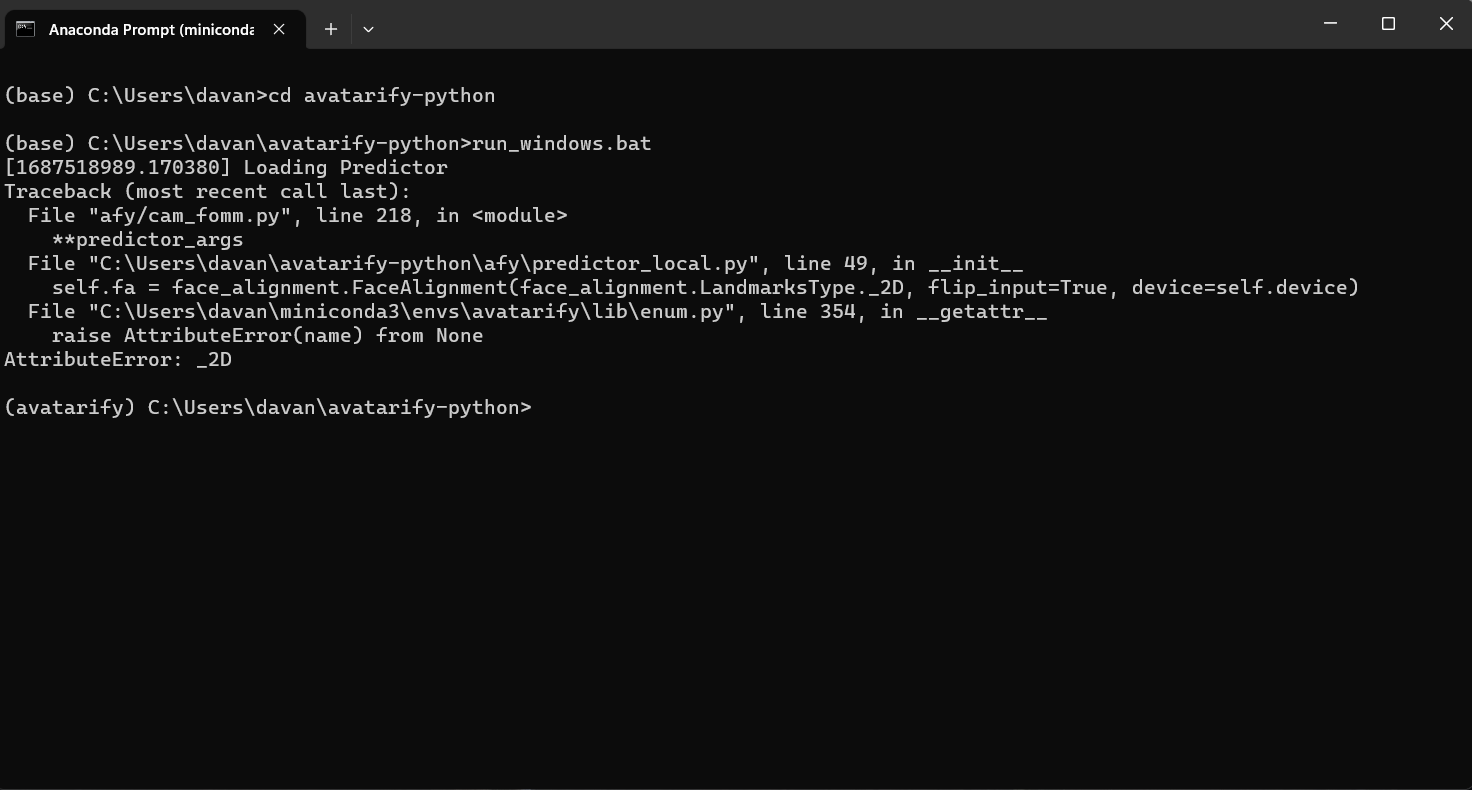
read through the instructions
