

 alievk
Avatarify cam issue
I use Alienware 10th Gen core i7 nvidia RTX 3060 graphics, the whole program runs smoothly but once I run_windows.bat and my cam comes up and I type X, both my cam and the avatar cam starts dragging, what can i do?

Based on other comments it seems like it isn't using the GPU on RTX30xx cards.
You can download the code, fix the problem, and submit a pull request :)
Neither alievk (the author av Avatarify) or me (volunteer co-maintainer) owns one of these cards, so it would be difficult for either of us to try to fix it. But since it is open source, anyone is free to help develop it!


It ran very well on my GTX1080, but now that I've got a 3080 I'll see if I can figure out how to get it to run on this card
I use Alienware 10th Gen core i7 nvidia RTX 3060 graphics, the whole program runs smoothly but once I run_windows.bat and my cam comes up and I type X, both my cam and the avatar cam starts dragging, what can i do?
You should consider the size of your NVIDIA . If its low . Then i advise you run this on google culab .
You can aswel try update all drivers expecially your nvidia. Try updating the drive. I mean use an updated driver . Turn off system security antivirus .
Consider your windows is in proper condition.
If these do not work . Best you run this in google culab .
I hope this helps

I use Alienware 10th Gen core i7 nvidia RTX 3060 graphics, the whole program runs smoothly but once I run_windows.bat and my cam comes up and I type X, both my cam and the avatar cam starts dragging, what can i do?
You should consider the size of your NVIDIA . If its low . Then i advise you run this on google culab .
You can aswel try update all drivers expecially your nvidia. Try updating the drive. I mean use an updated driver . Turn off system security antivirus .
Consider your windows is in proper condition.
If these do not work . Best you run this in google culab .
I hope this helps
That's not really helpful at all. They wrote what graphics card they have, a RTX3060 is way above what's needed to run Avatarify. The problem is that the version of PyTorch that Avatarify uses does not support these cards.
Don't tell people to turn off their antivirus or other security features of their OS. I'm sure you mean well, but that's not good advice in general, and it won't do anything to help this situation.
hello sir, im having the same problem relating to the installation. i have GEFORCE RTX 3050,AMD RYZEN 5 5000 series. installed the avatarify app directly onmy desktop but turns out to run slow when ever i try opening it. At first i thought it was a normal problem so i gave it up 20mins thinking it would work but it never did. I used both procedures being the software and avatarify python approach but it still doesnt work. Please is there any way you can help me out with this

@budujo if you get around 1 frame per second it's probably using the CPU instead of the GPU. Read the things that avatarify-python writes to the terminal when you run it, and see if it says something is wrong.
I suspect that someone needs to check out the code, update dependencies to later versions, fix any resulting code errors, and create a PR with the changes.
I need help I'm using Alienwares core i7 11th generation 'vox-adv-cok.pth.tar said source not found after I followed all process correctly what may be the solution 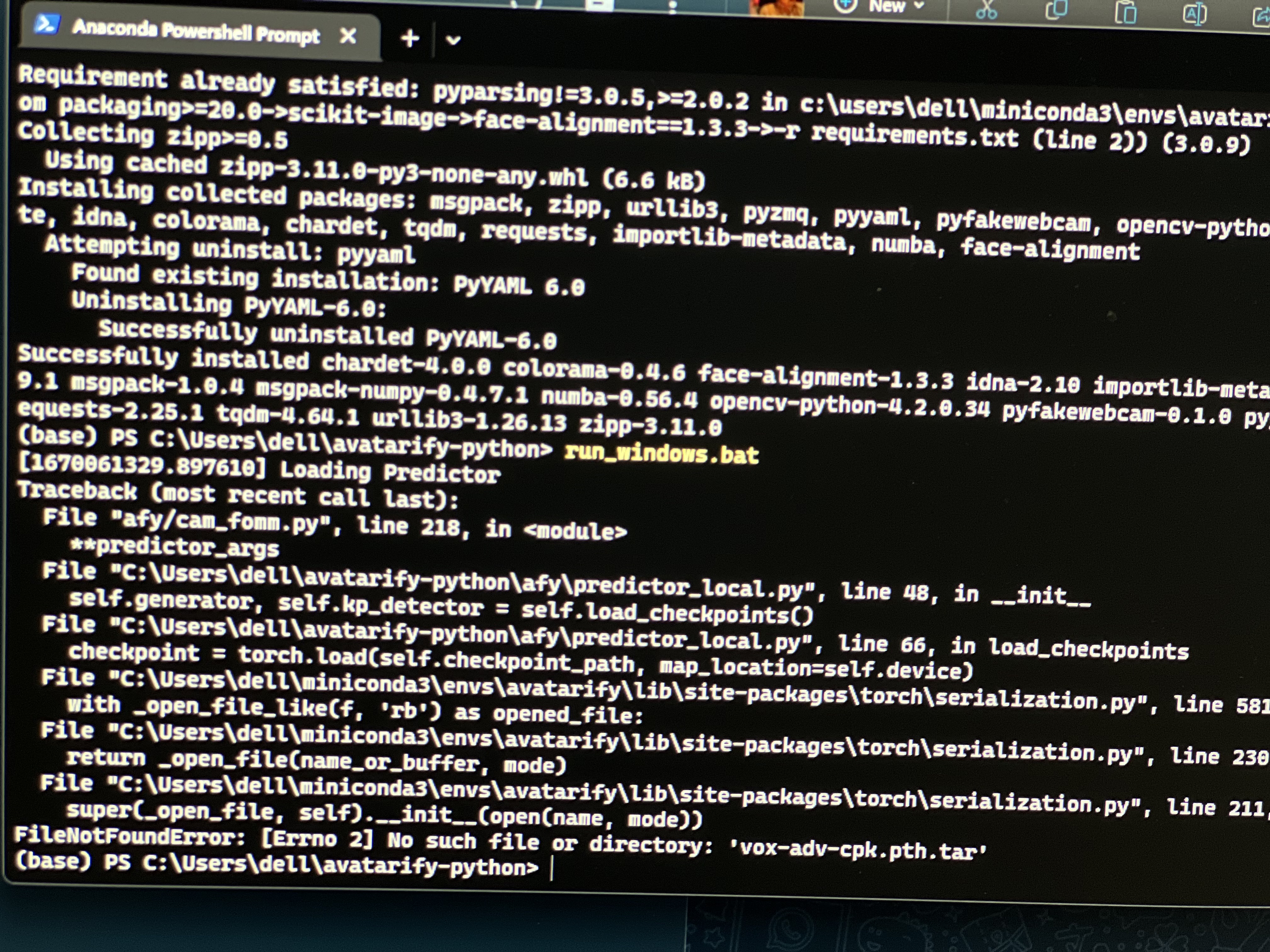

@Kingempirefx that has nothing to do with this issue. You have missed a thing that the instructions tell you to do, and the error message literally tells you what's wrong.
On Sun, 4 Dec 2022 at 3:03 PM, Johan @.***> wrote:
@Kingempirefx https://github.com/Kingempirefx that has nothing to do with this issue. You have missed a thing that the instructions tell you to do, and the error message literally tells you what's wrong.
— Reply to this email directly, view it on GitHub https://github.com/alievk/avatarify-python/issues/451#issuecomment-1336419929, or unsubscribe https://github.com/notifications/unsubscribe-auth/A4RNSF5HYPHRYEJTRLXYNHLWLSQEJANCNFSM57Y5MJNQ . You are receiving this because you were mentioned.
can you send me your own steps let me see if I’m getting it wrong
My own steps are the docs. This is an open source project so anyone can contribute (or at least suggest) changes, and I would have updated the docs if they didn't work for me. I use Linux so I focus on those parts, but any Windows user could have contributed a fix if something was wrong with those steps.
Search the docs for "vox-adv-cpk.pth.tar"
On Sun, 4 Dec 2022 at 3:13 PM, Johan @.***> wrote:
My own steps are the docs. This is an open source project so anyone can contribute (or at least suggest) changes, and I would have updated the docs if they didn't work for me. I use Linux so I focus on those parts, but any Windows user could have contributed a fix if something was wrong with those steps.
Search the docs for "vox-adv-cpk.pth.tar"
— Reply to this email directly, view it on GitHub https://github.com/alievk/avatarify-python/issues/451#issuecomment-1336422537, or unsubscribe https://github.com/notifications/unsubscribe-auth/A4RNSFYCWU4LFK7APKXEGKTWLSRKFANCNFSM57Y5MJNQ . You are receiving this because you were mentioned.Message ID: @.***>
I have it already but it’s still not reading it I have tried a thousand times still the same thing…
Open a new issue and hopefully someone can help. This is not related to "Avatarify cam issue"