

 algolia
ais-configure doesn't change url
Describe the bug 🐛 I am using ais-configure on set an initial value for a 'facetFilters', but it doesn't change url even though i have routing set to true.
Expected behavior 💭 setting value for 'facetFilters' in ais-configure will change url to reflect that refinement.

Here is what I am actually trying to achieve by using ais-configure. I have two pages. Home page and Search page. ais-instantsearch only exists in the Search page, but in the home page, I want to make it possible for users to click on ie: a brand name ( brand is an attribute ) and that will bring users to the Search Page with that brand name used as a refinement on the search results. That part works fine with ais-configure. The issue is that it doesn't change url to reflect that refinement.
Can you create what you have so far in a sandbox environment? We have a template available for that purpose here. Thanks!
My guess is that, if you have a refinement list widget on the page as well, you should use disjunctiveFacets & disjunctiveFacetsRefinements in the configure widget

The ais-configure component is by default stripped out of the URL on purpose, you might want to follow the routing guide to learn how to include it.

Hi @Haroenv I had some issues with that sandbox environment, so i create a repo here for you to check out instead. https://github.com/chhaymenghong/Test I use apikey and appId from the sandbox you mentioned.
Some background context: There are pages. home page and search page. In the home page:
- users can either click on a button to show only Samsung product (facetFilter on brand), or
- they can click on a button to show only tv product (facetFilter on categories) or
- they can use the global search input box in the nav to search for a specific term ( not that this is not ais-search-box )
- there are also the same two buttons on the nav that can trigger the same behavior in #1 and #2 from any pages.
The current behavior in search page:
- when I click on the "show Samsung" button on the home page, it triggers a route change to the Search page and sets the categories facet filter to Samsung. The URL changes correctly by angular (not ais-instant-search), but when I click on additional refinements, ais-instant-search modifies the URL in response to the new refinements, but URL doesn't include the "Samsung" facet, so as you can imagine, refresh the page, will break it.
- the same thing happens when I click on the "show Audio" button. It is just a different facet.
- when users search using the global input in the nav (not an ais component), I programmatically create an input event and send that to the hidden ais-search-box to change the result. Url is also broken as additional refinements are selected.
I would like to make sure that the original facet/search query maintain in the URL as additional refinements are selected. Please advise. Thank you
Hi @chhaymenghong , I think I have a perfect example for you. https://codesandbox.io/s/github/algolia/doc-code-samples/tree/master/Angular%20InstantSearch/routing-seo-friendly?file=/src/app/search/search.component.ts:1020-1035
If you look at the url above, it will be like this:
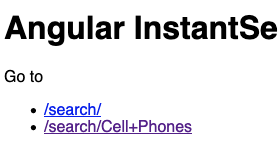 If you click "/search/Cell+Phones", it opens
 search.component.
Inside the component, there is a customized routing.
It will parseURL first, it reads "Cell Phones" from the url.
Then it's passed to routeToState.
 And that part configures category.
Now that we have category under control of InstantSearch, after refining searches, the category will remain.
Does it make sense to you? Let me know how it goes and if you have any question :)

Hi @eunjae-lee. Thank you! This great example. It gives me a starting point on how I should implement my stuff. Just a couple of issues though.
-
Given this sandbox, assuming we have a button on the search page, and when that button is click, I do router.navigate(''). The URL will be incorrectly set to /search instead of /. This also applies to the browser "back" button when it is clicked. It is not obvious in your example because you used href="" for the '/search/' and '/search/Cell+Phones' links, which actually trigger the whole page reload, so you wont be able to click back button, but if you were to replace those href with angular routerLink, the problem becomes obvious. I fixed that by checking the location parameter in createURL and only let algolia instantsearch runs its special routing when location.pathname.includes('search'). In another word, run algolia instantsearch custom routing on the search page only.
-
I dont want whole page to reload so instead of using href, I am adding a click handler to those links and call router.navigate to move to the search page, but I noticed something weird with the URL. it quickly switches from /search/Cell+Phones to /search/Cell+Phones/ This actually add two new url history into the browser and I would have to click back button twice to get to the home page.
-
I noticed createURL and functions in stateMapping to run multiple times for no obvious reasons. Does this have anything to do with results that span multiple pages (in pagination )?
-
When I am already on the search page, and want to see result of a new brand completely by doing router.navigate(['search'], {queryParams: {brand: 'any brand here'}} instead of using the brand refinementList, it doesn't work. I had to do the following to trick it: this.router.navigateByUrl('/', {skipLocationChange: true}) .then(() => { this.router.navigate(['search'], { queryParams: { brand: 'any brand here' } }); });
@eunjae-lee @Haroenv do you guys have any ideas on how to overcome these issues?