alexandernst
Make entire row selectable
Only having the check icon as the selectable area is not very good for usability. I would like to be able to select an option by clicking anywhere on that row.
- Is it possible to configure this today or will it be implemented in the near future?
- Can I implement a (CSS?) workaround for this now?
Thanks, Joakim

Look at the mods part in the documentation El El lun, 4 abr 2016 a las 15:31, transbetacism [email protected] escribió:
Only having the check icon as the selectable area is not very good for usability. I would like to be able to select an option by clicking anywhere on that row.
- Is it possible to configure this today?
- Will this be possible in the future?
- Can I implement a (CSS?) workaround for this now?
Thanks, Joakim
— You are receiving this because you are subscribed to this thread. Reply to this email directly or view it on GitHub https://github.com/alexandernst/angular-multi-select/issues/88

Here's a solution that I came up by modifying the mod, "toggle-open-state-on-label-click.js".
tpl = tpl.replace(/(class="(?:.?)ams-item(?:.?)")/gi, '$1 ng-click="toggle_check_node(item)"');
^ won't work because it'll add toggle_check_node to both "ams-item" and "ams-items". This will create a null error because ams-items is outside of the ng-repeat scope found on ams-item so the item being passed into the function does not exist.
tpl = tpl.replace(/(class="(?:.?)\Wams-item\W(?:.?)")/gi, '$1 ng-click="toggle_check_node(item)"');
^ won't work exactly because it double-toggles when clicking on the checkmark. This is because the checkmark element in the original template has it's own "toggle_check_node" event, and because it is nested within "ams-item" ng-click ends up being triggered for both. Because the checkmark ends up being toggled twice, any change is nullified when clicking the checkmark and it will look like nothing is happening. In the end, you need something like the below 2 lines:
tpl = tpl.replace(/(ng-click="toggle_check_node(item)")/gi, ""); tpl = tpl.replace(/(class="(?:.?)\Wams-item\W(?:.?)")/gi, '$1 ng-click="toggle_check_node(item)"');
The above removes prior instances of toggle_check_node from the original template before adding one onto ams-item [which represents a full row]. Please note that I didn't test this for a multi-select with subitems though so I have no clue if clicking a subitem will select the parent row or just the subitem itself.

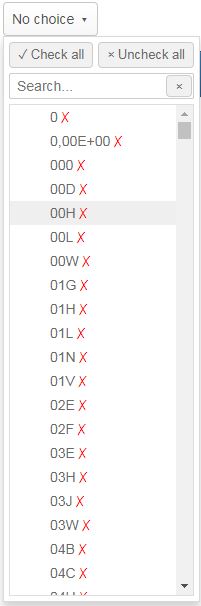
Hi, I have datasource as shown in picture and mods toggle-checked-state-on-label-click is used.
How modify your component angular-multi-select to enable click on row, white spaces too, not only text, to check/uncheck?