

 aldostools
nethost mount does not work since 1.47.34
Hi,
I just noticed that since 1.47.34, mounting e.g. /net0/ROMS as /dev_bdvd does not work any more. When selecting the "Net0 Folder", I don't see any sub-menus appearing (like /net0/PKG, /net0,ROMS, ...). Up to 1.47.32 it works. Now, my PS3NetSrv 20200708 is running as net0, but the appearing of these sub-menus has nothing to do with it running or not as in net1-4 I can see the same behaviour.
Regards Adam

I just checked it, and it works on my system. Maybe it's something in your settings. Make sure that you have the net0 enabled and the IP of the ps3netsrv is correct:

Also check that your firewall is not blocking the access.

I'm using ps3netsrv 20200708 running on C:\DATA\SHARE

The latest FULL edition of webMAN MOD 1.47.36 mounts the /net0/ROMS fine:

The folder /dev_bdvd is showing the folders:

Also mounting individual games from /net0/ROMS mounts fine:

The game can be launched from app_home/PS3_GAME:


BTW it is recommended to disable the content scanning at statup.
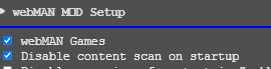
It may result in a 503 Out of memory error if you try to access the remote directory while the system is scanning.
I can report the same.
I have a completed all steps again but still. Empty root.

Thank you for your feedback. I just tested mounting the games on 1.47.37 and the remote games are mounting fine.
It is very important that your PC and PS3 use static IP address and the ports are open in the PC and router.
In /setup.ps3 it is required to have the remote IP address of your PC configured and the server check marked.

IMPORTANT: The remote server must be running when webMAN MOD is started. If the server is turned off, the option is disabled until the next reboot.
Also check that the Windows Defender Firewall is NOT blocking the inbound connections to the ps3netsrv

I used Telnet to check if my port was open and it is. Now comes the fun part.
After I ran Telnet with open IPADRESS 38008 I saw, that the ps3netsrv responded and now my ps3 is also fetching data now.
If find this somewhat strange. Maybe a Windows bug?
As i mentioned above, if ps3netsrv ia not running when the plugin is loaded (specifically when the content is scanned), the setting is disabled untill the next restart. It looks it was your case.
It definitely was running. Rebootet my PC and PS3 and WebMan Mod.
No success. I have no idea why Telnet fixed it, since it's just listening to the port but this fixed the issue for me.
I even got crazy and opened the port on my router even so it has no effect to it, but you never know.
I can't confirm if Telnet was for sure my solution, but it definitely worked after I listened to the port.
I wonder if that has something to do with Windows 11?
LOL That's really weird and illogical... at least it's fixed now. Enjoy it!
Hello, i have the same problem with latest PS3NetSrv...
I can mount and play games but i i try to mount the PKG folder from PS3 menu i don't have any submenu under NET0...
My Configs:

I can see the folders from web browser:

Spool of the server:

If i try from PS3 XMB no spool or anything..
Best Regards Stefano
