

 alafr
alafr
BUG: masking with curved path
I have an SVG with masks and curved paths that renders correctly in SVG but incorrectly in PDF (the mask should be exactly the same as the blue shape, so the red circle should be inside the blue area):
<?xml version="1.0" encoding="UTF-8" standalone="no"?>
<svg version="1.1" preserveAspectRatio="xMidYMid meet" xmlns="http://www.w3.org/2000/svg" viewBox="0 0 1000 1000" width="1000" height="1000">
	<defs>
		<mask id="mask1" x="-500" y="-500" width="2000" height="2000">
			<rect x="0" y="0" width="1000" height="1000" fill="#fff"></rect>
		</mask>
		<mask id="mask2" x="-500" y="-500" width="2000" height="2000">
			<rect x="0" y="0" width="1000" height="1000" fill="#000"></rect>
			<path d="M358.50,185.33 Q668.43,55.42,820.57,399.51 Q972.70,743.60,620.25,850.00 Q267.80,956.40,158.18,635.83 Q48.56,315.25,358.50,185.33 Z" fill="#fff"></path>
		</mask>
	</defs>
	<rect x="0" y="0" width="1000" height="1000" fill="#000"></rect>
	<g mask="url(#mask1)">
		<path d="M358.50,185.33 Q668.43,55.42,820.57,399.51 Q972.70,743.60,620.25,850.00 Q267.80,956.40,158.18,635.83 Q48.56,315.25,358.50,185.33 Z" fill="#00f"></path>
		<g mask="url(#mask2)">
			<circle cx="750" cy="750" r="300" fill="#f00"></circle>
		</g>
	</g>
</svg>
Strangely enough, this path without curves works correctly:
<?xml version="1.0" encoding="UTF-8" standalone="no"?>
<svg version="1.1" preserveAspectRatio="xMidYMid meet" xmlns="http://www.w3.org/2000/svg" viewBox="0 0 1000 1000" width="1000" height="1000">
	<defs>
		<mask id="mask1" x="-500" y="-500" width="2000" height="2000">
			<rect x="0" y="0" width="1000" height="1000" fill="#fff"></rect>
		</mask>
		<mask id="mask2" x="-500" y="-500" width="2000" height="2000">
			<rect x="0" y="0" width="1000" height="1000" fill="#000"></rect>
			<path d="M250,250 L750,250 L750,750 L250,750 Z" fill="#fff"></path>
		</mask>
	</defs>
	<rect x="0" y="0" width="1000" height="1000" fill="#000"></rect>
	<g mask="url(#mask1)">
		<path d="M250,250 L750,250 L750,750 L250,750 Z" fill="#00f"></path>
		<g mask="url(#mask2)">
			<circle cx="750" cy="750" r="300" fill="#f00"></circle>
		</g>
	</g>
</svg>
@alafr Any idea how to solve this?

I can't reproduce this bug...
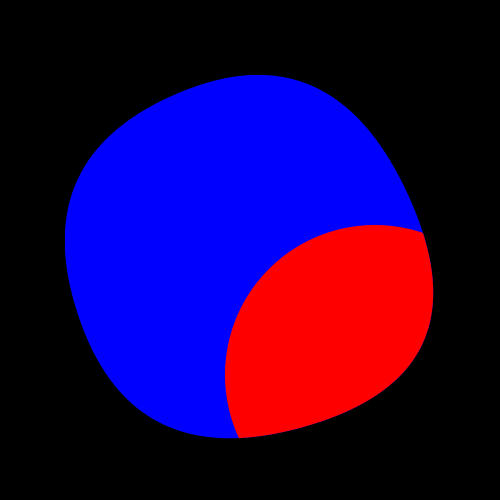
Chrome SVG rendering:
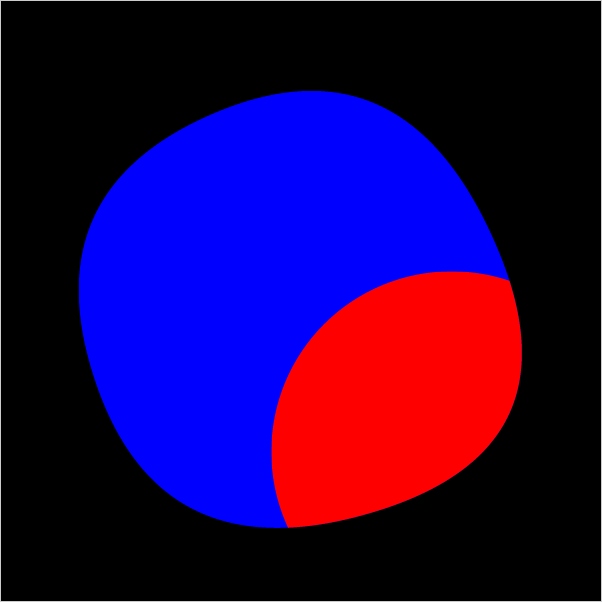
 SVG-to-PDFKit result:
 PDF File:
180cdf43-078d-4874-8169-13198267779e.pdf
PDF File:
180cdf43-078d-4874-8169-13198267779e.pdf

@alafr that is strange. I'm trying on Safari. Indeed, Chrome works correctly.
Another thing though. your PDF file still doesn't show correctly in Preview.app on Mac: [180cdf43-078d-4874-8169-13198267779e.pdf]
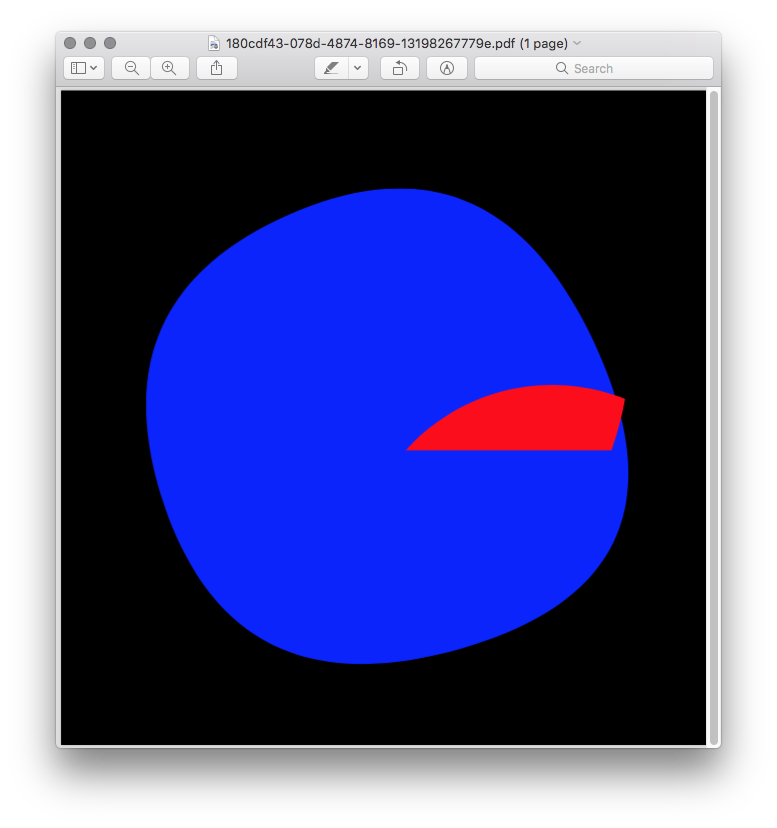
Any ideas?
Another issue. This SVG doesn't work in either Safari or Firefox (the red circle with a gradient and fill-opacity doesn't render). Chrome works fine.
<?xml version="1.0" encoding="UTF-8" standalone="no"?>
<svg version="1.1" preserveAspectRatio="xMidYMid meet" xmlns="http://www.w3.org/2000/svg" viewBox="0 0 1000 1000" width="1000" height="1000">
	<defs>
		<radialGradient id="gradient1" gradientUnits="objectBoundingBox" gradientTransform="translate(0.5, 0.5) scale(1.000, 1) translate(-0.5, -0.5)" cx="0.500" cy="0.500" r="0.500">
			<stop offset="0" stop-color="#ff0"></stop>
			<stop offset="1" stop-color="#f00"></stop>
		</radialGradient>
		<mask id="mask1" x="-500" y="-500" width="2000" height="2000">
			<rect x="0" y="0" width="1000" height="1000" fill="#fff"></rect>
		</mask>
		<mask id="mask2" x="-500" y="-500" width="2000" height="2000" stroke="0">
			<rect x="0" y="0" width="1000" height="1000" fill="#000"></rect>
			<path d="M358.50,185.33 Q668.43,55.42,820.57,399.51 Q972.70,743.60,620.25,850.00 Q267.80,956.40,158.18,635.83 Q48.56,315.25,358.50,185.33 Z" stroke="#fff" stroke-width="0.00" stroke-linecap="round" stroke-linejoin="round" fill="#fff"></path>
		</mask>
	</defs>
	<rect x="0" y="0" width="1000" height="1000" fill="#fff"></rect>
	<g mask="url(#mask1)">
		<path d="M358.50,185.33 Q668.43,55.42,820.57,399.51 Q972.70,743.60,620.25,850.00 Q267.80,956.40,158.18,635.83 Q48.56,315.25,358.50,185.33 Z" fill="#00f"></path>
		<g mask="url(#mask2)">
			<circle cx="748.13" cy="580.50" r="290.58" fill="url(#gradient1)" fill-opacity="0.5"></circle>
		</g>
	</g>
</svg>
It seems that every browser has its own rendering engine for PDFs. But ideally these relatively simple graphics should render correctly in every PDF rendering engine. Do you maybe have any pointers to make my SVG markup less error-prone?
I'll try to look into these issues. The first one is probably an issue in the Preview app. The last one has the same behaviour in many PDF viewers. It's an issue with SVG-to-PDFKit. It appears that gradients don't combine well with masks and clip-paths...
@alafr I just remembered to revisit this issue (after 2 years :) ). Do you perhaps have any updates on this?