

 ajay-dewari
Issues with Snackbar
Case 1. When the Snackbar is visible, and user triggers showFABMenu(), the small FABs will all overlapped together at the bottom of the screen after the Snackbar is dismissed.
Case 2. When the FABMenu is visible, and then the Snackbar is shown, the MoveUpwardBehavior correctly "pushes" the big FAB upwards, but the small FABs aren't moving.
Any idea to fix this? I'm not too familiar with the animation of this kind. Thank you!

Note: you have to add the custom class MoveUpwardBehavior.java which is present in the activities.utils package.
after that you need to add the property app:layout_behavior as MoveUpwardBehavior to the view which contains your FAB or the views that you want to move upwards w.r.t snackbar.
app:layout_behavior="com.ajaysinghdewari.floatingactionbuttonmenu.activities.utils.MoveUpwardBehavior"
The code is already present, may be you have removed it from the LinearLayout which contain the FAB.
 <LinearLayout
        android:id="@+id/fabLayout2"
        android:layout_width="wrap_content"
        android:layout_height="wrap_content"
        android:padding="@dimen/standard_12"
        android:clipToPadding="false"
        android:layout_marginRight="@dimen/standard_23"
        android:gravity="center_vertical"
        app:layout_behavior="com.ajaysinghdewari.floatingactionbuttonmenu.activities.utils.MoveUpwardBehavior"
        android:layout_marginBottom="@dimen/standard_23"
        android:layout_gravity="bottom|end"
        android:visibility="gone">

        <TextView
            android:layout_width="wrap_content"
            android:layout_height="wrap_content"
            android:text="FabTitle2"/>

        <android.support.design.widget.FloatingActionButton
            android:id="@+id/fab2"
            android:layout_width="wrap_content"
            android:layout_height="wrap_content"
            android:layout_marginLeft="10dp"
            app:srcCompat="@drawable/ic_camera"
            app:fabSize="mini"/>
    </LinearLayout>

Thanks for your very prompt reply. To better illustrate the issue, I have modified your sample codes, by adding a button to trigger a snackbar. Nothing else has been changed.
I have clicked on the new button, so that the snackbar becomes visible, and then immediately I click on the big FAB to show the FAB menus.
You can see the FabTitle1 is behind the big FAB (means the FAB menu is not moved upward enough because of the Snackbar)
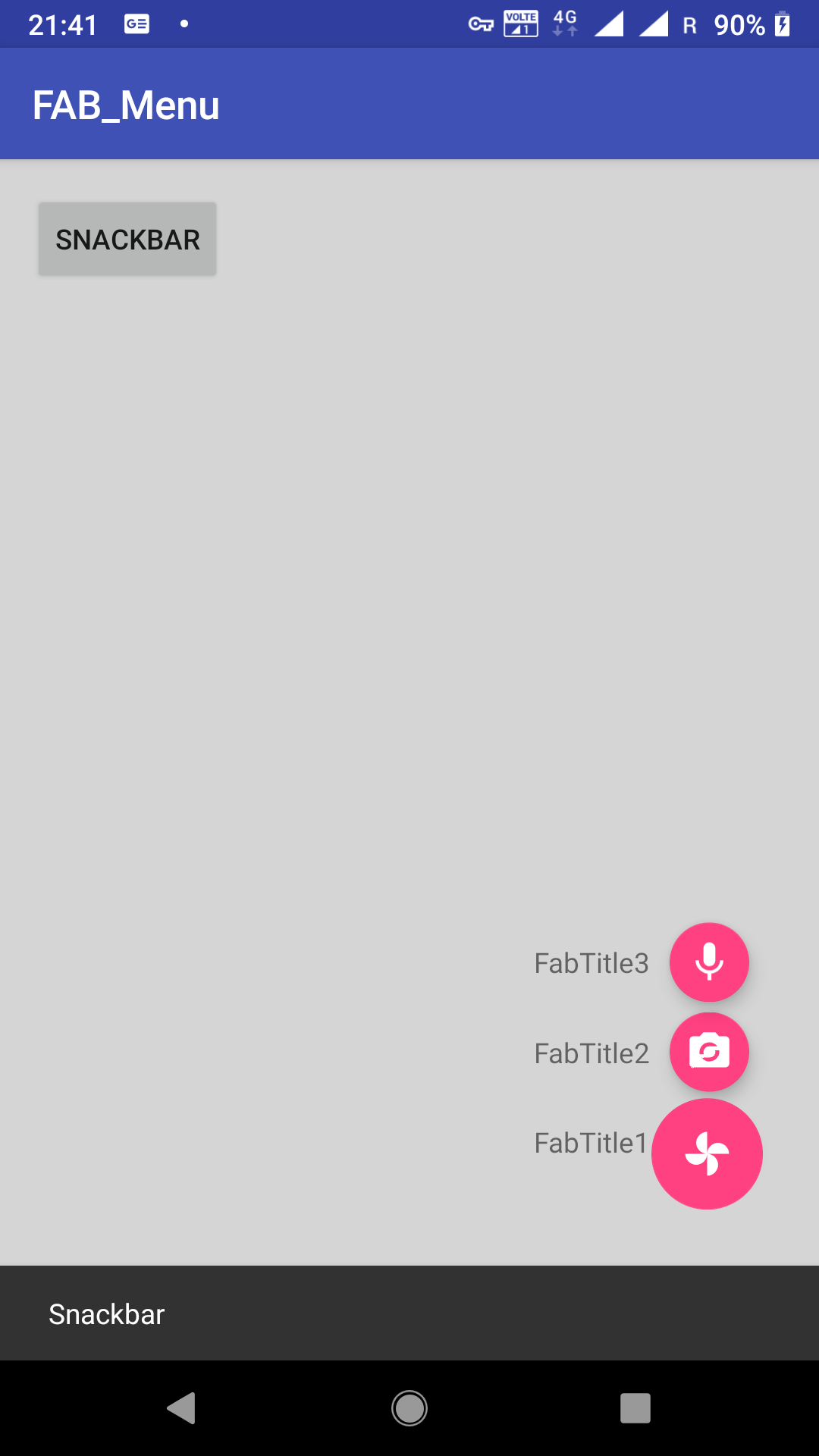
After the snackbar dismissed, the FAB menu looks like this:

Ended up this is my not-so-smart workaround:
MoveUpwardBehavior.java :
 @Override
    public boolean onDependentViewChanged(CoordinatorLayout parent, View child, View dependency) {
        float translationY = Math.min(0, ViewCompat.getTranslationY(dependency) - dependency.getHeight());
        if (child.getVisibility() == View.VISIBLE) {
            if (child.getId() == R.id. fabLayout1) {
                translationY += -child.getContext().getResources().getDimension(R.dimen.standard_55);
            } else if (child.getId() == R.id. fabLayout2) {
                translationY += -child.getContext().getResources().getDimension(R.dimen.standard_100);
            } else if (child.getId() == R.id. fabLayout3) {
                translationY += -child.getContext().getResources().getDimension(R.dimen.standard_145);
            }
        }
        ViewCompat.setTranslationY(child, translationY);
        return true;
    }

    //you need this when you swipe the snackbar(thanx to ubuntudroid's comment)
    public void onDependentViewRemoved(CoordinatorLayout parent, View child, View dependency) {
        float translationY = Math.min(0, ViewCompat.getTranslationY(dependency) - dependency.getHeight());
        if (child.getVisibility() == View.VISIBLE) {
            if (child.getId() == R.id.fabLayout1) {
                translationY += -child.getContext().getResources().getDimension(R.dimen.standard_55);
            } else if (child.getId() == R.id.fabLayout2) {
                translationY += -child.getContext().getResources().getDimension(R.dimen.standard_100);
            } else if (child.getId() == R.id.fabLayout3) {
                translationY += -child.getContext().getResources().getDimension(R.dimen.standard_145);
            }
        }
        ViewCompat.animate(child).translationY(translationY).start();
    }
MainActivity.java :
 private void showFABMenu() {
        isFABOpen = true;
        fabLayout1.setVisibility(View.VISIBLE);
        fabLayout2.setVisibility(View.VISIBLE);
        fabLayout3.setVisibility(View.VISIBLE);
        fabBGLayout.setVisibility(View.VISIBLE);
        fab.animate().rotationBy(180);
        float baseTranslation = fabLayout1.getTranslationY(); // The translationYs are based on the existing position, relatively
        fabLayout1.animate().translationY(-getResources().getDimension(R.dimen.standard_55) + baseTranslation);
        fabLayout2.animate().translationY(-getResources().getDimension(R.dimen.standard_100) + baseTranslation);
        fabLayout3.animate().translationY(-getResources().getDimension(R.dimen.standard_145) + baseTranslation);
    }
My approach is to specifically reposition the FAB Menu items relatively above the big FAB. Since I am using this on a single screen only, you see I have hardcoded the three LinearLayout IDs to make things easier to work with. I am not sure if the additional code segments can be generalised because you see each LinearLayout requires a different vertical offset.