adriengivry
Object scale shouldn't influence gizmo translation
Description When an object is child of a scaled object, its translation speed using gizmo is affect
To Reproduce Steps to reproduce the behavior:
- Create an empty
GameObject - Create a cube, child of the previous
GameObject - Scale the empty
GameObjectto 0.1 - Move the cube using the translation gizmo
- Notice the issue (Slow translation)
Expected behavior The translation gizmo behaviour shouldn't consider the scale of the object

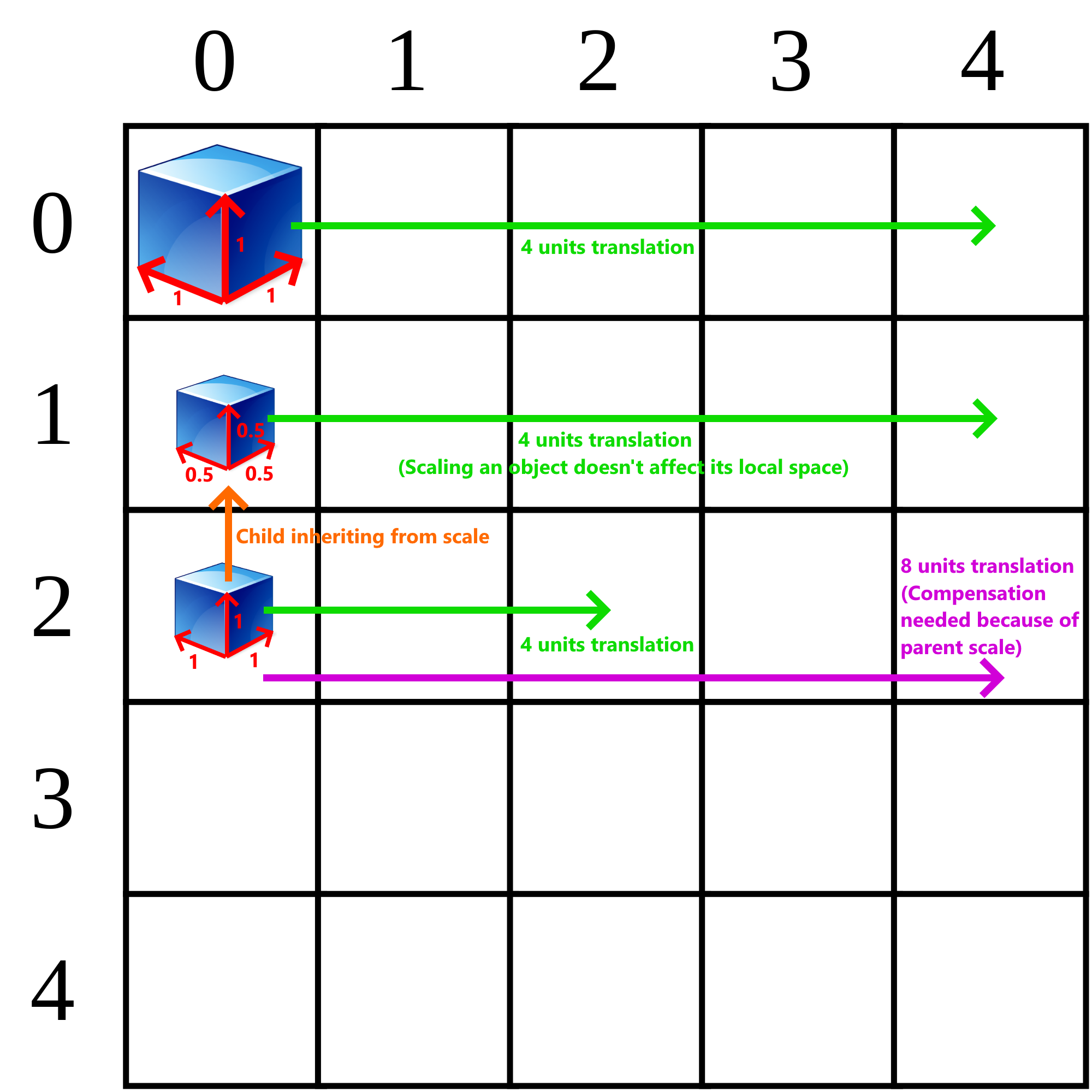
The problem here is that 1 unit in local space is different from 1 unit in world space. In our current implementation of Gizmos, we are moving objects in the space with unit coefficient instead of using raycasts.
Here is how we move our translated object:
m_target->transform.SetLocalPosition(originPosition + GetRealDirection() * translationCoefficient);
We should have some kind of SetWorldPosition to bypass the local space. We should also add SetWorldRotation and SetWorldScale. I'll open another issue for this new methods to implement.
Quick illustration of the problem: