

 adobe
adobe
Icons not loading on webpage
Description
I am loading icons for use in spectrum CSS as described in the docs at https://github.com/adobe/spectrum-css/blob/main/README.md but the icons do not show up. I see the icons are loaded in the DOM but are not loaded in the svg use element. Do you have a working sample that demonstrates this method in HTML/css/js Also, some icons in the HTML like #spectrum-icon-18-More are not defined at all in the SVG files in in the node_modules @spectrum icons folder https://opensource.adobe.com/spectrum-css/card.html
              <svg class="spectrum-Icon spectrum-Icon--sizeM" focusable="false" aria-hidden="true">
                <use xlink:href="#spectrum-icon-18-More"/>
              </svg>
Steps to reproduce
follow steps at https://github.com/adobe/spectrum-css/blob/main/README.md to use icons.
Expected behavior
icons show up.
Screenshots
Environment
- Spectrum CSS version:
- Browser(s) and OS(s):
Additional context

You need <link rel="stylesheet" href="node_modules/@spectrum-css/icon/dist/index-vars.css"> also.
See this pen: https://codepen.io/lazd/pen/JjWbogp
Inspect the includes for CSS by clicking the gear icon:
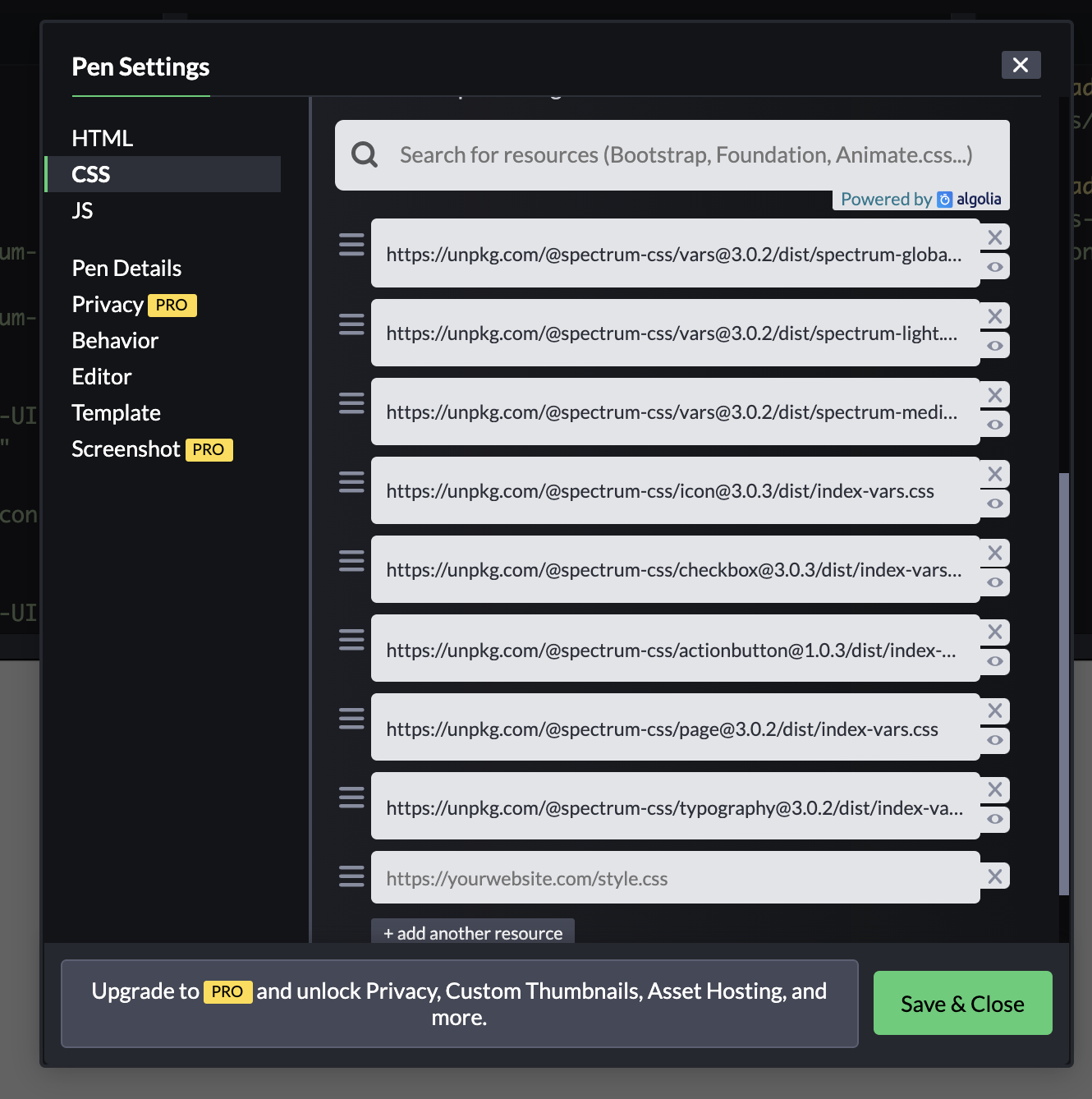

I was missing loadicons for the worklflow icons. Working now - the docs for the Spectrum CSS should list the dependencies. Michael
From: Larry Davis @.> Sent: Tuesday, May 18, 2021 1:37 PM To: adobe/spectrum-css @.> Cc: Michael Scherotter (HE/HIM) @.>; Author @.> Subject: Re: [adobe/spectrum-css] Icons not loading on webpage (#1191)
You need <link rel="stylesheet" @.@./icon/dist/index-vars.css>"> also.
See this pen: https://codepen.io/lazd/pen/JjWbogphttps://nam06.safelinks.protection.outlook.com/?url=https%3A%2F%2Fcodepen.io%2Flazd%2Fpen%2FJjWbogp&data=04%7C01%7Cmischero%40microsoft.com%7Cfbbc9a7a50f04a7f5b1508d91a3ca95f%7C72f988bf86f141af91ab2d7cd011db47%7C1%7C0%7C637569670109729807%7CUnknown%7CTWFpbGZsb3d8eyJWIjoiMC4wLjAwMDAiLCJQIjoiV2luMzIiLCJBTiI6Ik1haWwiLCJXVCI6Mn0%3D%7C1000&sdata=jAxAuTOCL4%2FUjQUopCefPSzriLYOBUIEsEDCk0B6tVc%3D&reserved=0
Inspect the includes for CSS by clicking the gear icon:
You are receiving this because you authored the thread. Reply to this email directly, view it on GitHubhttps://nam06.safelinks.protection.outlook.com/?url=https%3A%2F%2Fgithub.com%2Fadobe%2Fspectrum-css%2Fissues%2F1191%23issuecomment-843541809&data=04%7C01%7Cmischero%40microsoft.com%7Cfbbc9a7a50f04a7f5b1508d91a3ca95f%7C72f988bf86f141af91ab2d7cd011db47%7C1%7C0%7C637569670109739765%7CUnknown%7CTWFpbGZsb3d8eyJWIjoiMC4wLjAwMDAiLCJQIjoiV2luMzIiLCJBTiI6Ik1haWwiLCJXVCI6Mn0%3D%7C1000&sdata=Bn3zXBA5fmRDjlCtkkypWGF2PId7K30DUQEk9Y6AeL4%3D&reserved=0, or unsubscribehttps://nam06.safelinks.protection.outlook.com/?url=https%3A%2F%2Fgithub.com%2Fnotifications%2Funsubscribe-auth%2FAAE4VJQZJED6OQ7FSG2UMJTTOLFWBANCNFSM45C7UYUQ&data=04%7C01%7Cmischero%40microsoft.com%7Cfbbc9a7a50f04a7f5b1508d91a3ca95f%7C72f988bf86f141af91ab2d7cd011db47%7C1%7C0%7C637569670109749719%7CUnknown%7CTWFpbGZsb3d8eyJWIjoiMC4wLjAwMDAiLCJQIjoiV2luMzIiLCJBTiI6Ik1haWwiLCJXVCI6Mn0%3D%7C1000&sdata=WaMftTvFqhxBi995HpA6T3oUwc5%2B4mQoOW4kdCi0lRc%3D&reserved=0.