abuzuhri
CreateInboundShipmentPlan isn't handling item condition correctly
When creating an inbound shipment plan if you set the item condition to NewItem you get the following error:
Amazon Api didn't respond with Okay, see exception for more details{ "errors": [ { "message": "Invalid request body: [object has missing required properties ([\"Condition\"])]", "code": "InvalidInput" } ] }
In this scenario, it isn't sending the default enumeration value but Amazon requires it.
If you set item condition to NewWithWarranty you get this error:
Amazon Api didn't respond with Okay, see exception for more details{ "errors": [ { "message": "Invalid request body: [instance value (1) not found in enum (possible values: [\"NewItem\",\"NewWithWarranty\",\"NewOEM\",\"NewOpenBox\",\"UsedLikeNew\",\"UsedVeryGood\",\"UsedGood\",\"UsedAcceptable\",\"UsedPoor\",\"UsedRefurbished\",\"CollectibleLikeNew\",\"CollectibleVeryGood\",\"CollectibleGood\",\"CollectibleAcceptable\",\"CollectiblePoor\",\"RefurbishedWithWarranty\",\"Refurbished\",\"Club\"]), instance type (integer) does not match any allowed primitive type (allowed: [\"string\"]), format attribute \"int32\" not supported]", "code": "InvalidInput" } ] }
In this scenario, it isn't translating from the enum integer value to the string value.


Does this work?
<Test, UseDatabase> Sub SandboxCreateInboundShipmentPlan()

    Dim request As New AmazonSpApiSDK.Models.FulfillmentInbound.CreateInboundShipmentPlanRequest

    With request

        .ShipFromAddress = New AmazonSpApiSDK.Models.FulfillmentInbound.Address

        With .ShipFromAddress
            .Name = "Name"
            .AddressLine1 = "123 any st"
            .AddressLine2 = "AddressLine2"
            .City = "Ann Arbor"
            .StateOrProvinceCode = "MI"
            .PostalCode = "48188"
            .CountryCode = "US"
        End With

        .LabelPrepPreference = AmazonSpApiSDK.Models.FulfillmentInbound.LabelPrepPreference.SELLERLABEL

        .ShipToCountryCode = "ShipToCountryCode"
        .ShipToCountrySubdivisionCode = "ShipToCountrySubdivisionCode"

        Dim items As New AmazonSpApiSDK.Models.FulfillmentInbound.InboundShipmentPlanRequestItemList

        Dim item As New AmazonSpApiSDK.Models.FulfillmentInbound.InboundShipmentPlanRequestItem

        With item
            .SellerSKU = "SellerSKU"
            .ASIN = "ASIN"
            .Condition = AmazonSpApiSDK.Models.FulfillmentInbound.Condition.NewItem
            .Quantity = 1
            .QuantityInCase = 1

            Dim preps = New AmazonSpApiSDK.Models.FulfillmentInbound.PrepDetailsList

            Dim prep = New AmazonSpApiSDK.Models.FulfillmentInbound.PrepDetails

            With prep
                .PrepInstruction = AmazonSpApiSDK.Models.FulfillmentInbound.PrepInstruction.Polybagging
                .PrepOwner = AmazonSpApiSDK.Models.FulfillmentInbound.PrepOwner.AMAZON
            End With

            preps.Add(prep)

            .PrepDetailsList = preps
        End With

        items.Add(item)

        .InboundShipmentPlanRequestItems = items
    End With

    Dim plans = SandboxConnection.FulFillmentInbound.CreateInboundShipmentPlan(request)

    Assert.AreEqual(1, plans.InboundShipmentPlans.Count)

End Sub

Function SandboxConnection() As AmazonConnection

    Return New AmazonConnection(New AmazonCredential() With {
        .AccessKey = "{AccessKey}",
        .SecretKey = "{SecretKey}",
        .RoleArn = "{RoleArn}",
        .ClientId = "{ClientId}",
        .ClientSecret = "{ClientSecret}",
        .RefreshToken = "{RefreshToken}",
        .MarketPlace = MarketPlace.GetMarketPlaceByID("ATVPDKIKX0DER"),
        .Environment = Environments.Sandbox
    })

End Function
its will be helpful if you debug and get result JSON because I cant produce same error
its will be helpful if you debug and get result JSON because I cant produce same error
The result JSON was in the original post, which I've included below with the formatting cleaned up a bit. Is this what you need or something else?
When creating an inbound shipment plan if you set the item condition to NewItem you get the following error: Amazon Api didn't respond with Okay, see exception for more details{ "errors": [ { "message": "Invalid request body: [object has missing required properties (["Condition"])]", "code": "InvalidInput" } ] }
In this scenario, it isn't sending the default enumeration value but Amazon requires it.
If you set item condition to NewWithWarranty you get this error: Amazon Api didn't respond with Okay, see exception for more details{ "errors": [ { "message": "Invalid request body: [instance value (1) not found in enum (possible values: ["NewItem","NewWithWarranty","NewOEM","NewOpenBox","UsedLikeNew","UsedVeryGood","UsedGood","UsedAcceptable","UsedPoor","UsedRefurbished","CollectibleLikeNew","CollectibleVeryGood","CollectibleGood","CollectibleAcceptable","CollectiblePoor","RefurbishedWithWarranty","Refurbished","Club"]), instance type (integer) does not match any allowed primitive type (allowed: ["string"]), format attribute "int32" not supported]", "code": "InvalidInput" } ] }
In this scenario, it isn't translating from the enum integer value to the string value.
@gambit823
please check nuget v1.4.25 and let me know if that solve the problem
with item.Condition = AmazonSpApiSDK.Models.FulfillmentInbound.Condition.NewWithWarranty I am now getting: Amazon Api didn't respond with Okay, see exception for more details[{"code":"InvalidInput","message":"Could not match input arguments"}]
With item.Condition = AmazonSpApiSDK.Models.FulfillmentInbound.Condition.NewItem I am getting: Amazon Api didn't respond with Okay, see exception for more details{ "errors": [ { "message": "Invalid request body: [object has missing required properties (["Condition"])]", "code": "InvalidInput" } ] }
its will be helpful if you debug and get result JSON because I cant produce same error
I'm getting same error, seems like amazon is returning response payload (I traced it through HTTP Debugger) but something is not right with the following code,
protected void ParseResponse(IRestResponse response) { if (response.StatusCode == HttpStatusCode.OK || response.StatusCode == HttpStatusCode.Accepted || response.StatusCode == HttpStatusCode.Created) return; else if (response.StatusCode == HttpStatusCode.NotFound) { throw new AmazonNotFoundException("Resource that you are looking for is not found", response); } else { Console.WriteLine("Amazon Api didn't respond with Okay, see exception for more details" + response.Content);
            var errorResponse = response.Content.ConvertToErrorResponse();
            if (errorResponse != null)
            {
                var error = errorResponse.Errors.FirstOrDefault();

                switch (error.Code)
                {
                    case "Unauthorized":
                        throw new AmazonUnauthorizedException(error.Message, response);
                    case "InvalidSignature":
                        throw new AmazonInvalidSignatureException(error.Message, response);
                    case "InvalidInput":
                        throw new AmazonInvalidInputException(error.Message, response);
                    case "QuotaExceeded":
                        throw new AmazonQuotaExceededException(error.Message, response);
                }

            }
        }

        throw new AmazonException("Amazon Api didn't respond with Okay, see exception for more details", response);
    }

This is giving me fits. Any idea when we'll have a fix? Anything I can do to assist?
@gambit823 can you add a breakpoint in requestservice.cs addjsonbody and have a look to see how the json is getting serialized? If you can post it here to double check.

@gambit823 can you add a breakpoint in requestservice.cs addjsonbody and have a look to see how the json is getting serialized? If you can post it here to double check.
with item.Condition = AmazonSpApiSDK.Models.FulfillmentInbound.Condition.NewItem it serializes: "{"LabelPrepPreference":"SELLER_LABEL","ShipFromAddress":{"Name":"Name","AddressLine1":"123 any st","AddressLine2":"AddressLine2","City":"Ann Arbor","StateOrProvinceCode":"MI","CountryCode":"US","PostalCode":"48188"},"ShipToCountryCode":"ShipToCountryCode","ShipToCountrySubdivisionCode":"ShipToCountrySubdivisionCode","InboundShipmentPlanRequestItems":[{"SellerSKU":"SellerSKU","ASIN":"ASIN","Quantity":1,"QuantityInCase":1,"PrepDetailsList":[{"PrepInstruction":"Polybagging","PrepOwner":"AMAZON"}]}]}"
and Amazon returns: { "errors": [ { "message": "Invalid request body: [object has missing required properties (["Condition"])]", "code": "InvalidInput" } ] }
@gambit823 can you add a breakpoint in requestservice.cs addjsonbody and have a look to see how the json is getting serialized? If you can post it here to double check.
with item.Condition = AmazonSpApiSDK.Models.FulfillmentInbound.Condition.NewItem it serializes: "{"LabelPrepPreference":"SELLER_LABEL","ShipFromAddress":{"Name":"Name","AddressLine1":"123 any st","AddressLine2":"AddressLine2","City":"Ann Arbor","StateOrProvinceCode":"MI","CountryCode":"US","PostalCode":"48188"},"ShipToCountryCode":"ShipToCountryCode","ShipToCountrySubdivisionCode":"ShipToCountrySubdivisionCode","InboundShipmentPlanRequestItems":[{"SellerSKU":"SellerSKU","ASIN":"ASIN","Quantity":1,"QuantityInCase":1,"PrepDetailsList":[{"PrepInstruction":"Polybagging","PrepOwner":"AMAZON"}]}]}"
and Amazon returns: { "errors": [ { "message": "Invalid request body: [object has missing required properties (["Condition"])]", "code": "InvalidInput" } ] }
Can you share c# code for sample i will test from my side
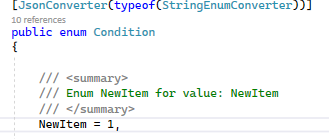
@abuzuhri it looks like the JsonSerializer doesn't serialize the enum with position 0 if the class has a DataContract decoration.
to recreate create a console app and try this
Console.WriteLine(JsonConvert.SerializeObject(new InboundShipmentPlanRequestItem() { Condition= Condition.NewItem })); Console.WriteLine(JsonConvert.SerializeObject(new InboundShipmentPlanRequestItem() { Condition = Condition.CollectibleLikeNew }));

But if you change the position of the NewItem to start in 1 (rather than the default of zero) then it works