

 absolute-quantum
UnicodeDecodeError: 'utf-8' codec can't decode byte .... in position 1: invalid continuation byte
When fixing model:
Python: Traceback (most recent call last): File "C:\Users\AaronWu\AppData\Roaming\Blender Foundation\Blender\3.1\scripts\addons\cats-blender-plugin-master\tools\armature.py", line 969, in execute Common.fix_twist_bones(mesh, bones_to_delete) File "C:\Users\AaronWu\AppData\Roaming\Blender Foundation\Blender\3.1\scripts\addons\cats-blender-plugin-master\tools\common.py", line 2096, in fix_twist_bones mix_weights(mesh, vg_twist1.name, vg_parent.name, mix_strength=0.75) UnicodeDecodeError: 'utf-8' codec can't decode byte 0xd0 in position 1: invalid continuation byte
location:

This is an issue with blender 3.0 and 3.1. This is fixed in Development version/branch


This is not fixed in the development version. (yes, the path does say cats-blender-plugin-master, but it is the development version installed there)

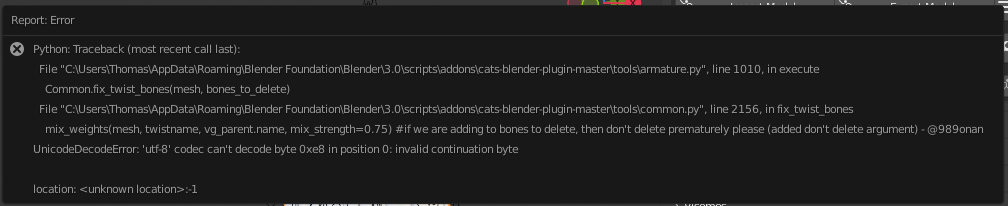


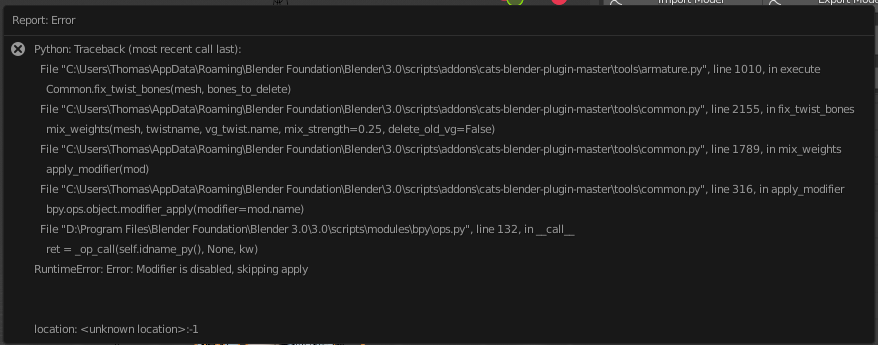
If it doesn't fail with a UnicodeDecodeError it often fails with a RuntimeError: Error: Modifier is disabled, skipping apply instead, which may be related since it originates from the same mix_weights function and leaves a single VertexWeightMix Modifier on the mesh, with a missing "Vertex Group A".

Rarely, "Fix Model" will manage to succeed without either of these two errors.
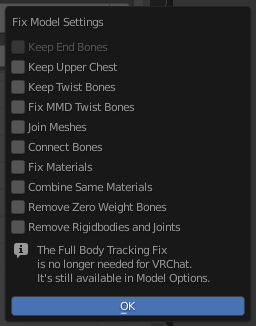
The settings I was using with "Fix Model" was every setting disabled
 The model in question that is having these issues is
 Eiri Shimizu V2.pmx from https://bowlroll.net/file/13980
I did nothing other than Import Model followed by Fix Model

I believe I have found the issue here and it's specific to Blender 3.0+. The problem is that applying the Vertex Weight Mix modifier internally recreates/reorders all of the vertex groups on the object in such a way that they don't necessarily remain in the same memory locations. This means that existing references to vertex groups on a mesh cannot be used after applying the Vertex Weight Mix modifier. To replicate the issue.
- Select a mesh object (I've been using a default cube) and add a few vertex groups
- In the Python console:
all_vg = bpy.context.object.vertex_groups[:] - Apply a Vertex Weight Mix modifier with default settings and any two of the object's vertex groups as Vertex Group A and B
- In the Python console:
[v.name for v in all_vg] - In most cases, you will get a UnicodeDecodeError or find that the names are now in the wrong order or are now blank
I think this is a Blender bug, because I can't reproduce it in Blender 2.93 or 2.80, but it occurs on 3.0, 3.1 and the 3.2 alpha build I have. I haven't yet got around to checking the 3.2 release or looking for this issue on Blender's issue tracker.
It's worth pointing out that it's not just the names of the vertex groups that end up broken when this happens, during my testing I tried getting the weights of certain vertices from the old references to the vertex groups and found them giving incorrect results, and similarly, I tried getting the index attribute of the vertex groups and those were incorrect too.
I've made a bug report on Blender's issue tracker for this issue https://developer.blender.org/T98751. We will likely need to come up with a workaround in Cats in the meantime.
This issue is a duplicate of https://github.com/absolute-quantum/cats-blender-plugin/issues/308

I'm having a similar problem, however it's with naming visemes. This happens in the development version of Cats. I've been using Blender 3.5. If I were to apply a viseme in a Japanese name (in this case I was naming the Japanese symbol of "a"), whenever it's applied and if I were to click on one of the 3 options ("Viseme AA", "Viseme OH", or "Viseme CH"), the name would end up gibberish and I'd get the error if I clicked on that name. However, if I were to look at the "Object Data Properties" tab, it shows the Japanese name I named under the shape keys drop down in that tab.
