
OBSControl
 OBSControl copied to clipboard
 Zingabopp
A Beat Saber mod to control and monitor OBS in-game.
OBSControl 
 |
|

A Beat Saber mod to automatically start/stop recording in OBS when you play a song.
Installation
- OBS
- Requires the OBS-Websocket OBS plugin.
- OBS v28 requires the OBS-Websocket 4.9.1-compat plugin
- OBS v27 requires the OBS-Websocket 4.9.1 plugin
- You should have something like this in OBS:
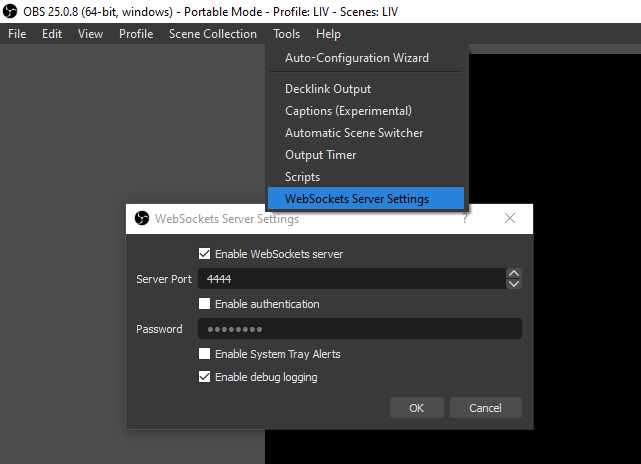
- If OBS is running on the same PC as Beat Saber, you would use
ws://127.0.0.1:4444(default) as theServerAddressinBeat Saber\UserData\OBSControl.json.
- Requires the OBS-Websocket OBS plugin.
- Beat Saber
- Extract the release zip from the Releases page to your Beat Saber folder.
OBSControl.dllshould end up in yourBeat Saber\Pluginsfolder. - You should see OBSControl in the Mod Settings menu if you installed it correctly.
- Extract the release zip from the Releases page to your Beat Saber folder.
Configuration
Settings can be found in-game in the Mod Settings > OBSControl menu.
- Enabled: Check to have OBSControl automatically start/stop recording.
- ServerAddress: The address of your OBS websocket server (in the form of
ws://ip:port). This doesn't usually need to be changed. - ServerPassword: If you set a password in OBS Websocket, enter it here.
- LevelStartDelay: Amount of time in seconds to delay the start of the level. When the Play button is clicked, OBS will start recording for this amount of time before the level actually starts.
- RecordingStopDelay: Amount of time in seconds to wait after the end of a level before stopping the recording or switching to the End Scene.
- Scene Settings
- GameSceneName: Set the name of the OBS scene you want to use for gameplay footage, leave blank to disable scene switching.
- StartSceneName: Name of the OBS scene to use as an intro for your videos. You must have a valid GameSceneName set to use this option.
- StartSceneDuration: Amount of time in seconds to show the Start Scene before switching to the Game Scene.
- EndSceneName: Name of the OBS scene to use as an outro for your videos. This scene is shown after RecordingStopDelay has finished. You must have a valid GameSceneName set to use this option.
- EndSceneDuration: Amount of time in seconds to show the End Scene before stopping the recording.
- Advanced (Available only by editing
OBSControl.jsonin yourBeat Saber\UserDatafolder)- RecordingFileFormat: Defines how the file will be renamed after the recording stops.
- Substitution characters are prefixed with
? - Optional groups are bounded by
<>- The group is only shown if one or more of the substitutions inside the group are not empty strings.
- Example: The format
VideoFile<_I_Got_A_?F>will beVideoFile_I_Got_A_FCif you get a full combo orVideoFileif you don't.
- Example: The format
- The group is only shown if one or more of the substitutions inside the group are not empty strings.
- Optional parameters: Some substitutions can have additional parameters inside { }. For example, the format
?@{yyyyMMddHHmm}would rename the file to202005050807.mkvon 05/05/2020 8:07 AM.
- Substitution characters are prefixed with
- RecordingFileFormat: Defines how the file will be renamed after the recording stops.
Availble Substitutions:
Song Data:
| Key | Substitution | Parameter(s) | Notes |
|---|---|---|---|
| B | BeatsPerMinute | BPM to two decimal places, ignoring trailing zeroes. | |
| D | DifficultyName | Full name of the difficulty. | |
| d | DifficultyShortName | Short name of the difficulty (i.e E+ instead of ExpertPlus). |
|
| A | LevelAuthorName | (int)Max Length | Name of the mapper. Example: ?A{10} to use up to 10 characters of the mapper name. |
| a | SongAuthorName | (int)Max Length | Name of the song artist. Example: ?a{10} to use up to 10 characters of the artist name. |
| @ | CurrentTime | (string)DateTimeFormat | Date/Time of the recording when stopped. Format Information, default is yyyyMMddHHmm |
| I | LevelId | LevelId of the song. | |
| J | NoteJumpSpeed | NJS to two decimal places, ignoring trailing 0s. | |
| L | SongDurationLabeled | Duration of the song in minutes and seconds (i.e. 3m.25s for 3 min 25 sec). |
|
| l | SongDurationNoLabels | Duration of the song in minutes and seconds with no labels (i.e. 3.25 for 3 min 25 sec). |
|
| N | SongName | (int)Max Length | Name of the song. Example: ?N{10} to use up to 10 characters of the song name. |
| n | SongSubName | (int)Max length | Subname of the song. Example: ?n{10} to use up to 10 characters of the song subname. |
Completion Results Data:
| Key | Substitution | Parameter(s) | Notes |
|---|---|---|---|
| 1 | FirstPlay | 1st if you haven't played the song according to Beat Saber's data. |
|
| b | BadCutsCount | Number of bad cuts. | |
| T | EndSongTimeLabeled | How far into the song you got in minutes and seconds (i.e. 3m.25s for 3 min 25 sec). |
|
| t | EndSongTimeNoLabels | How far into the song you got in minutes and seconds with no labels (i.e. 3.25 for 3 min 25 sec). |
|
| F | FullCombo | FC if you full combo'd the song. |
|
| M | Modifiers | Enabled song modifiers, separated by _ (i.e. DA_FS for Disappearing Arrows and Faster Song). |
|
| m | MissedCount | Number of notes missed. | |
| G | GoodCutsCount | Number of good cuts. | |
| E | LevelEndType | Has a value for any level end type (Cleared/Quit/Failed/Unknown). |
|
| e | LevelIncompleteType | Only has a value if the level was incomplete (Quit/Failed/Unknown). |
|
| C | MaxCombo | Max combo for the song. | |
| S | RawScore | Score before any modifiers were applied. | |
| s | ModifiedScore | Score after modifiers (your actual score). | |
| R | Rank | Score rank (SSS/SS/S/A/B/C/D/E). |
|
| % | ScorePercent | Score percent to two decimal places. |
 Zingabopp