

 Yummypets
Memory spikes after selecting 25 photos and press "Next" without applying any filter
Describe the bug If I select 25 photos from the album the those just closes the screen (like locking it for example) after I press "Next" on the filters screen. This is the memory increasing after each step Opening de screen - 80 mb Opening the YPImagePicker with the default album - 101 mb Switching from the main album to a custom one - 146 mb (goes back to 136 after few seconds) Selecting 25 images - 170mb but goes down to 120mb after a while Press next and moving to the filters screen - 250 mb No filters applied and press next - memory goes to 550mb (on older iPhones this is the moment when the phone closes) After the filters screen is dismissed the memory goes down to 280mb
Memory spikes:
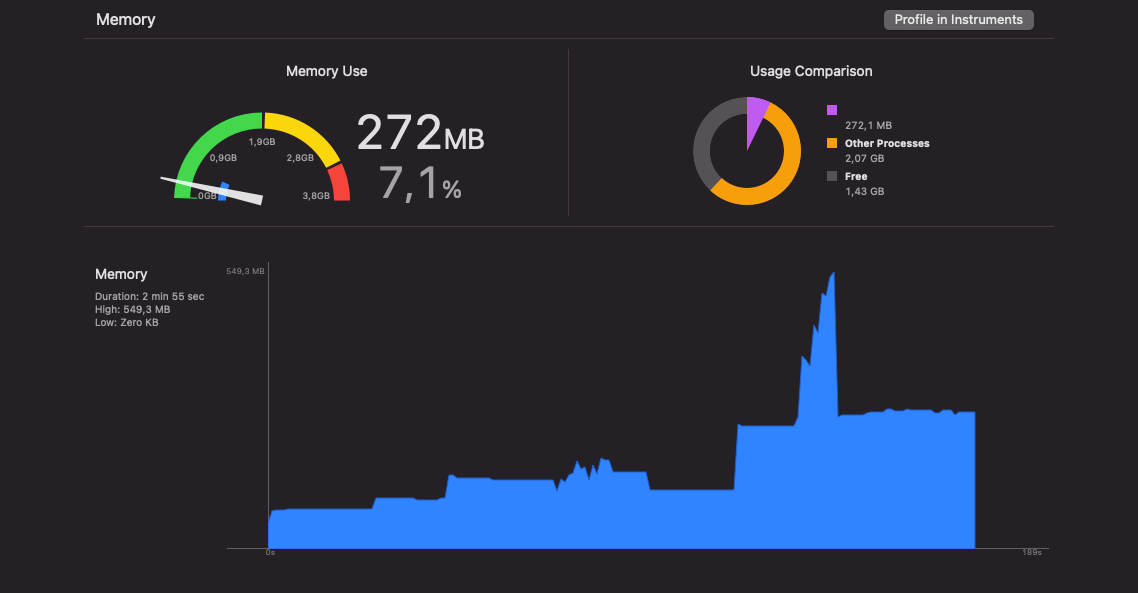
On newer iPhones (8, X, 11 etc) this flow works fine, but on the older iPhones (5S, 6S, 7) this memory spike causes the app to be closed by the system without any warning. The phone itself just closes (screen turned off and turned on after few seconds)...
To Reproduce Steps to reproduce the behavior:
- Download images from here: https://drive.google.com/file/d/1DZS6Yt5FPQNU_GftxhefWkGbi2D6ec1w/view?usp=sharing Those are some stock photos with about 1.5 - 3MB each
- Add those photos in one album on an iPhone 5S/6/6S/7
- Open YPImagePicker
- Select for example 25 images from this album
- Press Next (don't apply any image filter) - I don't know what happens here but it takes up to 1 minute to close this screen and call the completion block with the images
- Phone screen turns off...
Expected behavior The app should not turn off
Environment (please complete the following information):
- Device: iPhone 5S/6/6S/7
- OS: 12/13/14
- Xcode Version: Version 12.4 (12D4e)
- Swift Version: 5.1
Installation Type
- Cocoapods

Also related to this issue: https://stackoverflow.com/questions/25447171/uiimagepicker-image-size-is-more-than-original
for example, one photo that I used has the following size:
in finder: 2.5mb (wp1848524-8k-wallpapers.jpg from .zip)
After I select that image from YPImagePicker and I call the compression function:
10mb:
(lldb) po self.jpegData(compressionQuality: 1.0)
▿ Optional<Data>
▿ some : 10402683 bytes
- count : 10402683
▿ pointer : 0x0000000138387000
- pointerValue : 5238190080
-
2.6 mb (even if I use half of the compression the value is not exactly equal..)
(lldb) po self.jpegData(compressionQuality: 0.5)
▿ Optional<Data>
▿ some : 2668145 bytes
- count : 2668145
▿ pointer : 0x0000000138e99000
- pointerValue : 5249798144
(lldb)
1.2 mb: (lldb) po self.jpegData(compressionQuality: 0.1) ▿ Optional<Data> ▿ some : 1201526 bytes - count : 1201526 ▿ pointer : 0x0000000138d73000 - pointerValue : 5248593920
