

 Xilinx
Can we run this code on zcu102?
Hello All,
I would like to run this code on a xilinx ZCU102 board. Can this run on ZCU102?
Thanks, kapoor7997

TLDR: If you have more than 8GB of RAM, yes, you can, if not, you cannot. And when your RAM is not performant enough, your mining performance would not be that great for the performance is limited by the memory performance.
I have minified(?) the logic of this code to fit into zedboard, so, yes, you can test drive this code with modifications on zcu102. The problem is that if you want to check performance you need large RAM (> 8GB) for DAG and more preferably, you will want to have HBM (high bandwidth memory) for merits of running FPGA implementation over GPU.
As I said, I had tested on my zedboard which has only 512MB of ram, I have to reduce the size of DAG several 10s of MBs, and just checked the parallel execution performance of the mining algorithm. (Yet, it has been a very interesting learning experience for I have almost no experience on FPGA programming and am trying to learn HLS development using Xilinx FPGA)
Of course, you have to check how many kernels of ETHASH could be implemented on your board as this code itself contains/runs multiple (8) kernels. And if your board does not have enough RAM, you cannot run real mining tasks.

Hi chunsj,
Thanks for replying on my question. I have ZCU102 board with 8 Gb ram. The dag size today is 4.8438. But you mentioned that ram needs to be >8Gb. Is there another reason we need more than 8Gb considering that the DAG size is 4.8438.
When you say "how many kernels of ETHASH could be implemented on your board". Do you mean how many parralel IP's of this code we can run, or do you mean something else by kernel?
When you say "parallel execution performance of the mining algorithm", what doe that mean. Again Are you talking about running parralel IP's of this code.
So now that I do have 8Gb of ram on my board, What instructions can I follow to get it running on this board? Can you please provide a direction?
Thanks, kapoor7997
For 8GB, yes, I count the RAM size as 4GB. 8GB, that's why I have said that. :-)
If you have read the code in https://github.com/Xilinx/blockchainacceleration/tree/main/hw/ethash8Greturn/kernel then you could see that this implementation uses multiple instances of the kernel (of course, they are running in parallel). If you have enough LUT or FPGA resources, then you can implement 8 or more instances (to me, using zedboard, only one with other modification, could be implemented).
By parallel execution, I just mean FPGA just runs everything at once (unlike conventional CPU), sorry for my poor english. In my experiment, even on the zedboard, the hashing implementation on FPGA(PL part) runs almost 10 times faster than vertorized code on CPU(PS part); but as I said, this is not the exact performance measure, because I have used very small DAG data and which is the real bottleneck.
Hi chunsj,
I am trying to get it to work on the ZCu102 board.
I have vitis and vivado 2021.2 version installed.
I modified build.sh to replace the DEVICE=u55n_gen3x4 to DEVICE=zcu102 at two places.
Then I modified the Makefile in the /hw/ethash8Greturn directory from DEVICE ?= xilinx_u55n_gen3x4 to DEVICE ?= zcu102.
Then I downloaded the xclbin files and put it in same directory as build.sh.
Then I sources XRT like this source /opt/xilinx/xrt/setup.sh.
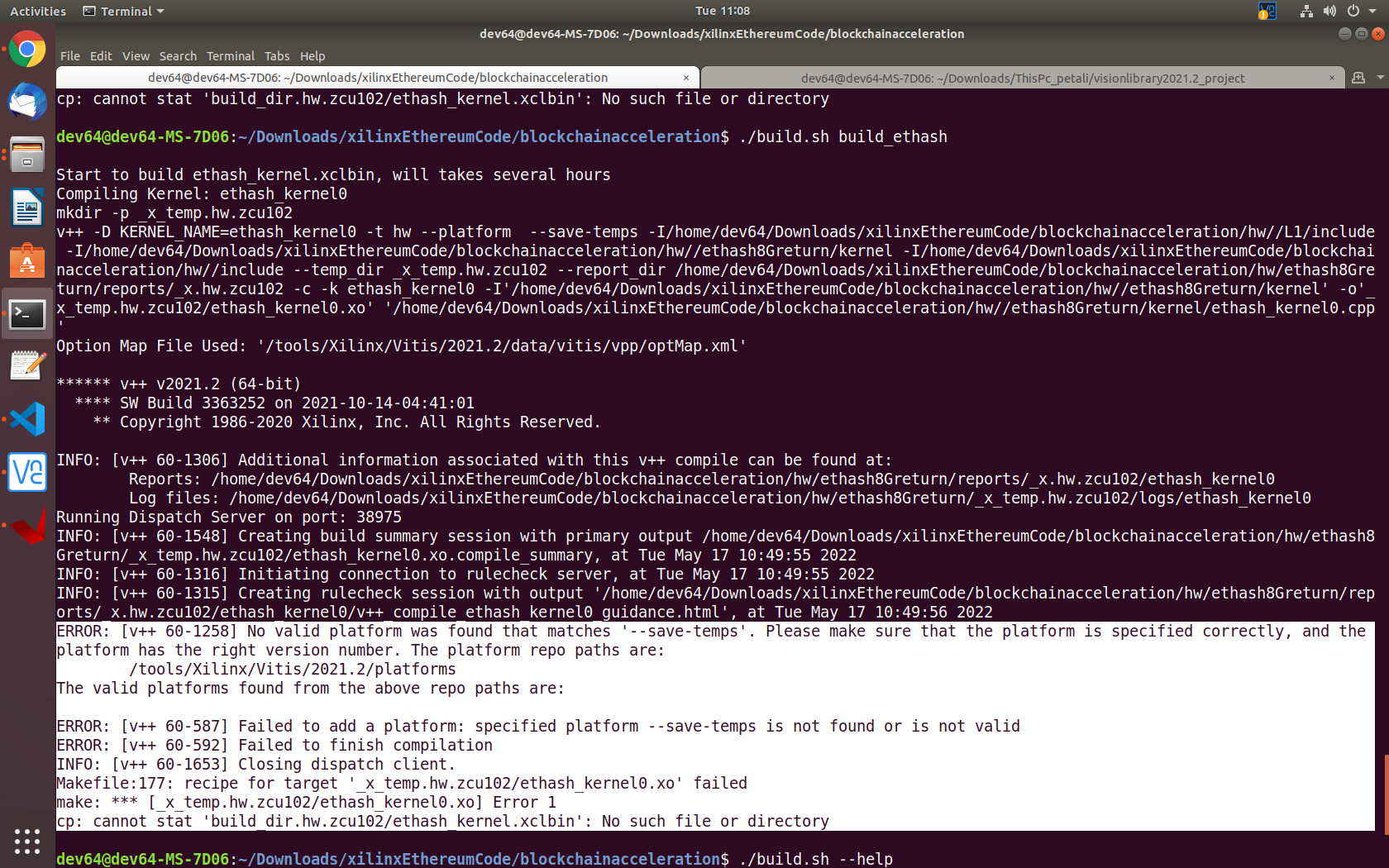
Then I run ./build.sh build_ethash
And I get this error(Also Snapshot is attached)
_ERROR: [v++ 60-1258] No valid platform was found that matches '--save-temps'. Please make sure that the platform is specified correctly, and the platform has the right version number. The platform repo paths are: /tools/Xilinx/Vitis/2021.2/platforms The valid platforms found from the above repo paths are: ERROR: [v++ 60-587] Failed to add a platform: specified platform --save-temps is not found or is not valid ERROR: [v++ 60-592] Failed to finish compilation INFO: [v++ 60-1653] Closing dispatch client. Makefile:177: recipe for target '_x_temp.hw.zcu102/ethash_kernel0.xo' failed make: *** [_x_temp.hw.zcu102/ethash_kernel0.xo] Error 1 cp: cannot stat 'build_dir.hw.zcu102/ethash_kernel.xclbin': No such file or directory_
Looks like its not accepting the hardware zcu102 as valid hardware. I will really really appreciate if you can let me know where I need modifications to run it on ZCU102 board as you went through all this to get it to work on the zedboard.
Thank you,
Oh, you have to create a Vitis Embedded Acceleration Platform if your board does not have a supported platform package from Xilinx (which is my case, I have to learn to create a Vitis Embedded Acceleration Platform for my zedboard which does not have officially supported platform package). Creating an Acceleration Platform is not that hard if you have experience in PetaLinux and those Xilinx tools (which I did not have).
You can find official documentations on it here. https://xilinx.github.io/Vitis-Tutorials/2021-2/build/html/docs/Vitis_Platform_Creation/Vitis_Platform_Creation.html Yet to me, https://www.hackster.io/mohammad-hosseinabady2/vitis-2021-1-embedded-platform-for-zybo-z7-20-d39e1a this is more helpful. (I have actually watched lectures of this man in Udemy)
And finally, I am rather afraid that the source code itself could be compiled for other platform as is without proper modifications.
Hi chunsj,
Thank you for your reply. I do have some experience on petalinux and xilinx tools.
So this repo doesnt have any hdl code. Which means I will create hardware xsa file. Do I use prebuilt zcu102 board's xsa?? How do I incorporate this code into the vitis embedded platform? Do you know the steps?
UPDATE::: How is it creating the xpfm file? I am trying to understand the steps and the flow
Can we use this kernel as it is on the ZCU102 board or is there changes needed in the kernel to get it to work on ZCu102 board? I saw that the Varium C1100 card mentions that it has xilinx ultrascale+ and I checked that ZCu102 mentions zynq ultrascale+ MPSOC. Is there a difference?
I would really appreciate if you can share the steps you used for your zedboard?
Thanks, kapoor7997
TLDR; you need to learn how to create vitis accelerated application.
I think you can start from learning how to create a Vitis Embedded Acceleration Platform. You can search on Google and find some references (including what I've attached in previous message). And sorry, I do not have any documentation on my own creation of the Vitis Embedded Acceleration Platform for zedboard. (though you can find the result here https://github.com/chunsj/zedboard_base if you are interested).
As far as I know you cannot simply use the binary kernel (and even the code without modification, at least for HBM and connectivity which I think you should know what I mean or you need to learn more on this) does work on ZCU102 board.
I, as well, do not have much experience on FPGA development (I'm learning HLS, and interested especially on the computational appliations) So I cannot tell you the exact or technical differences between boards better than Xilinx documentations.
On my zedboard testing; first, I have to create an Embedded Acceleration Platform to be used in Vitis as I said before, then, instead of using hw code in this repository, I have created a Vitis HLS project for DAG kernel referring (or you can saying copying code :-)) and learn what it does and how it does. And I created a Vitis project for DAG kernel (for zedboard)) as well as host code for driving kernel. (And running it on my zedboard). For ETHASH kernel, I had done similarly.
That's what I have done with my zedboard.
Hi chunsj,
We understand the idea that we need to generate vitis acceleration platform. The outcome of vitis acceleration platform is .xpfm file. Just trying to understand where in this code do we pass the generated xpfm file. I see in the utils.mk there is mention of xpfm but that part of code is conditional to if the $DEVICE is null/0. How did you use the xpfm file in this code?
Thanks, kapoor7997
Hi, Kapoor Please refer to the following link to create a Vitis embedded acceleration platform(XPFM file). Vitis-Tutorials/Vitis_Platform_Creation/Design_Tutorials/02-Edge-AI-ZCU104 By the way when you do step1 of the tutorial to create a Vivado project please choose the board as zcu102. Thanks

Thank you for replying to this thread. I understand that I have to create a vitis embedded platform, but my query is about this specific code.
The query questions are as follows:-
- How do we use the hw folder in this repo when working on the embedded platform when building for ZCU102
- Lets say I have generated the xpfm file, how will I use the xpfm file within this repo.
- Can I please get steps needed (or atleast some guidance on how) to build this for any other board. Specifically the changes needed in the makefile and build.sh.
Disclaimer:- I havent used HLS before. I just followed one tutorial for an embedded platform that didnt work. So I might not understand the steps completely. Please pardon my lack of knowledge.
Thanks, kapoor7997