

 XeroAPI
An error occured while sending the request
Hello community,
Im using webforms and try to integrate Xero into my webapp.
Im using Xero.NetStandard.OAuth2 v3.13.1 OAuth2Client v1.3.0.
First step I do is connect to the organisations in Xero by going to the autorize page from Xero;
`
Dim xeroConfig As New XeroConfiguration
With xeroConfig
.ClientId = "REALCLIENTID"
.ClientSecret = "REALCLIENTSECRET"
.CallbackUri = new Uri("https://localhost:44354/xero/")
.Scope = "openid profile email files accounting.transactions accounting.transactions.read accounting.reports.read accounting.journals.read accounting.settings accounting.settings.read accounting.contacts accounting.contacts.read accounting.attachments accounting.attachments.read offline_access"
.State = "my_net461_state"
End With
    Dim client = New XeroClient(xeroConfig)
    Response.Redirect(client.BuildLoginUri, True)
`
This al works fine. I get redirected to the autorize page, login and give autorisation to my app. When I get redirected back to my callbackURL im calling the following code;
`
Public async Sub requestAccessToken(code As String)
    Dim xeroConfig As New XeroConfiguration
    With xeroConfig
        .ClientId = "REALCLIENTID"
        .ClientSecret = "REALCLIENTSECRET"
        .CallbackUri = new Uri("https://localhost:44354/xero/")
        .Scope = "openid profile email files accounting.transactions accounting.transactions.read accounting.reports.read accounting.journals.read accounting.settings accounting.settings.read accounting.contacts accounting.contacts.read accounting.attachments accounting.attachments.read offline_access"
        .State = "my_net461_state"
    End With

    Dim client = New XeroClient(xeroConfig)
    Dim xeroToken As New XeroOAuth2Token
    Await client.RequestAccessTokenAsync(code)

    Dim tenants As List(Of Tenant)
    Tenants = Await client.GetConnectionsAsync(xeroToken)

    Dim firstTenant = tenants(0)

End Sub
`
But im getting an error on the code Await client.RequestAccessTokenAsync(code) and it gives me "An error occured while sending the request" and I have no clue what is going on.
I've already contacted Xero, but the said to try the github community. Hope you can help me out.
Thnks.

Hi @JamCrackersBV could you please share a screenshot of the error message so we can look into this? The authorization screen has a time limit and if it is left for more than a few minutes it might result in this error. On the callback you can also see if you have received the code in the url parameter. If it is missing then the initial step was not successful.

Hi Everyone
I am facing the same problem and It's quite discusting that this error is still exists as it was intitally reported.
@AlbertGromek What type of Screen Shop you are looking for.....
It's very streight forward message that "RequestAccessTokenAsync" throwing exception "An error occurred while sending the request."
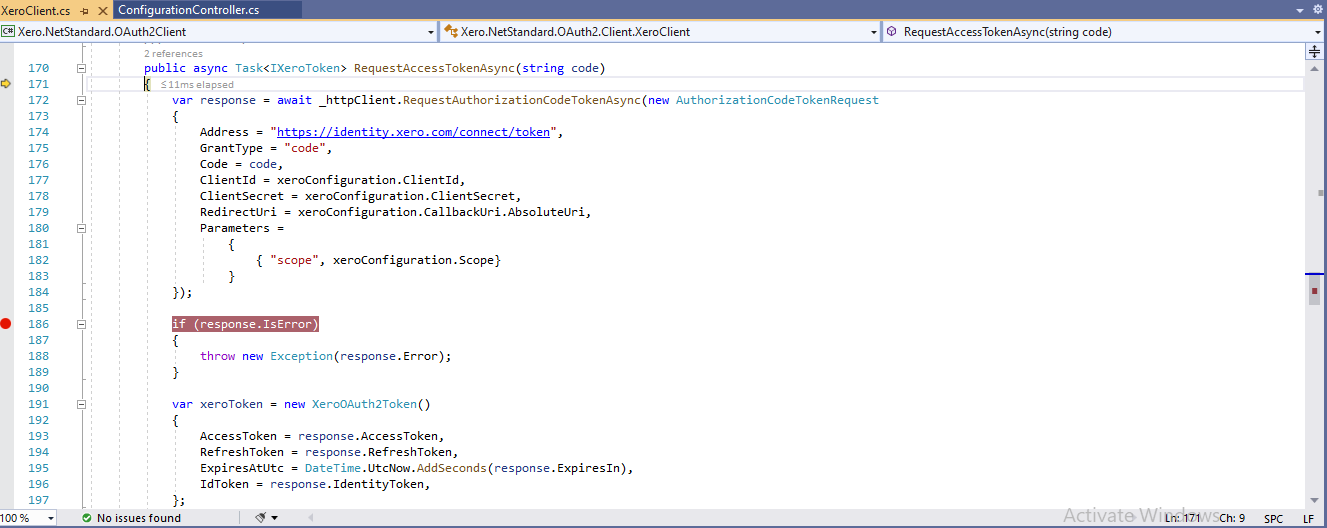


Has this issue been resolved yet? I'm getting the same exception.
I'm using:
Xero.NetStandard.OAuth2 v3.17.0 Xero.NetStandard.OAuth2Client v1.3.3
The exception is thrown here (Image 2.png) : var xeroToken = (XeroOAuth2Token) await client.RequestAccessTokenAsync(code);
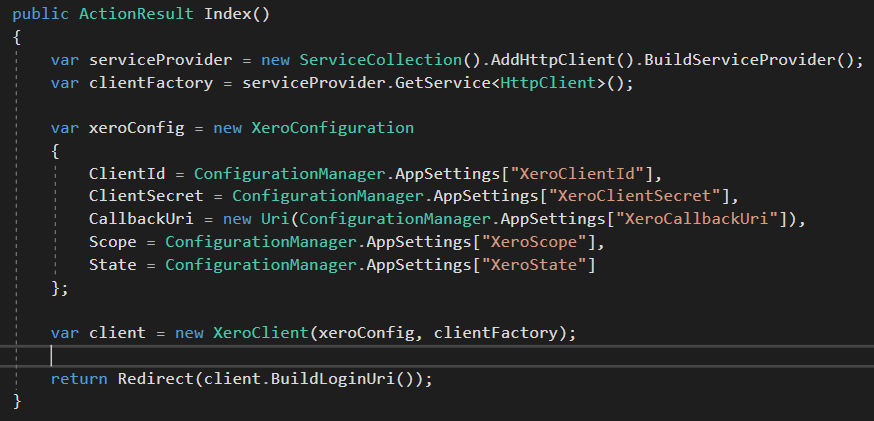
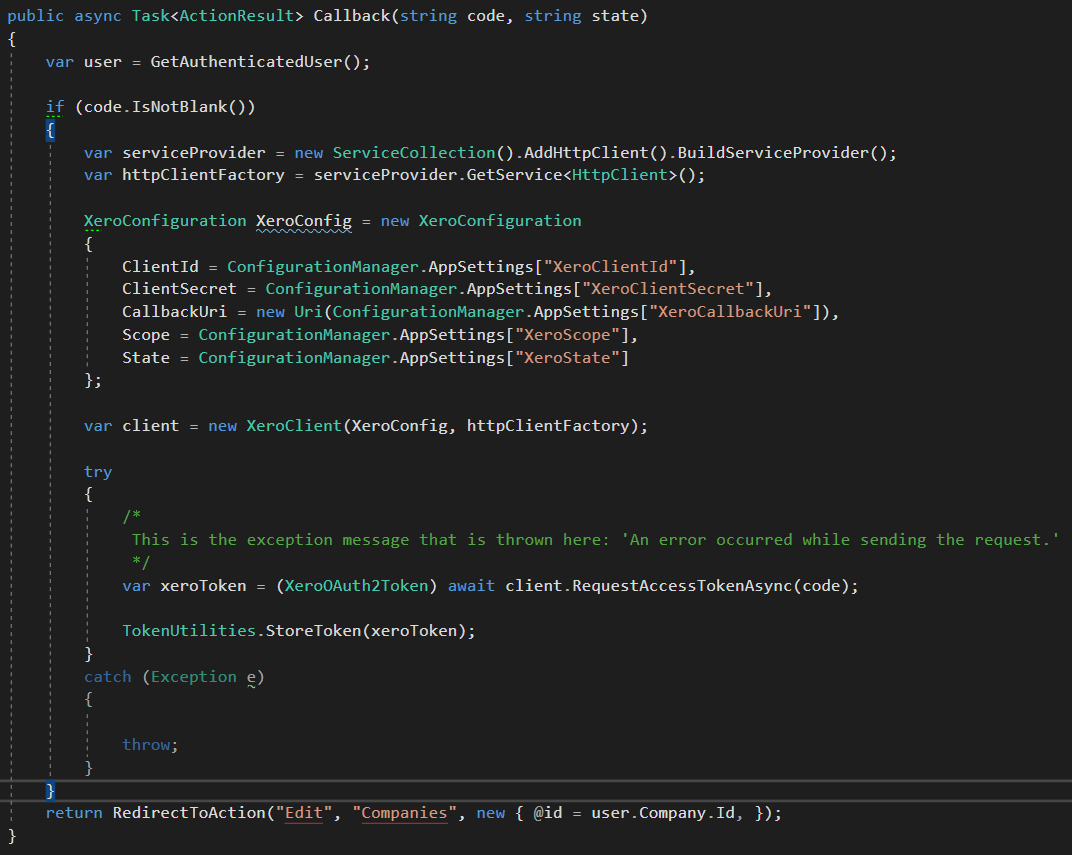

Did anyone find a solution to this? We're seeing exactly the same error as EzTiger with the following versions: Xero.NetStandard.OAuth2 v3.20.0 Xero.NetStandard.OAuth2Client v1.5.1

The issue I also had is a way to sync the token (as this expires after I believe 30 days). Assuming a user always log in every 30 days , i run this on every user login ;
Protected Async Sub SyncXeroToken() Dim XeroConnect As Boolean Dim xeroOAuth2 = New cls_Xero_oAuth2 XeroConnect = Await xeroOAuth2.oauth2() End Sub
cls_Xero_oAuth2 ; ` Imports System.Data.SqlClient Imports System.IO Imports System.Net Imports System.Threading.Tasks Imports Newtonsoft.Json.Linq Imports RestSharp Imports Xero.NetStandard.OAuth2.Config
Public Class cls_Xero_oAuth2 : Implements IDisposable Private xeroCode As String Private clientSecret As string Public accessToken As String Public accessTokenExpires As DateTime Private refreshToken As String Public tenantID As String Public clientID As string Private stopListening As Boolean = True Dim XeroConfig As XeroConfiguration Private callbackurl As String = "https://localhost:44354/xerodemo/"
Public Async Function oauth2() As Task(Of Boolean)

    'Getting current token
    Dim xeroAccessToken As New config(config.configSetting.xeroAccessToken)
    accessToken = xeroAccessToken.Value
    xeroAccessToken = Nothing

    Dim xeroAccessTokenExpires As New config(config.configSetting.xeroAccessTokenExpires)
    accessTokenExpires = xeroAccessTokenExpires.Value
    xeroAccessTokenExpires = Nothing

    Dim listener = New HttpListener()
    If accessToken <> "" And accessTokenExpires < Now() Then
        getOfflineAccessCodeandRefreshToken()
    ElseIf accessToken = "" Then
        Try
            listener.Start()
            stopListening = False
        Catch hlex As HttpListenerException
            Return False
        End Try

        Dim xeroclientID As New config(config.configSetting.xeroClientID)
        clientID = xeroclientID.Value
        xeroclientID = Nothing

        Dim urlCallBackFormat As String = WebUtility.UrlEncode(String.Format(callbackurl))
        Dim url As String = "https://login.xero.com/identity/connect/authorize?response_type=code&state=OzEPHd1GSvkwx0fnJ8023A&client_id=" & clientID & "&scope=offline_access%20openid%20profile%20email%20accounting.settings%20accounting.transactions&redirect_uri=" & urlCallBackFormat
        Process.Start(url)

        While listener.IsListening
            Dim context As Object = Await listener.GetContextAsync()
            Try
                Await ProcessRequestAsync(context)
                stopListening = True
            Catch ex As Exception
                Console.WriteLine("# EXCEPTION # " + ex.StackTrace)
            End Try
            If stopListening = True Then
                listener.Stop()
            End If
        End While

        listener.Stop()
        listener.Close()

     End If

End Function


Private Async Function ProcessRequestAsync(ByVal context As HttpListenerContext) As Task(Of Boolean)
    Dim body = Await New StreamReader(context.Request.InputStream).ReadToEndAsync()
    Dim request As HttpListenerRequest = context.Request
    Dim options = context.Request.QueryString
    xeroCode = context.Request.QueryString("code")
    Dim state = context.Request.QueryString("state")
    Dim b As Byte() = Encoding.UTF8.GetBytes("You may close this web page now")
    context.Response.StatusCode = 200
    context.Response.KeepAlive = False
    context.Response.ContentLength64 = b.Length
    Dim output = context.Response.OutputStream
    Await output.WriteAsync(b, 0, b.Length)
    context.Response.Close()
End Function

Public shared Function getBase64Encoded(xeroClientId As String,xeroClientSecret As string ) As String
    Dim base64Decoded As String = xeroClientId & ":" & xeroClientSecret
    Dim base64Encoded As String
    Dim data As Byte()
    data = System.Text.ASCIIEncoding.ASCII.GetBytes(base64Decoded)
    base64Encoded = System.Convert.ToBase64String(data)
    Return base64Encoded
End Function

Public shared Function GetOnlineAccessToken(code As String)
    dim accessToken As string = ""
    dim accessTokenExpires As Date
    dim refreshToken As string = ""
    dim tenantID As string = ""
    dim callbackurl As string = "https://localhost:44354/xerodemo/"
    dim xeroCode As string = ""
    dim xeroClientId As string = "[YOUR OWN CLIENT ID]"
    dim xeroClientSecret As string = "[YOUR OWN SECRET ID]"
    ServicePointManager.Expect100Continue = True
    ServicePointManager.SecurityProtocol = SecurityProtocolType.Tls Or SecurityProtocolType.Tls11 Or SecurityProtocolType.Tls12 Or SecurityProtocolType.Ssl3
    Dim Basic As String = "Basic " & getBase64Encoded(xeroClientId,xeroClientSecret)
    xeroCode = code
    Dim getTenant As RestClient = New RestClient("https://identity.xero.com/connect/token")
    getTenant.Timeout = -1
    Dim requestTenant = New RestRequest(Method.POST)
    requestTenant.AddHeader("authorization", Basic)
    requestTenant.AddHeader("Content-Type", "application/x-www-form-urlencoded")
    requestTenant.AddParameter("grant_type", "authorization_code")
    requestTenant.AddParameter("code", xeroCode)
    requestTenant.AddParameter("redirect_uri", String.Format(callbackurl))

    System.Net.ServicePointManager.SecurityProtocol = SecurityProtocolType.Tls12
    Dim responseTenant As IRestResponse = getTenant.Execute(requestTenant)
    Dim myJObject = JObject.Parse("{'results':" & responseTenant.Content & "}")
    Dim tokenError As String
    For Each Row In myJObject("results").ToList()
        Select Case DirectCast(Row, JProperty).Name
            Case "access_token"
                accessToken = DirectCast(Row, JProperty).Value
                Debug.Print(accessToken)
            Case "expires_in"
                accessTokenExpires = DateAdd(DateInterval.Second, CDbl(DirectCast(Row, JProperty).Value), Now())
            Case "refresh_token"
                refreshToken = DirectCast(Row, JProperty).Value
            Case "error"
                tokenError = DirectCast(Row, JProperty).Value
        End Select
    Next

End Function

Public Function getOfflineAccessCodeandRefreshToken() As Boolean

    Dim xeroRefreshToken As New config(config.configSetting.xeroRefreshToken)
    refreshToken = xeroRefreshToken.Value
    xeroRefreshToken = Nothing

    Dim xeroClientID As New config(config.configSetting.xeroClientID)
    clientID = xeroClientID.Value
    xeroClientID = Nothing

    Dim xeroClientSecret As New config(config.configSetting.xeroClientSecret)
    clientSecret = xeroClientSecret.Value
    xeroClientSecret = Nothing

    ServicePointManager.Expect100Continue = True
    ServicePointManager.SecurityProtocol = SecurityProtocolType.Tls Or SecurityProtocolType.Tls11 Or SecurityProtocolType.Tls12 Or SecurityProtocolType.Ssl3
    Dim Basic As String = "Basic " & getBase64Encoded(clientID,clientSecret)
    Dim getTenant As RestClient = New RestClient("https://identity.xero.com/connect/token")
    getTenant.Timeout = -1
    Dim requestTenant = New RestRequest(Method.POST)
    requestTenant.AddHeader("authorization", Basic)
    requestTenant.AddHeader("Content-Type", "application/x-www-form-urlencoded")
    requestTenant.AddParameter("grant_type", "refresh_token")
    requestTenant.AddParameter("refresh_token", refreshToken)


    Dim responseTenant As IRestResponse = getTenant.Execute(requestTenant)
    Dim myJObject = JObject.Parse("{'results':" & responseTenant.Content & "}")
    Dim tokenRrror As String

    For Each Row In myJObject("results").ToList()
        Select Case DirectCast(Row, JProperty).Name
            Case "access_token"
                accessToken = DirectCast(Row, JProperty).Value
            Case "expires_in"
                accessTokenExpires = DateAdd(DateInterval.Second, CDbl(DirectCast(Row, JProperty).Value), Now())
            Case "refresh_token"
                refreshToken = DirectCast(Row, JProperty).Value
            Case "error"
                tokenRrror = DirectCast(Row, JProperty).Value
                Return False
        End Select

    Next


    'alle gegevens die we hebben opgehaald , updaten
      Dim dr As SqlDataReader
        Dim cmd As SqlCommand
        Dim CMRConnection As New SqlConnection
        Dim connection As New cls_Connections
        CMRConnection = connection.OpenCMRConnection
        Using CMRConnection
            Dim cmdAccessToken As String = "UPDATE tbl_DMD_config SET setting_value = @setting_value WHERE record_id = 16"
            cmd = New SqlCommand(cmdAccessToken, CMRConnection)
            cmd.CommandType = CommandType.Text
            cmd.Parameters.AddWithValue("@setting_value", accessToken)
            cmd.ExecuteReader()


        'refreshToken updaten
         Dim cmdRefreshToken As String = "UPDATE tbl_DMD_config SET setting_value = @setting_value WHERE record_id = 17"
            cmd = New SqlCommand(cmdRefreshToken, CMRConnection)
            cmd.CommandType = CommandType.Text
            cmd.Parameters.Clear
            cmd.Parameters.AddWithValue("@setting_value", refreshToken)
            'cmd.Parameters.AddWithValue("@xeroCode", xeroCode)
            cmd.ExecuteReader()

        'expiredate updaten
          'refreshToken updaten
         Dim cmdExpires As String = "UPDATE tbl_DMD_config SET setting_value = @setting_value WHERE record_id = 18"
            cmd = New SqlCommand(cmdExpires, CMRConnection)
            cmd.CommandType = CommandType.Text
            cmd.Parameters.Clear
            cmd.Parameters.AddWithValue("@setting_value", accessTokenExpires)
            'cmd.Parameters.AddWithValue("@xeroCode", xeroCode)
            cmd.ExecuteReader()


    'hier hebben we een nieuwe accessToken, dus kunnen we ook het tenantID ophalen
             'tenantID ophalen
    ServicePointManager.Expect100Continue = True
    ServicePointManager.SecurityProtocol = SecurityProtocolType.Tls Or SecurityProtocolType.Tls11 Or SecurityProtocolType.Tls12 Or SecurityProtocolType.Ssl3

    Dim getTenant2 As RestClient = New RestClient("https://api.xero.com/connections")
    getTenant2.Timeout = -1
    Dim requestTenant2 = New RestRequest(Method.GET)
    requestTenant2.AddHeader("Authorization", "Bearer " & accessToken)
    requestTenant2.AddHeader("Content-Type", "application/json")
    Dim responseTenant2 = getTenant2.Execute(requestTenant2)
    Dim myJObject2 = JObject.Parse("{'results':" & responseTenant2.Content & "}")

    Dim commToken As JToken
    Dim commValue As String
    Dim dt As DataTable = New DataTable("tenants")
    Dim c As DataColumn
    c = New DataColumn("tenantID", System.Type.GetType("System.String"))
    dt.Columns.Add(c)
    c = New DataColumn("tenantName", System.Type.GetType("System.String"))
    dt.Columns.Add(c)

    Dim r As DataRow
    For Each Row In myJObject2("results").ToList()
        r = dt.NewRow
        commToken = Row("tenantId")
        commValue = DirectCast(commToken, JValue).Value
        r("tenantID") = commValue
        commToken = Row("tenantName")
        commValue = DirectCast(commToken, JValue).Value
        r("tenantName") = commValue
        dt.Rows.Add(r)
    Next

    Dim selectedTenant As String = ""
    selectedTenant = dt(1)(0)
    tenantID = selectedTenant

          Dim cmdTenant As String = "UPDATE tbl_DMD_config SET setting_value = @setting_value WHERE record_id = 19"
            cmd = New SqlCommand(cmdTenant, CMRConnection)
            cmd.CommandType = CommandType.Text
            cmd.Parameters.Clear
            cmd.Parameters.AddWithValue("@setting_value", tenantID)
            cmd.ExecuteReader()

         End Using

        dr = Nothing
        cmd = Nothing


    Return True
End Function

Public Sub Dispose() Implements IDisposable.Dispose
    Throw New NotImplementedException()
End Sub
End Class
`
The create the initial token, i run the code locally. It's a little workaround, but works for me.

I solved my problem by adding the following line of configuration so that requests are made using TLS 1.2:
System.Net.ServicePointManager.SecurityProtocol = SecurityProtocolType.Tls12;