

 X-Sharp
[Visual Studio] - need intellisense after typing "AS" when defining a Method
Inside of a Class definition in a PRG, when I type:
Method MyMethod()
Then next I type (space) AS (space) and next I'd expect intellisense to pop up a list of data type keywords as I type out the rest of it...
Method MyMethod() As Logic

Matt, We have had that working, but this proved to be very slow. Right now Fabrice is working on making our VS integration faster by using async features of Visual Studio. Once that is done then we will activate this again.
Robert

This does show now, but the code completion list appears just after when typing "AS" (not after typing a space after it), so if you select "something" from the list, then you end up with "ASsomething" (with no space in between)
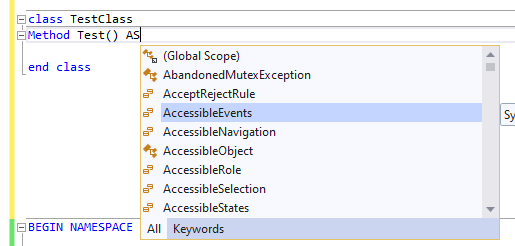
Also there seems that the "AS" code completion does not always pop up, in some projects it does, in others it doesn't, but I haven't figured out the pattern yet.

This now does work, but only after typing a few characters of the type (amount of characters is configurable in the intellisense options), which I guess is good enough. There currently exists a problem though, after confirming one of the options in the list with <Enter>, then an extra space is auto-typed after the identifier. Also if the item selected is a method, then the opening param is auto-typed, but parameter tips are not shown.
Chris, I do not think that after AS there are methods in the list. But I will take care of the extra white space character.
Robert, no but it's the same problem causing the parameter lists not to display in other cases. For example:
LOCAL n AS INT n:
select "CompareTo" from the list, the editor will type it and again add a space at the end and no parameter tip is being shown (which was being shown a couple weeks ago after you had fixed it).
I will fix the whitespace problem. When you say 'select "CompareTo" from the list', how do you select it? Return/Enter key, Tab key, Open Paren, another key. These all follow different paths through the completion code.
Ah sorry, should had mention that, it's [Enter] that I use. Old habit from VO, I always use [Enter]